
Ask your question and get a summary of the document by referencing this page and the AI provider of your choice
If you have an idea for improving this documentation, please feel free to contribute by submitting a pull request on GitHub.
GitHub link to the documentationCopy doc Markdown to clipboard
Per-Component vs. Centralized i18n
The per-component approach is not a new concept. For example, in the Vue ecosystem, vue-i18n supports Single File Component (SFC) i18n. Nuxt also offers per-component translations, and Angular employs a similar pattern through its Feature Modules.
Even in a Flutter app, we can often find this pattern:
Copy the code to the clipboard
Copy the code to the clipboard
However, in the React world, we mainly see different approaches, that I will group in three categories:
Centralized approach (i18next, next-intl, react-intl, lingui)
- (with no namespaces) considers a single source to retrieve content. By default, you load the content from all pages when your app loads.
Granular approach (intlayer, inlang)
- fine-grain the content retrieval per key, or per-component.
In this blog, I won't focus on compiler-based solutions, which I already covered here: Compiler vs Declarative i18n. Note that compiler-based i18n (e.g., Lingui) simply automates the extraction and loading of content. Under the hood, they often share the same limitations as others approaches.
Note that the more you fine-grain how you retrieve your content, the more you risk inserting additional state and logic into your components.
Granular approaches are more flexible than centralized ones, but it's often a tradeoff. Even if "tree shaking" is advertised by that libraries, in practice, you'll often end up loading a page in every language.
So, broadly speaking, the decision breaks down like this:
- More pages than languages → Favor a granular approach
- More languages than pages → Lean toward a centralized approach
Of course, the library authors are aware of these limitations and provide workarounds.
Among them: splitting into namespaces, dynamically loading JSON files (await import()), or purging content at build time.
Here is what each choice costs on a theoretical app of 1 to 10 pages in 1 to 10 locales, with about 30 KB of text per page. Dynamic import cuts the locale axis, scoping cuts the page axis, and only the combination stays flat.
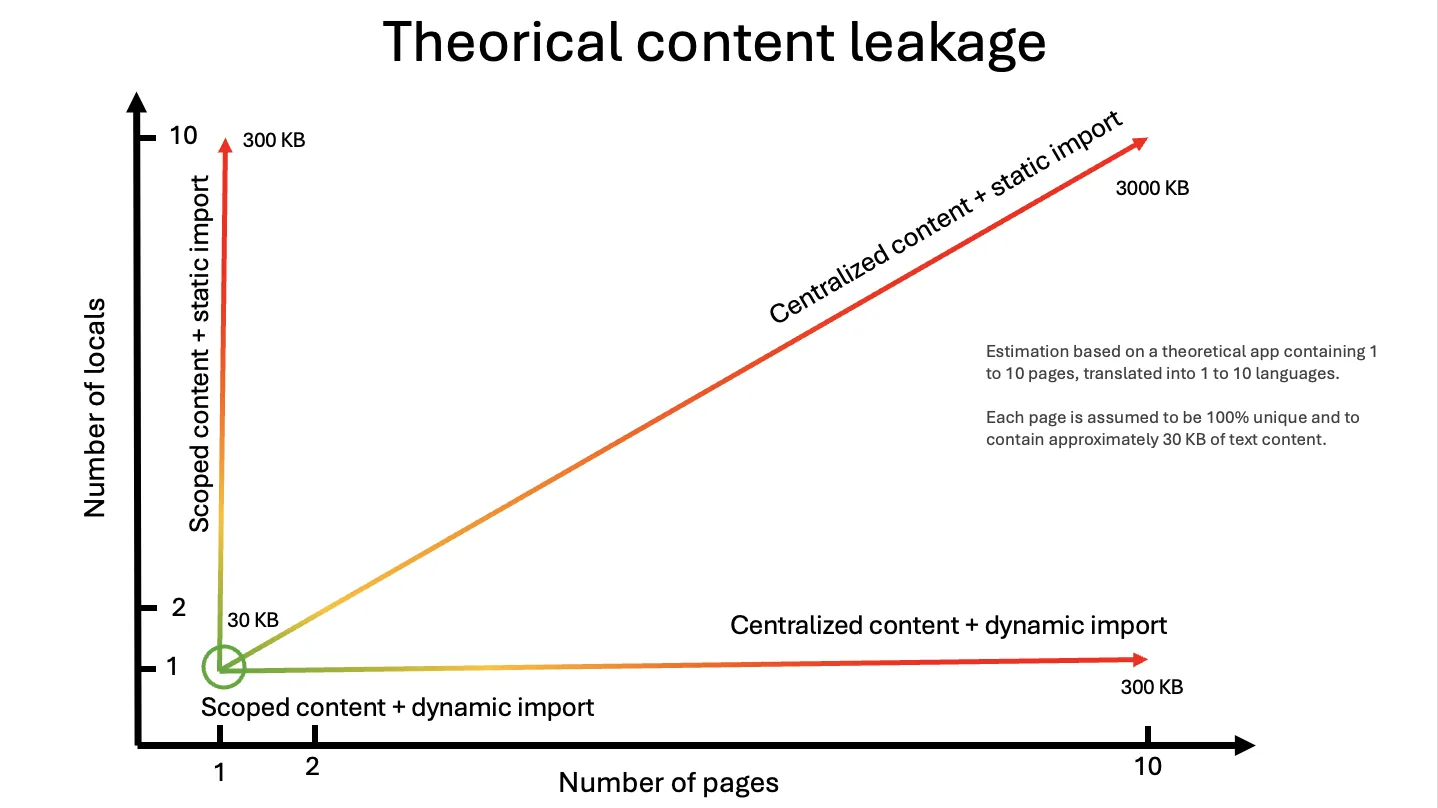
At the same time, you should know that when you dynamically load your content, you introduce additional requests to your server. Each extra useState or hook means an extra server request.
To fix this point, Intlayer suggests grouping multiple content definitions under a same key, Intlayer will then merge that content.
But from all that solution, it's clear that the most popular approach is the centralized one.
So why is the Centralized approach so popular?
- First, i18next was the first solution to become widely used, following a philosophy inspired by PHP and Java architectures (MVC), which rely on a strict separation of concerns (keeping content separate from code). It arrived in 2011, establishing its standards even before the massive shift toward Component-Based Architectures (like React).
- Then, once a library is widely adopted, it becomes difficult to shift the ecosystem to other patterns.
- Using a centralized approach also makes things easier in Translation Management Systems such as Crowdin, Phrase, or Localized.
- The logic behind a per-component approach is more complex than a centralized one and takes extra time to develop, especially when you have to solve problems like identifying where the content is located.
To understand where these libraries come from, read the history of JavaScript i18n.
Ok, but why not just stick to a Centralized approach?
Let me tell you why it can be problematic for your app:
- Unused Data: When a page loads, you often load the content from all other pages. (In a 10-page app, that's 90% unused content loaded). You lazy load a modal? The i18n library doesn't care, it loads the strings first anyway.
- Performance: For each re-render, every single one of your components is hydrated with a massive JSON payload, which impacts your app's reactivity as it grows.
- Maintenance: Maintaining large JSON files is painful. You have to jump across files to insert a translation, ensuring no translations are missing and no orphan keys are left behind.
- Design-system:
It creates incompatibility with design systems (e.g., a
LoginFormcomponent) and constrains component duplication across different apps.
"But we invented Namespaces!"
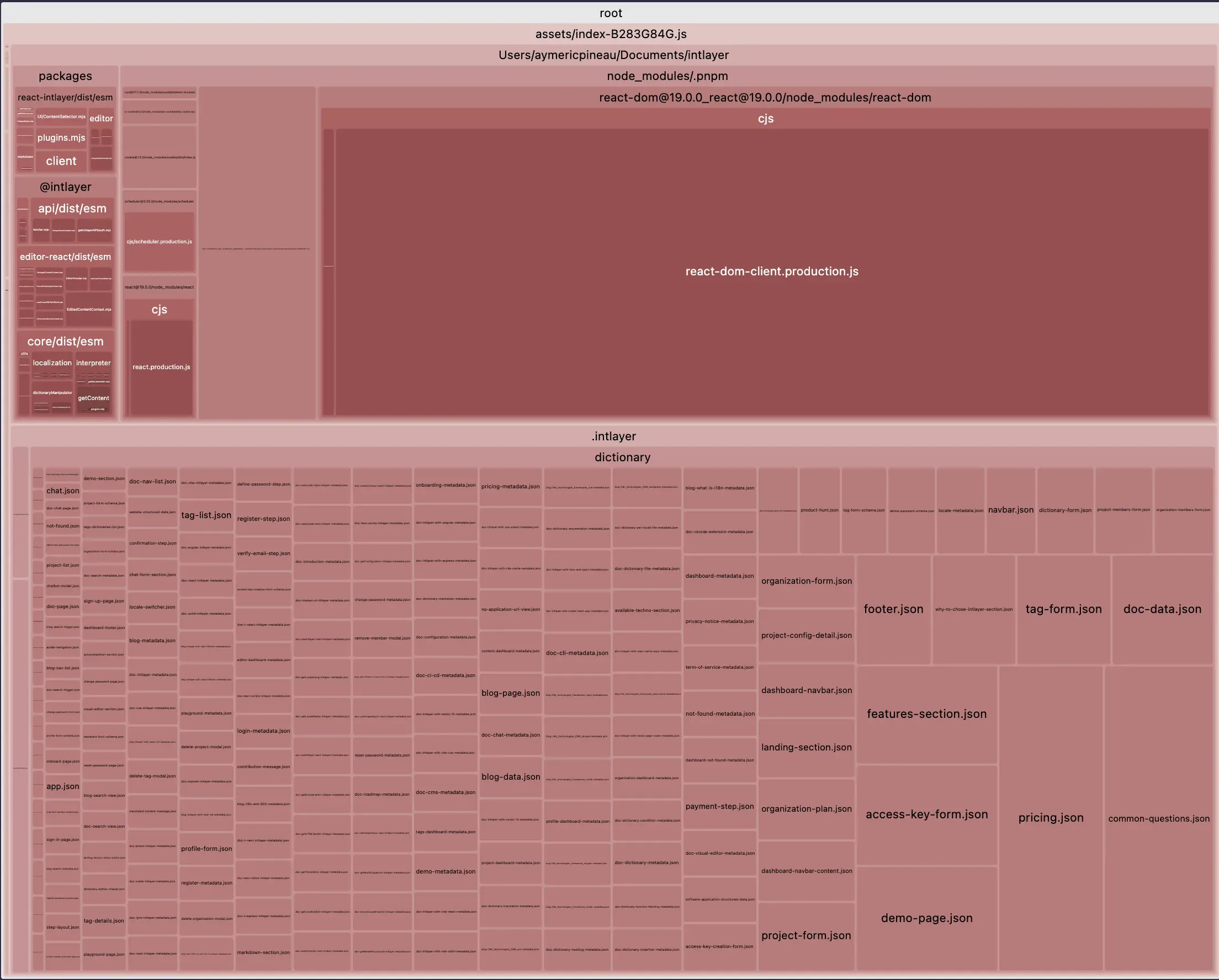
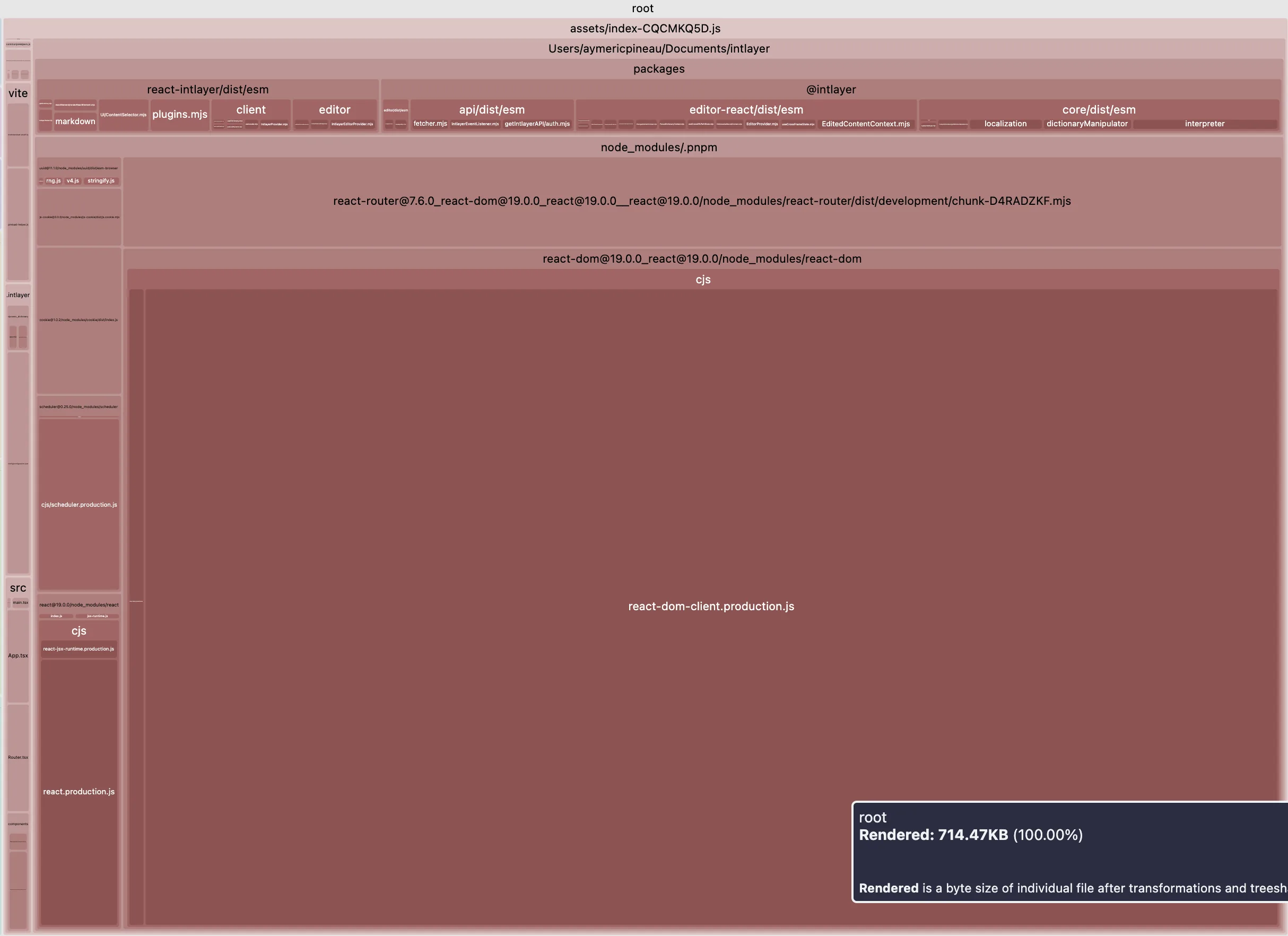
Sure, and that's an massive move forward. Let's look at the comparison of the main bundle size of a Vite + React + React Router v7 + Intlayer setup. We simulated a 20-page application.
The first example does not include lazy-loaded translations per locale and no namespace splitting. The second includes content purging + dynamic loading for translations.
Open the table in a modal to view all data content clearly
| Optimized bundle | Bundle not optimized |
|---|---|
 |  |
So thanks for namespaces, we moved from this structure:
Copy the code to the clipboard
To this one:
Copy the code to the clipboard
Great! But is it enough? Not really. Now you have to finely manage what part of your app content should be loaded, and where. Conclusion, the vast majority of projects just skip this part due to the complexity (see next-i18next guide for instance to see the challenges that represents (just) following good practices). Consequently, those projects end up with the massive JSON loading problem explained earlier.
Note that this problem is not specific to i18next, but to all centralized approaches listed above.
However, I want to remember your that not all granular approaches solve this. For instance, vue-i18n SFC's or inlang approaches do not inherently lazy load the translations per locale, so you simply trade the bundle size problem for another one.
Moreover, without proper separation of concerns, it becomes much more difficult to extract and provide your translations to translators for review.
How Intlayer's per-component approach solves this
Intlayer proceeds in several steps:
- Declaration: Declare your content anywhere in your codebase using
*.content.{ts|jsx|cjs|json|json5|...}files. This ensures separation of concerns while keeping content colocated. A content file can be per-locale or multilingual. - Processing: Intlayer runs a build step to process JS logic, handle missing translation fallbacks, generate TypeScript types, manage duplicated content, and fetch content from your CMS, and more.
- Purging: When your app builds, Intlayer purges unused content (a bit like how Tailwind manages your classes) by replacing the content as follows:
Declaration:
Copy the code to the clipboard
Copy the code to the clipboard
Processing: Intlayer builds the dictionary based on the .content file and generates:
Copy the code to the clipboard
Replacement: intlayer extracts your component during the application build.
- Static Import Mode:
Copy the code to the clipboard
- Dynamic Import Mode:
Copy the code to the clipboard
useDictionaryAsync uses a Suspense-like mechanism to load the localized JSON only when needed.Key benefits of this per-component approach:
Keeping your content declaration close to your components allows better maintainability (e.g moving a components to another app or design system. Deleting the component folder remove the related content too, as you probably already do for your
.test,.stories)A per-component approach prevents AI agents from needing to jump across all your different files. It treats all translations in one place, limiting the complexity of the task, and the amount of tokens used.
Limitations
Of course, this approach comes with trade-offs:
- It makes things harder to connect to other l10n systems and extra tooling.
- You get locked in (which is basically already the case with any i18n solution due to their specific syntax).
That's the reason why Intlayer tries to provide a complete toolset for i18n (100% free and OSS), including AI translation using your own AI Provider and API keys. Intlayer also provides tooling to synchronize your JSON, functioning like ICU / vue-i18n / i18next message formatters to map the content to their specific formats.
Comments
No comments yet. Be the first to share your thoughts.