
अपने प्रश्न को पूछें और दस्तावेज़ का सारांश प्राप्त करें, इस पृष्ठ और आपके चुने हुए AI प्रदाता का उपयोग करके
इस पृष्ठ की सामग्री एक AI द्वारा अनुवादित की गई है।
अंग्रेजी में मूल सामग्री के अंतिम संस्करण देखेंअगर आपके पास इस दस्तावेज़ को सुधारने के लिए कोई विचार है, तो कृपया GitHub पर एक पुल अनुरोध सबमिट करके योगदान देने में संकोच न करें।
दस्तावेज़ के लिए GitHub लिंकदस्तावेज़ का Markdown को क्लिपबोर्ड पर कॉपी करें
next-i18next बनाम next-intl बनाम intlayer

आइए Next.js के लिए तीन i18n विकल्पों: next-i18next, next-intl और Intlayer के बीच समानताओं और अंतरों पर नज़र डालें।
यह एक पूर्ण ट्यूटोरियल नहीं है। यह एक तुलना है जो आपको चुनने में मदद करेगी।
हम Next.js 13+ App Router (जिसमें React Server Components शामिल हैं) पर ध्यान केंद्रित करते हैं और मूल्यांकन करते हैं:
संक्षेप में: ये सभी तीनों Next.js ऐप को स्थानीयकृत कर सकते हैं। यदि आप चाहते हैं कंपोनेंट-स्कोप्ड कंटेंट, कठोर TypeScript प्रकार, बिल्ड-टाइम मिसिंग-की जांच, ट्री-शेक्ड डिक्शनरीज़, और फर्स्ट-क्लास App Router + SEO हेल्पर्स, तो Intlayer सबसे पूर्ण, आधुनिक विकल्प है।
डेवलपर्स अक्सर यह भ्रम रखते हैं किnext-intl,react-intlका Next.js संस्करण है। ऐसा नहीं है,next-intlका रखरखाव Amann करते हैं, जबकिreact-intlका रखरखाव FormatJS करता है।
उच्च स्तरीय स्थिति
- next-intl - हल्का, सरल संदेश स्वरूपण जो मजबूत Next.js समर्थन के साथ आता है। केंद्रीकृत कैटलॉग आम हैं; DX सरल है, लेकिन सुरक्षा और बड़े पैमाने पर रखरखाव मुख्य रूप से आपकी जिम्मेदारी बनी रहती है।
- next-i18next - Next.js के लिए i18next का रूप। परिपक्व इकोसिस्टम और प्लगइन्स (जैसे ICU) के माध्यम से फीचर्स, लेकिन कॉन्फ़िगरेशन लंबा हो सकता है और जैसे-जैसे प्रोजेक्ट बढ़ते हैं कैटलॉग केंद्रीकृत हो जाते हैं।
- Intlayer - Next.js के लिए कंपोनेंट-केंद्रित कंटेंट मॉडल, कठोर TS टाइपिंग, बिल्ड-टाइम चेक्स, ट्री-शेकिंग, इन-बिल्ट मिडलवेयर और SEO हेल्पर्स, वैकल्पिक विज़ुअल एडिटर/CMS, और AI-सहायता प्राप्त अनुवाद।
सभी डेटा सामग्री को स्पष्ट रूप से देखने के लिए तालिका को मोडल में खोलें
| Library | GitHub Stars | Total Commits | Last Commit | First Version | NPM Version | NPM Downloads |
|---|---|---|---|---|---|---|
aymericzip/intlayer |  |  |  | April 2024 |  |  |
amannn/next-intl |  |  |  | Nov 2020 |  |  |
i18next/i18next |  |  |  | Jan 2012 |  |  |
i18next/next-i18next |  |  |  | Nov 2018 |  |  |
बैज अपने आप अपडेट होते हैं। स्नैपशॉट समय के साथ बदल सकते हैं।
साइड-बाय-साइड फीचर तुलना (Next.js केंद्रित)
सभी डेटा सामग्री को स्पष्ट रूप से देखने के लिए तालिका को मोडल में खोलें
| फीचर | next-intlayer (Intlayer) | next-intl | next-i18next |
|---|---|---|---|
| कंपोनेंट के पास अनुवाद | ✅ हाँ, प्रत्येक कंपोनेंट के साथ सामग्री सह-स्थित | ❌ नहीं | ❌ नहीं |
| टाइपस्क्रिप्ट एकीकरण | ✅ उन्नत, स्वचालित रूप से उत्पन्न सख्त प्रकार | ✅ अच्छा | ⚠️ बुनियादी |
| अनुवाद की कमी का पता लगाना | ✅ टाइपस्क्रिप्ट त्रुटि हाइलाइट और बिल्ड-टाइम त्रुटि/चेतावनी | ⚠️ रनटाइम फॉलबैक | ⚠️ रनटाइम फॉलबैक |
| समृद्ध सामग्री (JSX/मार्कडाउन/कंपोनेंट्स) | ✅ सीधे समर्थन | ❌ समृद्ध नोड्स के लिए डिज़ाइन नहीं किया गया | ⚠️ सीमित |
| एआई-संचालित अनुवाद | ✅ हाँ, कई एआई प्रदाताओं का समर्थन करता है। अपने स्वयं के API कुंजी का उपयोग करके उपयोग किया जा सकता है। आपके एप्लिकेशन और सामग्री के संदर्भ को ध्यान में रखता है | ❌ नहीं | ❌ नहीं |
| विज़ुअल एडिटर | ✅ हाँ, स्थानीय विज़ुअल एडिटर + वैकल्पिक CMS; कोडबेस सामग्री को बाहरी रूप से प्रबंधित कर सकता है; एम्बेड करने योग्य | ❌ नहीं / बाहरी स्थानीयकरण प्लेटफार्मों के माध्यम से उपलब्ध | ❌ नहीं / बाहरी स्थानीयकरण प्लेटफार्मों के माध्यम से उपलब्ध |
| स्थानीयकृत रूटिंग | ✅ हाँ, बॉक्स से बाहर स्थानीयकृत पथों का समर्थन करता है (Next.js और Vite के साथ काम करता है) | ✅ अंतर्निर्मित, ऐप राउटर [locale] सेगमेंट का समर्थन करता है | ✅ अंतर्निर्मित |
| डायनामिक रूट जनरेशन | ✅ हाँ | ✅ हाँ | ✅ हाँ |
| बहुवचन | ✅ एनेमरेशन-आधारित पैटर्न | ✅ अच्छा | ✅ अच्छा |
| स्वरूपण (तिथियाँ, संख्याएँ, मुद्राएँ) | ✅ अनुकूलित स्वरूपक (अंदर से Intl) | ✅ अच्छा (Intl सहायक) | ✅ अच्छा (Intl सहायक) |
| सामग्री स्वरूप | ✅ .tsx, .ts, .js, .json, .md, .txt, (.yaml WIP) | ✅ .json, .js, .ts | ⚠️ .json |
| ICU समर्थन | ⚠️ प्रगति पर | ✅ हाँ | ⚠️ प्लगइन के माध्यम से (i18next-icu) |
| SEO सहायक (hreflang, साइटमैप) | ✅ अंतर्निर्मित उपकरण: साइटमैप, robots.txt, मेटाडेटा के लिए सहायक | ✅ अच्छा | ✅ अच्छा |
| इकोसिस्टम / समुदाय | ⚠️ छोटा लेकिन तेजी से बढ़ रहा और प्रतिक्रियाशील | ✅ मध्यम आकार, Next.js-केंद्रित | ✅ मध्यम आकार, Next.js-केंद्रित |
| सर्वर-साइड रेंडरिंग और सर्वर कंपोनेंट्स | ✅ हाँ, SSR / React सर्वर कंपोनेंट्स के लिए सुव्यवस्थित | ⚠️ पेज स्तर पर समर्थित लेकिन चाइल्ड सर्वर कंपोनेंट्स के लिए कंपोनेंट ट्री में t-फंक्शंस पास करने की आवश्यकता है | ⚠️ पेज स्तर पर समर्थित लेकिन चाइल्ड सर्वर कंपोनेंट्स के लिए कंपोनेंट ट्री में t-फंक्शंस पास करने की आवश्यकता है |
| ट्री-शेकिंग (केवल उपयोग किए गए कंटेंट को लोड करना) | ✅ हाँ, Babel/SWC प्लगइन्स के माध्यम से बिल्ड समय पर प्रति-कंपोनेंट | ⚠️ आंशिक | ⚠️ आंशिक |
| लेज़ी लोडिंग | ✅ हाँ, प्रति-लोकल / प्रति-डिक्शनरी | ✅ हाँ (प्रति-रूट/प्रति-लोकल), नेमस्पेस प्रबंधन की आवश्यकता | ✅ हाँ (प्रति-रूट/प्रति-लोकल), नेमस्पेस प्रबंधन की आवश्यकता |
| अप्रयुक्त कंटेंट को हटाना | ✅ हाँ, बिल्ड समय पर प्रति-डिक्शनरी | ❌ नहीं, नेमस्पेस प्रबंधन के साथ मैन्युअली प्रबंधित किया जा सकता है | ❌ नहीं, नेमस्पेस प्रबंधन के साथ मैन्युअली प्रबंधित किया जा सकता है |
| बड़े प्रोजेक्ट्स का प्रबंधन | ✅ मॉड्यूलर को प्रोत्साहित करता है, डिज़ाइन-सिस्टम के लिए उपयुक्त | ✅ सेटअप के साथ मॉड्यूलर | ✅ सेटअप के साथ मॉड्यूलर |
परिचय
Next.js आपको अंतर्राष्ट्रीयकृत routing (जैसे locale segments) के लिए built-in support देता है। लेकिन यह feature अपने आप translations नहीं करता। आपको अपने users को localized content render करने के लिए एक library की जरूरत है।
कई i18n libraries मौजूद हैं, लेकिन Next.js की दुनिया में आज, तीन को ध्यान मिल रहा है: next-i18next, next-intl, और Intlayer।
ये लाइब्रेरी कहाँ से आईं, यह समझने के लिए JavaScript i18n का इतिहास पढ़ें।
आर्किटेक्चर और स्केलेबिलिटी
- next-intl / next-i18next: डिफ़ॉल्ट रूप से केंद्रीकृत कैटलॉग प्रति locale (साथ ही i18next में namespaces)। शुरुआत में अच्छी तरह काम करता है, लेकिन अक्सर बढ़ते coupling और key churn के साथ एक बड़ी साझा सतह बन जाता है।
- Intlayer: per-component (या per-feature) dictionaries को co-located करने के लिए प्रोत्साहित करता है जो उस कोड के साथ हैं जिसकी वे सेवा करते हैं। यह संज्ञानात्मक भार को कम करता है, UI pieces के duplication/migration को आसान बनाता है, और cross-team conflicts को कम करता है। अप्रयुक्त content को खोजना और हटाना स्वाभाविक रूप से आसान है।
यह क्यों मायने रखता है: बड़े codebases या design-system setups में, modular content monolithic catalogs की तुलना में बेहतर स्केल करता है।
Bundle आकार और dependencies
अनुप्रयोग बनाने के बाद, bundle वह JavaScript है जो ब्राउज़र पृष्ठ को प्रस्तुत करने के लिए लोड करेगा। इसलिए bundle का आकार अनुप्रयोग के प्रदर्शन के लिए महत्वपूर्ण है।
i18n बेंचमार्क एक ही 10-पेज, 10-locale वाले Next.js एप्लिकेशन पर हर library के वास्तविक प्रभाव को मापता है:
मीट्रिक
डायनामिक JSON लोडिंग
रनटाइम पर आलस्य से अनुवाद लोड करता है
स्कोप्ड JSON (नेमस्पेसिंग)
प्रति-पृष्ठ अनुवाद नेमस्पेस
यह मीट्रिक क्या है?
अंतर्राष्ट्रीयकरण लाइब्रेरी बंडल का कुल gzip-संपीड़ित आकार। इसमें केवल ट्री-शेकिंग और मिनिफिकेशन के बाद प्रदाता और सामग्री पुनर्प्राप्ति तर्क शामिल हैं।
यह महत्वपूर्ण क्यों है?
एक छोटा लाइब्रेरी आकार प्रारंभिक जावास्क्रिप्ट पेलोड को कम करता है, जिससे क्लाइंट पर तेज़ डाउनलोड और निष्पादन समय होता है।
देखने का तरीका
Next.js App Router पर मापे गए मुख्य आँकड़े (gzip):
सभी डेटा सामग्री को स्पष्ट रूप से देखने के लिए तालिका को मोडल में खोलें
| सेटअप | Library आकार | औसत पेज JS | अन्य locale leak | अन्य पेज leak | औसत कंपोनेंट |
|---|---|---|---|---|---|
| बेस (i18n के बिना) | - | 141.0 KB | 0.0% | 0.0% | 0.9 KB |
next-intl (static) | 14.7 KB | 153.6 KB | 4.2% | 89.8% | 21.8 KB |
next-intl (dynamic) | 14.7 KB | 153.6 KB | 9.7% | 89.9% | 21.8 KB |
@intlayer/next-intl (compat) | 8.0 KB | 148.7 KB | 0.0% | 0.0% | 8.1 KB |
next-i18next (static) | 19.7 KB | 218.5 KB | 0.0% | 89.8% | 78.5 KB |
next-i18next (dynamic) | 19.7 KB | 169.5 KB | 50.0% | 89.8% | 26.1 KB |
@intlayer/next-i18next (compat) | 9.4 KB | 150.7 KB | 0.0% | 0.0% | 9.7 KB |
next-intlayer (native Intlayer) | 5.5 KB | 141.3 KB | 0.0% | 0.0% | 6.9 KB |
पूरे विश्लेषण के लिए, Next.js बेंचमार्क रिपोर्ट और विस्तृत i18n बेंचमार्क अवलोकन देखें।
बहु-भाषा अनुप्रयोग bundle के संदर्भ में दो घटक महत्वपूर्ण हैं:
- अनुप्रयोग कोड
- ब्राउज़र द्वारा लोड की गई सामग्री
एप्लिकेशन कोड
इस मामले में एप्लिकेशन कोड का महत्व न्यूनतम है। तीनों समाधान tree-shakable हैं, जिसका अर्थ है कि कोड के अप्रयुक्त हिस्से bundle में शामिल नहीं होते हैं।
यहाँ तीनों समाधानों के साथ एक मल्टी-लैंग्वेज एप्लिकेशन के लिए ब्राउज़र द्वारा लोड किए गए JavaScript bundle size की तुलना दी गई है।
यदि एप्लिकेशन में हमें किसी formatter की आवश्यकता नहीं है, तो tree-shaking के बाद निर्यात किए गए फ़ंक्शन की सूची होगी:
- next-intlayer:
useIntlayer,useLocale,NextIntlClientProvider, (Bundle size 180.6 kB -> 15.24 kB (gzip)) - next-intl:
useTranslations,useLocale,NextIntlClientProvider, (Bundle size 101.3 kB -> 31.4 kB (gzip)) - next-i18next:
useTranslation,useI18n,I18nextProvider, (Bundle size 80.7 kB -> 25.5 kB (gzip))
ये फ़ंक्शन केवल React context/state के चारों ओर wrappers हैं, इसलिए bundle size पर i18n library का कुल प्रभाव न्यूनतम है।
सामग्री और अनुवाद
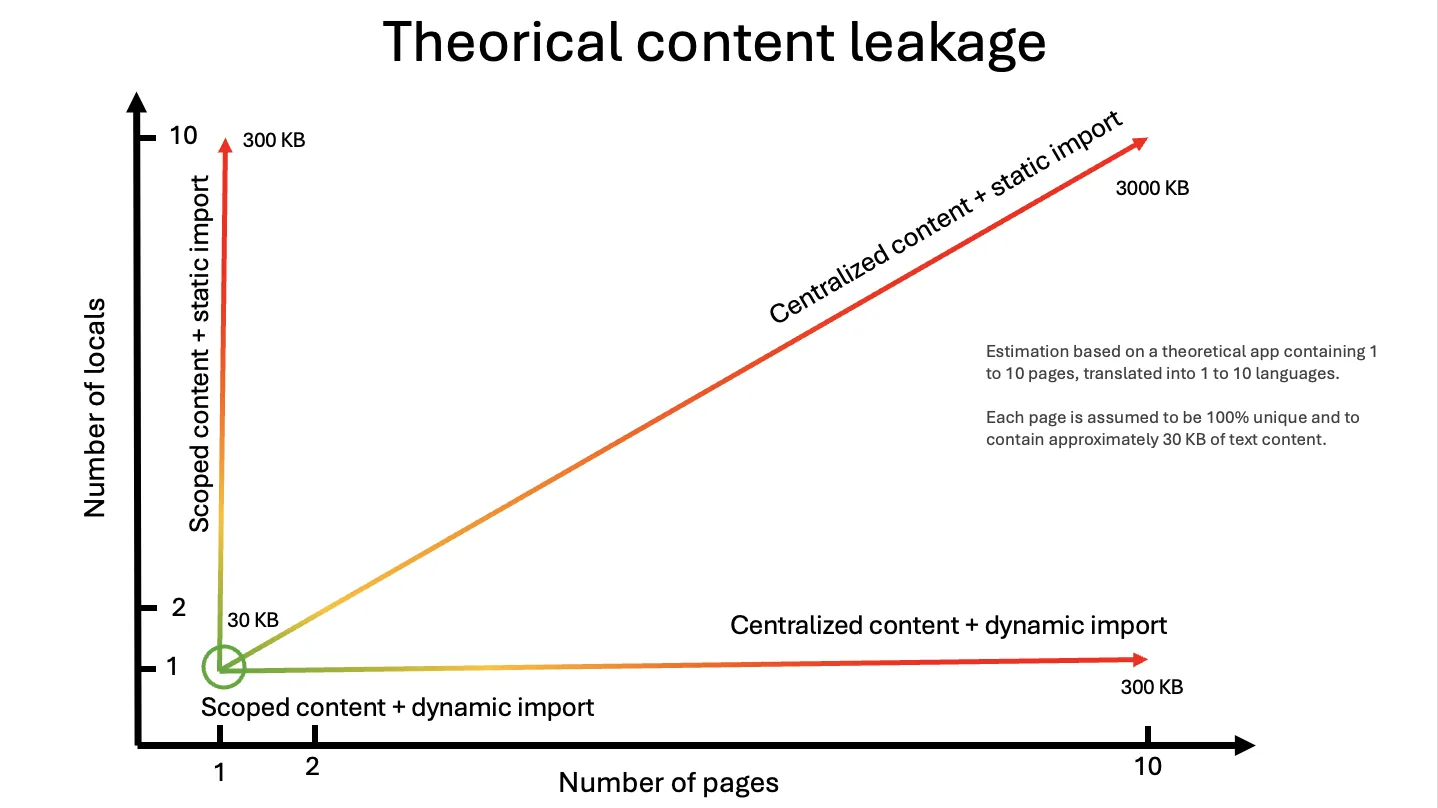
यह भाग अक्सर developers द्वारा नज़रअंदाज़ किया जाता है, लेकिन आइए 10 भाषाओं में 10 पृष्ठों से बने एक application के मामले पर विचार करें। मान लीजिए कि प्रत्येक पृष्ठ गणना को सरल बनाने के लिए 100% अद्वितीय सामग्री को एकीकृत करता है (वास्तव में, पृष्ठों के बीच बहुत सी सामग्री redundant होती है, जैसे page title, header, footer, आदि)।
एक user जो /fr/about पृष्ठ पर जाना चाहता है, दिए गए language में एक पृष्ठ की सामग्री load करेगा। सामग्री optimization को ignore करने का मतलब होगा 8,200% ((1 + (((10 pages - 1) × (10 languages - 1)))) × 100) application सामग्री को unnecessarily load करना। क्या आप समस्या देखते हैं? भले ही यह सामग्री text रहे, और जबकि आप शायद अपनी site की images को optimize करने के बारे में सोचना पसंद करते हैं, आप दुनिया भर में useless सामग्री भेज रहे हैं और users के computers को इसे कुछ नहीं के लिए process करने के लिए बना रहे हैं।
दो महत्वपूर्ण समस्याएं:
Route के आधार पर विभाजन:
यदि मैं
/aboutपृष्ठ पर हूं, तो मुझे/homeपृष्ठ की सामग्री load नहीं करनी चाहिएLocale के आधार पर विभाजन:
यदि मैं
/fr/aboutपृष्ठ पर हूं, तो मुझे/en/aboutपृष्ठ की सामग्री load नहीं करनी चाहिए
नीचे दिया गया ग्राफ़ एक सैद्धांतिक ऐप के कंटेंट पेलोड का अनुमान देता है, जिसमें 1 से 10 पेज हैं और जिसे 1 से 10 भाषाओं में अनुवादित किया गया है, प्रति पेज लगभग 30 KB टेक्स्ट के साथ। locale के अनुसार कंटेंट को डायनामिक रूप से लोड करने से भाषा वाली धुरी हट जाती है, कंटेंट को कंपोनेंट या रूट तक सीमित करने से पेज वाली धुरी हट जाती है, और केवल दोनों के संयोजन से ही पेलोड स्थिर रहता है।
फिर से, तीनों solutions इन समस्याओं के बारे में जानते हैं और इन optimizations को manage करने की अनुमति देते हैं। तीनों solutions के बीच अंतर DX (Developer Experience) में है।
next-intl और next-i18next translations को manage करने के लिए एक centralized approach का उपयोग करते हैं, जो locale के आधार पर और sub-files के आधार पर JSON को split करने की अनुमति देता है। next-i18next में, हम JSON files को 'namespaces' कहते हैं; next-intl messages को declare करने की अनुमति देता है। intlayer में, हम JSON files को 'dictionaries' कहते हैं।
next-intlके मामले में,next-i18nextकी तरह, content को page/layout level पर load किया जाता है, फिर इस content को एक context provider में load किया जाता है। इसका मतलब है कि developer को manually JSON files को manage करना चाहिए जो प्रत्येक पृष्ठ के लिए load होंगी।
व्यवहार में, इसका अर्थ है कि developers अक्सर इस optimization को छोड़ देते हैं, सरलता के लिए page के context provider में सभी content को load करना पसंद करते हैं।
intlayerके मामले में, सभी content को application में load किया जाता है। फिर एक plugin (@intlayer/babel/@intlayer/swc) bundle को optimize करने का ध्यान रखता है, केवल पृष्ठ पर उपयोग की जाने वाली content को load करके। इसलिए developer को manually dictionaries को manage करने की जरूरत नहीं है जो load होंगी। यह बेहतर optimization, बेहतर maintainability, और development time को कम करने की अनुमति देता है।
जैसे-जैसे application बढ़ता है (विशेष रूप से जब multiple developers application पर काम करते हैं), यह common है कि JSON files से ऐसी सामग्री को remove करना भूल जाएं जो अब उपयोग नहीं की जाती है।
ध्यान दें कि सभी JSON सभी cases में load होते हैं (next-intl, next-i18next, intlayer)।
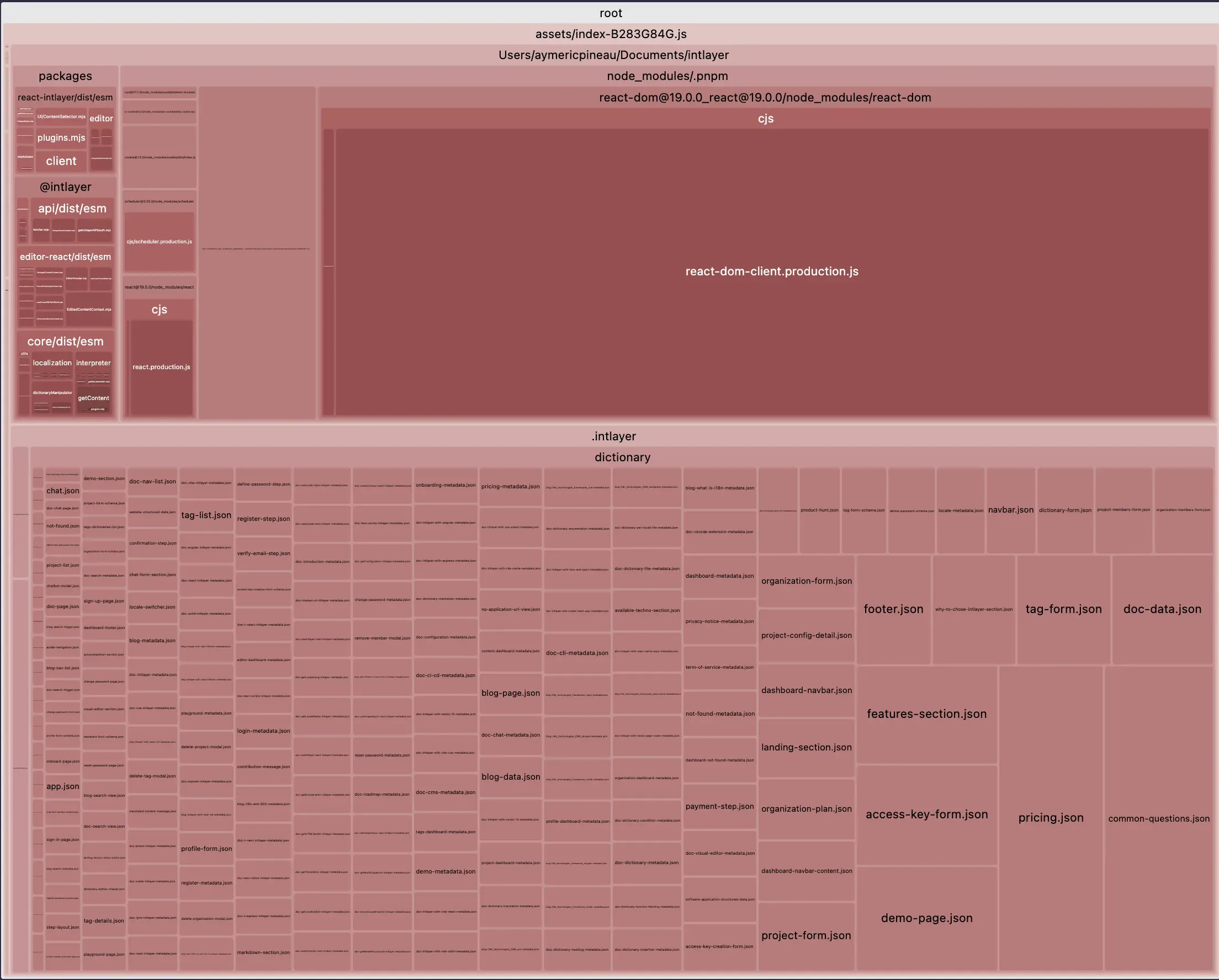
यही कारण है कि Intlayer का approach अधिक performant है: यदि एक component अब उपयोग नहीं किया जाता है, तो इसकी dictionary bundle में load नहीं होती है।
कैसे library fallbacks को handle करती है यह भी महत्वपूर्ण है। आइए मान लें कि application default रूप से English में है, और user /fr/about पृष्ठ पर जाता है। यदि French में translations missing हैं, तो हम English fallback पर विचार करेंगे।
next-intl और next-i18next के मामले में, library को current locale से संबंधित JSON को load करने की जरूरत है, लेकिन fallback locale से भी। इस प्रकार, यह मानते हुए कि सभी content का translation किया गया है, प्रत्येक पृष्ठ 100% unnecessary सामग्री को load करेगा। तुलना में, intlayer dictionary build time पर fallback को process करता है। इस प्रकार, प्रत्येक पृष्ठ केवल उपयोग की जाने वाली सामग्री को load करेगा।
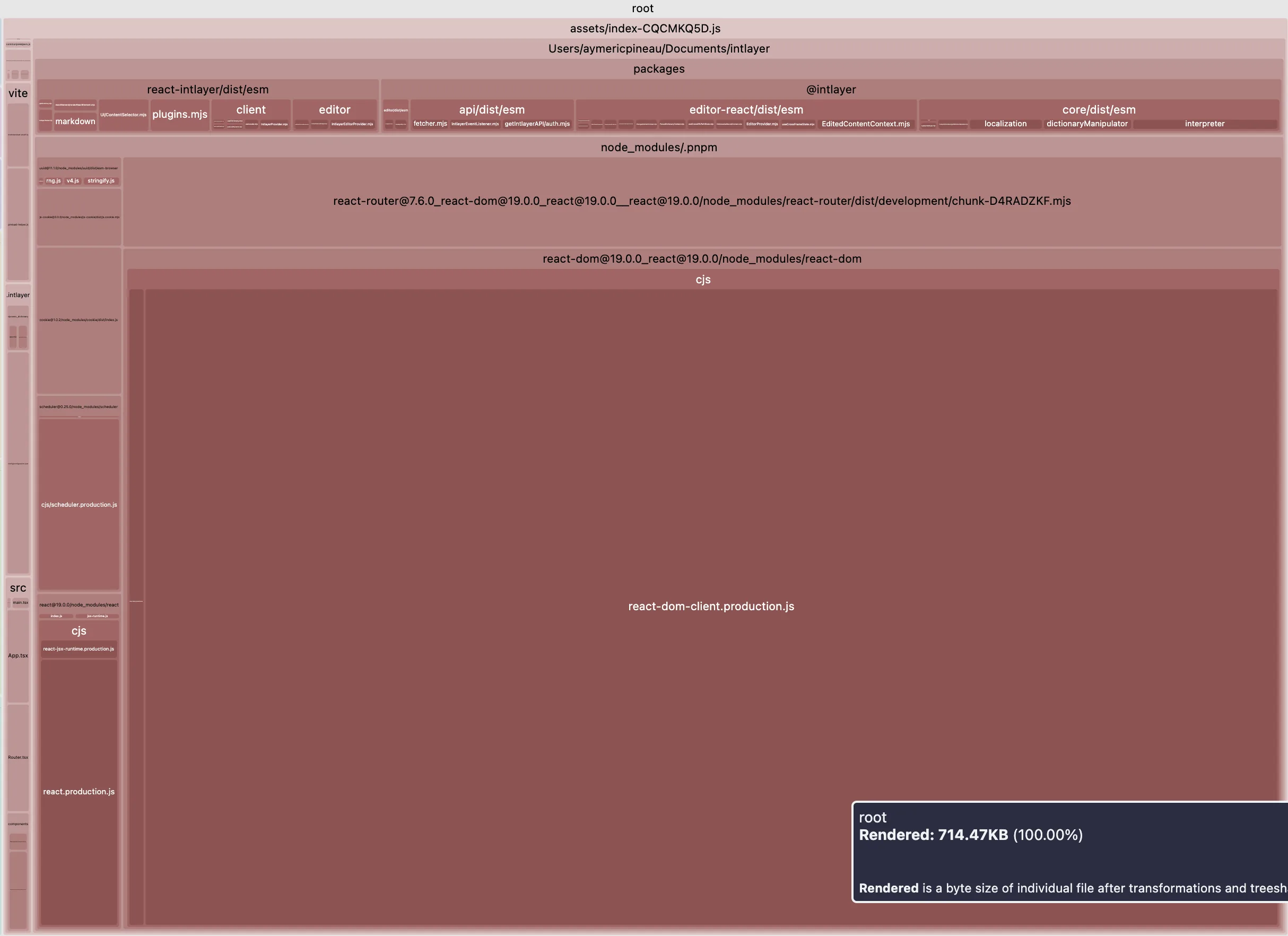
ध्यान दें:intlayerका उपयोग करके bundle को optimize करने के लिए, आपको अपनीintlayer.config.tsfile मेंimportMode: 'dynamic'option को set करने की जरूरत है। और सुनिश्चित करें कि plugin@intlayer/babel/@intlayer/swcinstalled हैं (default रूप सेvite-intlayerका उपयोग करके installed)।
यहां एक vite + react application में intlayer का उपयोग करके bundle size optimization के प्रभाव का एक उदाहरण दिया गया है:
सभी डेटा सामग्री को स्पष्ट रूप से देखने के लिए तालिका को मोडल में खोलें
| Optimized bundle | Bundle not optimized |
|---|---|
 |  |
TypeScript और सुरक्षा
next-i18next
- Hooks के लिए बेस typings। strict key typing के लिए अतिरिक्त tooling/config की आवश्यकता है।
next-intl
- ठोस TypeScript support, लेकिन keys डिफ़ॉल्ट रूप से strictly typed नहीं हैं। आप सुरक्षा patterns को manually maintain करेंगे।
intlayer
- आपकी content से strict types generate करता है। IDE autocompletion और compile-time errors deploy से पहले typos और missing keys को catch करते हैं।
यह क्यों महत्वपूर्ण है: Strong typing failures को left (CI/build) की ओर shift करता है right (runtime) की बजाय।
अनुपलब्ध अनुवाद हैंडलिंग
next-i18next
- runtime fallbacks पर निर्भर करता है। Build विफल नहीं होता।
next-intl
- runtime fallbacks पर निर्भर करता है। Build विफल नहीं होता।
intlayer
- Build-time detection with warnings/errors for missing locales or keys।
Why it matters: Build के दौरान gaps को पकड़ना production में 'undefined' strings को रोकता है।
राउटिंग, मिडलवेयर और यूआरएल रणनीति
next-i18next
- स्थानीयकृत राउटिंग की अनुमति देता है। लेकिन मिडलवेयर बिल्ट-इन नहीं है।
next-intl
- स्थानीयकृत राउटिंग की अनुमति देता है।
- मिडलवेयर प्रदान करता है।
intlayer
- स्थानीयकृत राउटिंग की अनुमति देता है।
- मिडलवेयर प्रदान करता है।
यह क्यों मायने रखता है: SEO और खोज के साथ-साथ उपयोगकर्ता अनुभव में मदद करता है।
Server Components (RSC) संरेखण
next-i18next
- पृष्ठ और लेआउट server components को सपोर्ट करता है।
- बाल server components के लिए synchronous API प्रदान नहीं करता है।
next-intl
- पृष्ठ और लेआउट server components को सपोर्ट करता है।
- बाल server components के लिए synchronous API प्रदान नहीं करता है।
intlayer
- पृष्ठ और लेआउट server components को सपोर्ट करता है।
- बाल server components के लिए synchronous API प्रदान करता है।
यह क्यों महत्वपूर्ण है: Server component सपोर्ट Next.js 13+ की एक मुख्य सुविधा है, जो performance में सुधार करती है। parent से बाल server components में locale या t फ़ंक्शन को props के रूप में पास करने से आपके components कम reusable हो जाते हैं।
स्थानीयकरण प्लेटफॉर्म (TMS) के साथ एकीकरण
बड़ी संगठनें अक्सर Crowdin, Phrase, Lokalise, Localizely, या Localazy जैसी Translation Management Systems (TMS) पर निर्भर करती हैं।
कंपनियों को क्यों परवाह है
- सहयोग और भूमिकाएँ: कई actors शामिल हैं: developers, product managers, translators, reviewers, marketing teams।
- स्केल और दक्षता: continuous localization, in-context review।
next-intl / next-i18next
- आमतौर पर centralized JSON catalogs का उपयोग करते हैं, इसलिए TMS के साथ export/import सीधा है।
- परिपक्व ecosystems और उपरोक्त प्लेटफॉर्म के लिए examples/integrations।
Intlayer
- decentralized, per-component dictionaries को प्रोत्साहित करता है और TypeScript/TSX/JS/JSON/MD content को समर्थन करता है।
- यह code में modularity में सुधार करता है, लेकिन जब कोई tool centralized, flat JSON files की अपेक्षा करता है तो plug-and-play TMS integration को कठिन बना सकता है।
- Intlayer विकल्प प्रदान करता है: AI-assisted translations (अपनी provider keys का उपयोग करके), एक Visual Editor/CMS, और CLI/CI workflows को catch और prefill gaps के लिए।
नोट:next-intlऔरi18nextTypeScript catalogs को भी स्वीकार करते हैं। यदि आपकी team.tsfiles में messages को store करती है या उन्हें feature द्वारा decentralize करती है, तो आप समान TMS friction का सामना कर सकते हैं। हालांकि, कईnext-intlsetupslocales/folder में centralized रहते हैं, जो TMS के लिए JSON में refactor करना थोड़ा आसान है।
डेवलपर अनुभव
यह भाग तीनों समाधानों के बीच एक गहन तुलना करता है। प्रत्येक समाधान के 'getting started' दस्तावेज़ में वर्णित सरल cases पर विचार करने के बजाय, हम एक वास्तविक use case पर विचार करेंगे, जो एक वास्तविक project के अधिक समान है।
ऐप्लिकेशन संरचना
ऐप्लिकेशन संरचना आपके codebase के लिए अच्छी maintainability सुनिश्चित करने के लिए महत्वपूर्ण है।
कोड को क्लिपबोर्ड पर कॉपी करें
कोड को क्लिपबोर्ड पर कॉपी करें
कोड को क्लिपबोर्ड पर कॉपी करें
तुलना
- next-intl / next-i18next: केंद्रीकृत कैटलॉग (JSON; नेमस्पेस/संदेश)। स्पष्ट संरचना, अनुवाद प्लेटफॉर्म के साथ अच्छी तरह से एकीकृत, लेकिन जैसे-जैसे ऐप्स बढ़ते हैं, फ़ाइलों के बीच अधिक संपादन हो सकते हैं।
- Intlayer: प्रति-घटक
.content.{ts|js|json}शब्दकोश जो घटकों के साथ सह-स्थित हैं। आसान घटक पुनः उपयोग और स्थानीय तर्क; फ़ाइलें जोड़ता है और बिल्ड-समय उपकरण पर निर्भर करता है।
सेटअप और कंटेंट लोडिंग
जैसा कि पहले उल्लेख किया गया है, आपको अपने कोड में प्रत्येक JSON फाइल को कैसे import किया जाता है इसे optimize करना चाहिए। यह महत्वपूर्ण है कि library कंटेंट लोडिंग को कैसे handle करती है।
कोड को क्लिपबोर्ड पर कॉपी करें
कोड को क्लिपबोर्ड पर कॉपी करें
कोड को क्लिपबोर्ड पर कॉपी करें
कोड को क्लिपबोर्ड पर कॉपी करें
कोड को क्लिपबोर्ड पर कॉपी करें
कोड को क्लिपबोर्ड पर कॉपी करें
कोड को क्लिपबोर्ड पर कॉपी करें
कोड को क्लिपबोर्ड पर कॉपी करें
कोड को क्लिपबोर्ड पर कॉपी करें
कोड को क्लिपबोर्ड पर कॉपी करें
कोड को क्लिपबोर्ड पर कॉपी करें
तुलना
तीनों per-locale content loading और providers को support करते हैं।
next-intl/next-i18next के साथ, आप आमतौर पर selected messages/namespaces को per route load करते हैं और providers को जहाँ आवश्यक हो वहाँ place करते हैं।
Intlayer के साथ, build-time analysis को add करता है usage को infer करने के लिए, जो manual wiring को reduce कर सकता है और एक single root provider की अनुमति दे सकता है।
Team preference के आधार पर explicit control और automation के बीच चुनें।
क्लाइंट कंपोनेंट में उपयोग
आइए एक क्लाइंट कंपोनेंट का एक उदाहरण लें जो एक काउंटर रेंडर करता है।
अनुवाद (एक JSON प्रति namespace src/locales/... के तहत)
कोड को क्लिपबोर्ड पर कॉपी करें
कोड को क्लिपबोर्ड पर कॉपी करें
क्लाइंट कंपोनेंट (केवल आवश्यक namespace लोड करता है)
कोड को क्लिपबोर्ड पर कॉपी करें
सुनिश्चित करें कि पेज/प्रोवाइडर केवल आवश्यक namespaces शामिल करता है (जैसे
about)। यदि आप React < 19 का उपयोग कर रहे हैं, तो भारी formatters जैसेIntl.NumberFormatको memoize करें।
अनुवाद (आकृति का पुन: उपयोग; उन्हें next-intl संदेशों में अपनी पसंद के अनुसार लोड करें)
कोड को क्लिपबोर्ड पर कॉपी करें
कोड को क्लिपबोर्ड पर कॉपी करें
क्लाइंट कंपोनेंट
कोड को क्लिपबोर्ड पर कॉपी करें
पेज क्लाइंट संदेश पर "about" संदेश जोड़ना न भूलें
सामग्री
कोड को क्लिपबोर्ड पर कॉपी करें
क्लाइंट कंपोनेंट
कोड को क्लिपबोर्ड पर कॉपी करें
तुलना
संख्या स्वरूपण
- next-i18next: कोई
useNumberनहीं;Intl.NumberFormat(या i18next-icu) का उपयोग करें। - next-intl:
useFormatter().number(value)। - Intlayer:
useNumber()built-in।
- next-i18next: कोई
Keys
- एक nested structure (
about.counter.label) रखें और अपने hook को accordingly scope करें (useTranslation("about")+t("counter.label")याuseTranslations("about.counter")+t("label"))।
- एक nested structure (
फ़ाइल स्थान
- next-i18next को
public/locales/{lng}/{ns}.jsonमें JSON की अपेक्षा है। - next-intl लचीला है; संदेशों को अपनी कॉन्फ़िगरेशन के अनुसार लोड करें।
- Intlayer TS/JS dictionaries में content store करता है और key के आधार पर resolve करता है।
- next-i18next को
सर्वर कंपोनेंट में उपयोग
हम एक UI कंपोनेंट के मामले को लेंगे। यह कंपोनेंट एक सर्वर कंपोनेंट है, और एक क्लाइंट कंपोनेंट के चाइल्ड के रूप में डाला जा सकता है। (page (server component) -> client component -> server component)। जैसा कि यह कंपोनेंट क्लाइंट कंपोनेंट के चाइल्ड के रूप में डाला जा सकता है, यह async नहीं हो सकता है।
कोड को क्लिपबोर्ड पर कॉपी करें
कोड को क्लिपबोर्ड पर कॉपी करें
जैसा कि सर्वर कंपोनेंट async नहीं हो सकता है, आपको translations और formatter फ़ंक्शन को props के रूप में पास करने की आवश्यकता है।
आपके page / layout में:
import { getTranslations, getFormatter } from "next-intl/server";const t = await getTranslations("about.counter");const formatter = await getFormatter().then((formatter) => formatter.number());
कोड को क्लिपबोर्ड पर कॉपी करें
Intlayernext-intlayer/serverके माध्यम से server-safe hooks को expose करता है। काम करने के लिए,useIntlayerऔरuseNumberhooks-like syntax का उपयोग करते हैं, जो क्लाइंट hooks के समान हैं, लेकिन server context (IntlayerServerProvider) पर निर्भर हैं।
मेटाडेटा / साइटमैप / रोबोट्स
content का अनुवाद करना बहुत अच्छा है। लेकिन लोग अक्सर भूल जाते हैं कि internationalization का मुख्य लक्ष्य आपकी website को दुनिया के लिए अधिक दृश्यमान बनाना है। I18n आपकी website visibility में सुधार के लिए एक अद्भुत साधन है।
यहाँ बहुभाषी SEO के संबंध में अच्छी practices की एक सूची दी गई है।
<head>tag में hreflang मेटा tags सेट करें > यह search engines को समझने में मदद करता है कि पृष्ठ पर कौन सी भाषाएं उपलब्ध हैंhttp://www.w3.org/1999/xhtmlXML schema का उपयोग करके sitemap.xml में सभी पृष्ठों के अनुवाद सूचीबद्ध करें >- robots.txt से prefixed pages को exclude करना न भूलें (उदा.
/dashboard,/fr/dashboard,/es/dashboard) > - सबसे localized page पर redirect करने के लिए custom Link component का उपयोग करें (उदा. फ्रेंच में
<a href="/fr/about">A propos</a>) >
Developers अक्सर locales के across अपने पृष्ठों को ठीक से reference करना भूल जाते हैं।
कोड को क्लिपबोर्ड पर कॉपी करें
कोड को क्लिपबोर्ड पर कॉपी करें
कोड को क्लिपबोर्ड पर कॉपी करें
कोड को क्लिपबोर्ड पर कॉपी करें
कोड को क्लिपबोर्ड पर कॉपी करें
कोड को क्लिपबोर्ड पर कॉपी करें
कोड को क्लिपबोर्ड पर कॉपी करें
कोड को क्लिपबोर्ड पर कॉपी करें
कोड को क्लिपबोर्ड पर कॉपी करें
कोड को क्लिपबोर्ड पर कॉपी करें
Intlayer आपके sitemap के लिए बहुभाषी URLs उत्पन्न करने के लिए एक getMultilingualUrls function प्रदान करता है।
लोकेल रूटिंग के लिए Middleware
लोकेल डिटेक्शन और रूटिंग को संभालने के लिए एक middleware जोड़ें:
कोड को क्लिपबोर्ड पर कॉपी करें
लोकेल डिटेक्शन और रूटिंग को संभालने के लिए एक middleware जोड़ें:
कोड को क्लिपबोर्ड पर कॉपी करें
Intlayer next-intlayer package कॉन्फ़िगरेशन के माध्यम से built-in middleware हैंडलिंग प्रदान करता है।
कोड को क्लिपबोर्ड पर कॉपी करें
Middleware की सेटअप intlayer.config.ts फाइल में केंद्रीकृत है।
सेटअप चेकलिस्ट और सर्वोत्तम प्रथाएं
- सुनिश्चित करें कि
langऔरdirकोsrc/app/[locale]/layout.tsxमें रूट<html>पर सेट किया गया है। - अनुवादों को नेमस्पेस में विभाजित करें (उदाहरण के लिए
common.json,about.json)src/locales/<locale>/के अंतर्गत। - क्लाइंट घटकों में
useTranslation('<ns>')का उपयोग करके औरI18nProviderको समान नेमस्पेस के साथ स्कोप करके केवल आवश्यक नेमस्पेस लोड करें। - पेजों को जहां संभव हो स्टैटिक रखें: पेजों पर
export const dynamic = 'force-static'निर्यात करें;dynamicParams = falseसेट करें औरgenerateStaticParamsको लागू करें। - क्लाइंट सीमाओं के तहत नेस्टेड सिंक सर्वर घटकों का उपयोग करें पहले से गणना की गई स्ट्रिंग्स या
tफ़ंक्शन औरlocaleको पास करके। - SEO के लिए, मेटाडेटा में
alternates.languagesसेट करें,sitemap.tsमें स्थानीयकृत URLs की सूची बनाएं, औरrobots.tsमें डुप्लिकेट स्थानीयकृत मार्गों को अनुमति न दें। - लोकेल-जागरूक फॉर्मेटर्स (उदाहरण के लिए,
Intl.NumberFormat(locale)) को वरीयता दें और यदि React < 19 का उपयोग कर रहे हैं तो उन्हें क्लाइंट पर मेमोइज़ करें।
- HTML
langऔरdirसेट करें:src/app/[locale]/layout.tsxमें,getLocaleDirection(locale)के माध्यम सेdirकी गणना करें और<html lang={locale} dir={dir}>सेट करें। - नेमस्पेस द्वारा संदेशों को विभाजित करें: प्रति लोकेल और नेमस्पेस JSON को व्यवस्थित करें (उदाहरण के लिए,
common.json,about.json)। - क्लाइंट पेलोड को कम करें: पेजों पर, केवल आवश्यक नेमस्पेस को
NextIntlClientProviderको भेजें (उदाहरण के लिए,pick(messages, ['common', 'about']))। - स्टैटिक पेजों को वरीयता दें:
export const dynamic = 'force-static'निर्यात करें और सभीlocalesके लिए स्टैटिक params जेनरेट करें। - सिंक्रोनस सर्वर घटक: पूर्व-गणना की गई स्ट्रिंग्स (अनुवादित लेबल, स्वरूपित संख्याएं) को पास करके सर्वर घटकों को सिंक रखें न कि async कॉल या गैर-सीरियलाइज़ेबल फ़ंक्शन।
- मॉड्यूलर सामग्री:
.content.{ts|js|json}फाइलों का उपयोग करके सामग्री शब्दकोशों को घटकों के साथ सह-स्थित करें। - प्रकार सुरक्षा: कंपाइल-समय सामग्री सत्यापन के लिए TypeScript एकीकरण का उपयोग करें।
- बिल्ड-समय अनुकूलन: स्वचालित ट्री-शेकिंग और बंडल अनुकूलन के लिए Intlayer के बिल्ड टूल्स का उपयोग करें।
- एकीकृत टूलिंग: बिल्ट-इन रूटिंग, SEO सहायकों और विजुअल एडिटर समर्थन का लाभ उठाएं।
और विजेता है…
यह सरल नहीं है। प्रत्येक विकल्प के अपने trade-offs हैं। यहाँ मेरा दृष्टिकोण है:
next-i18next
- परिपक्व, सुविधाओं से भरपूर, बहुत सारे कम्युनिटी प्लगइन, लेकिन उच्च सेटअप लागत। यदि आपको i18next के प्लगइन इकोसिस्टम की आवश्यकता है (उदाहरण के लिए, प्लगइन के माध्यम से उन्नत ICU नियम) और आपकी टीम पहले से i18next को जानती है, तो लचीलेपन के लिए अधिक कॉन्फ़िगरेशन स्वीकार करें।
next-intl
- सबसे सरल, हल्का-फुल्का, कम निर्णय आप पर थोपे गए। यदि आप एक न्यूनतम समाधान चाहते हैं, केंद्रीभूत कैटलॉग के साथ सहज हैं, और आपका ऐप्लिकेशन छोटा से मध्यम आकार का है।
Intlayer
- आधुनिक Next.js के लिए निर्मित, मॉड्यूलर कंटेंट, type safety, tooling, और कम boilerplate के साथ। यदि आप component-scoped content, strict TypeScript, build-time guarantees, tree-shaking, और batteries-included routing/SEO/editor tooling को महत्व देते हैं - विशेष रूप से Next.js App Router, design-systems और बड़े, मॉड्यूलर codebases के लिए।
यदि आप न्यूनतम सेटअप पसंद करते हैं और कुछ मैनुअल wiring स्वीकार करते हैं, तो next-intl एक अच्छा विकल्प है। यदि आपको सभी सुविधाओं की आवश्यकता है और जटिलता में कोई बुराई नहीं है, तो next-i18next काम करता है। लेकिन यदि आप एक आधुनिक, स्केलेबल, मॉड्यूलर समाधान चाहते हैं जिसमें निर्मित tools हैं, तो Intlayer इसे आपको सीधे प्रदान करने का लक्ष्य रखता है।
एंटरप्राइज टीमों के लिए विकल्प: यदि आपको एक well-proven समाधान की आवश्यकता है जो Crowdin, Phrase, या अन्य पेशेवर translation management systems जैसे स्थापित localization platforms के साथ पूरी तरह से काम करता है, तो अपने mature ecosystem और proven integrations के लिए next-intl या next-i18next पर विचार करें।
Future roadmap: Intlayer i18next और next-intl समाधानों के ऊपर काम करने वाले plugins विकसित करने की भी योजना बना रहा है। यह आपको automation, syntax, और content management के लिए Intlayer के फायदे देगा जबकि आपके application code में इन स्थापित समाधानों द्वारा प्रदान की गई security और stability को बनाए रखेगा।
GitHub STARs
GitHub stars किसी प्रोजेक्ट की लोकप्रियता, community के भरोसे और लंबे समय तक प्रासंगिकता का एक मज़बूत संकेतक हैं। भले ही ये तकनीकी गुणवत्ता का सीधा माप नहीं हैं, ये दर्शाते हैं कि कितने डेवलपर्स प्रोजेक्ट को उपयोगी पाते हैं, उसकी प्रगति को फ़ॉलो करते हैं और उसे अपनाने की संभावना रखते हैं। किसी प्रोजेक्ट का मूल्य आंकने के लिए, stars विकल्पों के बीच traction की तुलना करने और ecosystem की वृद्धि को समझने में मदद करते हैं।
कमिट गतिविधि
स्टार लोकप्रियता दिखाते हैं। कमिट दिखाते हैं कि किसी प्रोजेक्ट में कितना काम लगा है। लिखते समय Intlayer में लगभग 7,500 कमिट हैं, जो यहाँ तुलना की गई अधिकांश लाइब्रेरी से ज़्यादा हैं और next-intl या next-i18next से लगभग 5 गुना।
- i18next/next-i18next
- amannn/next-intl
- aymericzip/intlayer
डिफ़ॉल्ट ब्रांच पर कमिट, स्रोत: GitHub API।
Intlayer एक मोनोरेपो है, इसलिए इस संख्या में हर फ़्रेमवर्क पैकेज, CLI और डॉक्स शामिल हैं। कमिट को गुणवत्ता नहीं, गतिविधि का संकेत मानें।
npm डाउनलोड
- next-i18next
- next-intl
- next-intlayer
स्रोत: npm रजिस्ट्री डाउनलोड API।
डाउनलोड सबसे पुराने समाधानों को पुरस्कृत करते हैं, सबसे अच्छे को नहीं। वर्षों पहले जारी हुई लाइब्रेरी आज भी हर उस प्रोजेक्ट में इंस्टॉल होती है जिसने उसे तब चुना था, हर CI रन में और हर उस पैकेज में जो उस पर निर्भर है। यह संख्या नए चुनाव से ज़्यादा जड़ता को मापती है।
AI असिस्टेंट इस प्रभाव को और बढ़ाते हैं। next-intl, i18next और vue-i18n उस कोड में हर जगह हैं जिस पर वे प्रशिक्षित हुए, इसलिए वे विकल्पों की तुलना किए बिना इन्हें डिफ़ॉल्ट रूप से सुझाते हैं। हर सुझाव डाउनलोड बढ़ाता है, जो अगले सुझाव को बढ़ावा देता है। डाउनलोड की संख्या नहीं, बेंचमार्क के आधार पर तुलना करें।
निष्कर्ष
तीनों लाइब्रेरीज़ मूल स्थानीयकरण में सफल हैं। फर्क यह है कि आपको कितना काम करना होगा एक मजबूत, स्केलेबल सेटअप प्राप्त करने के लिए आधुनिक Next.js में:
- Intlayer के साथ, मॉड्यूलर कंटेंट, सख्त TS, बिल्ड-टाइम सुरक्षा, ट्री-शेक्ड बंडल, और प्रथम श्रेणी का App Router + SEO टूलिंग डिफ़ॉल्ट हैं, न कि बोझ।
- यदि आपकी टीम एक मल्टी-लोकल, कंपोनेंट-चालित ऐप में रखरखाव और गति को महत्व देती है, तो Intlayer आज सबसे पूर्ण अनुभव प्रदान करता है।
आगे पढ़ें और बेंचमार्क
अधिक जानकारी के लिए 'Why Intlayer?' दस्तावेज़ देखें।
टिप्पणियाँ
अभी तक कोई टिप्पणी नहीं। अपने विचार साझा करने वाले पहले व्यक्ति बनें।