ホームサンドボックスショーケースアプリ文書ブログ
    • English英語
      EN
    • Русскийロシア語
      RU
    • 日本語日本語
      JA
    • françaisフランス語
      FR
    • 한국어韓国語
      KO
    • 中文中国語
      ZH
    • Españolスペイン語
      ES
    • Deutschドイツ語
      DE
    • العربيةアラビア語
      AR
    • Italianoイタリア語
      IT
    • British Englishイギリス英語
      EN-GB
    • Portuguêsポルトガル語
      PT
    • हिन्दीヒンディー語
      HI
    • Türkçeトルコ語
      TR
    • polskiポーランド語
      PL
    • Indonesiaインドネシア語
      ID
    • Tiếng Việtベトナム語
      VI
    • Українськаウクライナ語
      UK
    /
    Alt+←
    国際化とは?
    SEOと国際化
    ガイド
    • next-i18nextによるi18n
    • next-intlによるi18n
    Intlayerをあなたのソリューションで使う
    • next-i18nextを自動化
    • react-i18nextを自動化
    • next-intlを自動化
    • react-intlを自動化
    • vue-i18nを自動化
    比較
    • next-i18next vs next-intl vs Intlayer
    • react-i18next vs react-intl vs Intlayer
    ドキュメンテーション
    1. Blog
    2. Next i18next vs next intl vs intlayer
    Creation:2025-08-23Last update:2026-05-31
    このドキュメントをあなたの好きなAIアシスタントに参照してください
    ChatGPT
    Claude
    DeepSeek
    Google AI mode
    Gemini
    Perplexity
    Mistral
    Grok

    このページとあなたの好きなAIアシスタントを使ってドキュメントを要約します

    このページのコンテンツはAIを使用して翻訳されました。

    英語の元のコンテンツの最新バージョンを見る
    Edit this doc

    If you have an idea for improving this documentation, please feel free to contribute by submitting a pull request on GitHub.

    GitHub link to the documentation
    Copy

    Copy doc Markdown to clipboard

    next-i18next VS next-intl VS intlayer | Next.jsの国際化(i18n)

    next-i18next VS next-intl VS intlayer

    Next.js向けの3つのi18nオプション、next-i18next、next-intl、Intlayerの類似点と相違点を見ていきましょう。

    これは完全なチュートリアルではなく、選択の参考となる比較です。

    私たちはNext.js 13+のApp Router(React Server Components対応)に焦点を当て、以下を評価します:

    1. アーキテクチャとコンテンツの構成
    2. TypeScriptと安全性
    3. 翻訳欠落の処理
    4. ルーティングとミドルウェア
    5. パフォーマンスと読み込み挙動
    6. 開発者体験(DX)、ツールとメンテナンス
    7. SEOと大規模プロジェクトの拡張性
    要約: 3つのいずれもNext.jsアプリのローカライズが可能です。もしコンポーネント単位のコンテンツ管理、厳格なTypeScript型、ビルド時の欠落キー検出、ツリーシェイク可能な辞書、そして一流のApp Router + SEOヘルパーを求めるなら、Intlayerが最も完全でモダンな選択肢です。
    開発者がよく混同しがちなのは、next-intlがreact-intlのNext.js版だと思うことです。そうではありません。next-intlはAmannによってメンテナンスされており、react-intlはFormatJSによってメンテナンスされています。

    簡単に言うと

    • next-intl - 軽量でシンプルなメッセージフォーマットを提供し、Next.jsのサポートがしっかりしています。カタログは中央集権的であることが多く、開発者体験(DX)はシンプルですが、安全性や大規模なメンテナンスは主にあなたの責任となります。
    • next-i18next - Next.js向けにラップされたi18nextです。成熟したエコシステムとプラグイン(例:ICU)による機能を持ちますが、設定が冗長になりがちで、プロジェクトが大きくなるにつれてカタログは中央集権化しやすいです。
    • Intlayer - Next.js向けのコンポーネント中心のコンテンツモデル、厳格なTS型付け、ビルド時チェック、ツリーシェイキング、組み込みのミドルウェア&SEOヘルパー、オプションのビジュアルエディター/CMS、およびAI支援翻訳。

    テーブルのすべての内容を表示

    テーブルをモーダルで開き、すべてのデータを明確に表示

    Library GitHub Stars Total Commits Last Commit First Version NPM Version NPM Downloads
    aymericzip/intlayer GitHub Repo stars GitHub commit activity Last Commit April 2024 npm npm downloads
    amannn/next-intl GitHub Repo stars GitHub commit activity Last Commit Nov 2020 npm npm downloads
    i18next/i18next GitHub Repo stars GitHub commit activity Last Commit Jan 2012 npm npm downloads
    i18next/next-i18next GitHub Repo stars GitHub commit activity Last Commit Nov 2018 npm npm downloads
    バッジは自動的に更新されます。スナップショットは時間とともに変動します。

    並列機能比較(Next.jsに特化)

    | 機能 | next-intlayer (Intlayer) | next-intl | next-i18next |

    バッジは自動的に更新されます。スナップショットは時間とともに変化します。

    並列機能比較(Next.jsに特化)

    テーブルのすべての内容を表示

    テーブルをモーダルで開き、すべてのデータを明確に表示

    機能 next-intlayer (Intlayer) next-intl next-i18next
    コンポーネント近くの翻訳 ✅ はい、各コンポーネントにコンテンツが配置されています ❌ いいえ ❌ いいえ
    TypeScript 統合 ✅ 高度、自動生成された厳密な型 ✅ 良好 ⚠️ 基本
    翻訳漏れ検出 ✅ TypeScript エラーのハイライトおよびビルド時のエラー/警告 ⚠️ ランタイムフォールバック ⚠️ ランタイムフォールバック
    リッチコンテンツ(JSX/Markdown/コンポーネント) ✅ 直接サポート ❌ リッチノード向けに設計されていません ⚠️ 制限あり
    AI搭載翻訳 ✅ はい、複数のAIプロバイダーをサポート。独自のAPIキーを使用可能。アプリケーションのコンテキストとコンテンツの範囲を考慮します ❌ いいえ ❌ いいえ
    ビジュアルエディター ✅ はい、ローカルのビジュアルエディター+オプションのCMS;コードベースのコンテンツを外部化可能;埋め込み可能 ❌ いいえ/外部のローカリゼーションプラットフォーム経由で利用可能 ❌ いいえ/外部のローカリゼーションプラットフォーム経由で利用可能
    ローカライズされたルーティング ✅ はい、標準でローカライズされたパスをサポート(Next.js & Viteで動作) ✅ 組み込み、App Routerは[locale]セグメントをサポート ✅ 組み込み
    動的ルート生成 ✅ はい ✅ はい ✅ はい
    複数形対応 ✅ 列挙ベースのパターン ✅ 良好 ✅ 良好
    フォーマット(日時、数値、通貨) ✅ 最適化されたフォーマッター(内部でIntlを使用) ✅ 良好(Intlヘルパー) ✅ 良好(Intlヘルパー)
    コンテンツフォーマット ✅ .tsx、.ts、.js、.json、.md、.txt、(.yaml 開発中) ✅ .json、.js、.ts ⚠️ .json
    ICUサポート ⚠️ 作業中 ✅ あり ⚠️ プラグイン経由(i18next-icu)
    SEOヘルパー(hreflang、サイトマップ) ✅ 組み込みツール:サイトマップ、robots.txt、メタデータのヘルパー ✅ 良好 ✅ 良好
    エコシステム / コミュニティ ⚠️ 小規模だが急速に成長し、反応が良い ✅ 良好 ✅ 良好
    サーバーサイドレンダリング & サーバーコンポーネント ✅ はい、SSR / Reactサーバーコンポーネント向けに最適化 ⚠️ ページレベルでサポートされているが、子のサーバーコンポーネントに対してt関数をコンポーネントツリーに渡す必要がある ⚠️ ページレベルでサポートされているが、子のサーバーコンポーネントに対してt関数をコンポーネントツリーに渡す必要がある
    ツリーシェイキング(使用されたコンテンツのみを読み込む) ✅ はい、Babel/SWCプラグインを使用したビルド時のコンポーネント単位で対応 ⚠️ 部分的に対応 ⚠️ 部分的に対応
    遅延読み込み ✅ はい、ロケール単位 / 辞書単位で対応 ✅ はい(ルート単位/ロケール単位)、名前空間管理が必要 ✅ はい(ルート単位/ロケール単位)、名前空間管理が必要
    未使用コンテンツの削除 ✅ はい、ビルド時に辞書単位で対応 ❌ いいえ、名前空間管理で手動対応可能 ❌ いいえ、名前空間管理で手動対応可能
    大規模プロジェクトの管理 ✅ モジュール化を推奨し、デザインシステムに適している ✅ セットアップによるモジュール化対応 ✅ セットアップによるモジュール化対応
    翻訳漏れのテスト(CLI/CI) ✅ CLI: npx intlayer content test(CIに適した監査) ⚠️ 組み込みではない;ドキュメントでは npx @lingual/i18n-check を推奨 ⚠️ 組み込みではない;i18nextツールやランタイムの saveMissing に依存

    はじめに

    Next.jsは国際化されたルーティング(例:ロケールセグメント)を組み込みでサポートしています。しかし、その機能だけでは翻訳は行われません。ユーザーにローカライズされたコンテンツを表示するには、別途ライブラリが必要です。

    多くのi18nライブラリが存在しますが、Next.jsの世界では現在、next-i18next、next-intl、そしてIntlayerの3つが注目されています。


    アーキテクチャとスケーラビリティ

    • next-intl / next-i18next: ロケールごとに 集中管理されたカタログ(および i18next の場合は ネームスペース)をデフォルトとします。初期段階では問題なく機能しますが、結合度が高まりキーの変更が頻繁になると、大きな共有領域となってしまいます。
    • Intlayer: サービスするコードと 共置 された コンポーネント単位(または機能単位)の辞書を推奨します。これにより認知負荷が軽減され、UIパーツの重複や移行が容易になり、チーム間の競合も減少します。未使用のコンテンツも自然に見つけやすく削除しやすくなります。

    なぜ重要か: 大規模なコードベースやデザインシステムのセットアップでは、モジュール化されたコンテンツの方がモノリシックなカタログよりもスケールしやすいです。


    バンドルサイズと依存関係

    アプリケーションをビルドした後、バンドルとはブラウザがページをレンダリングするために読み込むJavaScriptのことです。したがって、バンドルサイズはアプリケーションのパフォーマンスにとって重要です。

    多言語アプリケーションのバンドルにおいて重要な2つの要素は以下の通りです:

    • アプリケーションコード
    • ブラウザによって読み込まれるコンテンツ

    アプリケーションコード

    この場合、アプリケーションコードの重要性は最小限です。3つのソリューションすべてがツリーシェイカブルであり、未使用のコード部分はバンドルに含まれません。

    以下は、3つのソリューションを用いた多言語アプリケーションでブラウザが読み込むJavaScriptバンドルサイズの比較です。

    アプリケーション内でフォーマッターを必要としない場合、ツリーシェイキング後にエクスポートされる関数のリストは以下のようになります:

    • next-intlayer: useIntlayer, useLocale, NextIntlClientProvider、(バンドルサイズは180.6 kB -> 15.24 kB(gzip))
    • next-intl: useTranslations, useLocale, NextIntlClientProvider、(バンドルサイズは101.3 kB -> 31.4 kB(gzip))
    • next-i18next: useTranslation, useI18n, I18nextProvider、(バンドルサイズは80.7 kB -> 25.5 kB(gzip))

    これらの関数はReactのコンテキスト/ステートのラッパーに過ぎないため、i18nライブラリがバンドルサイズに与える影響は最小限です。

    コンテンツと翻訳

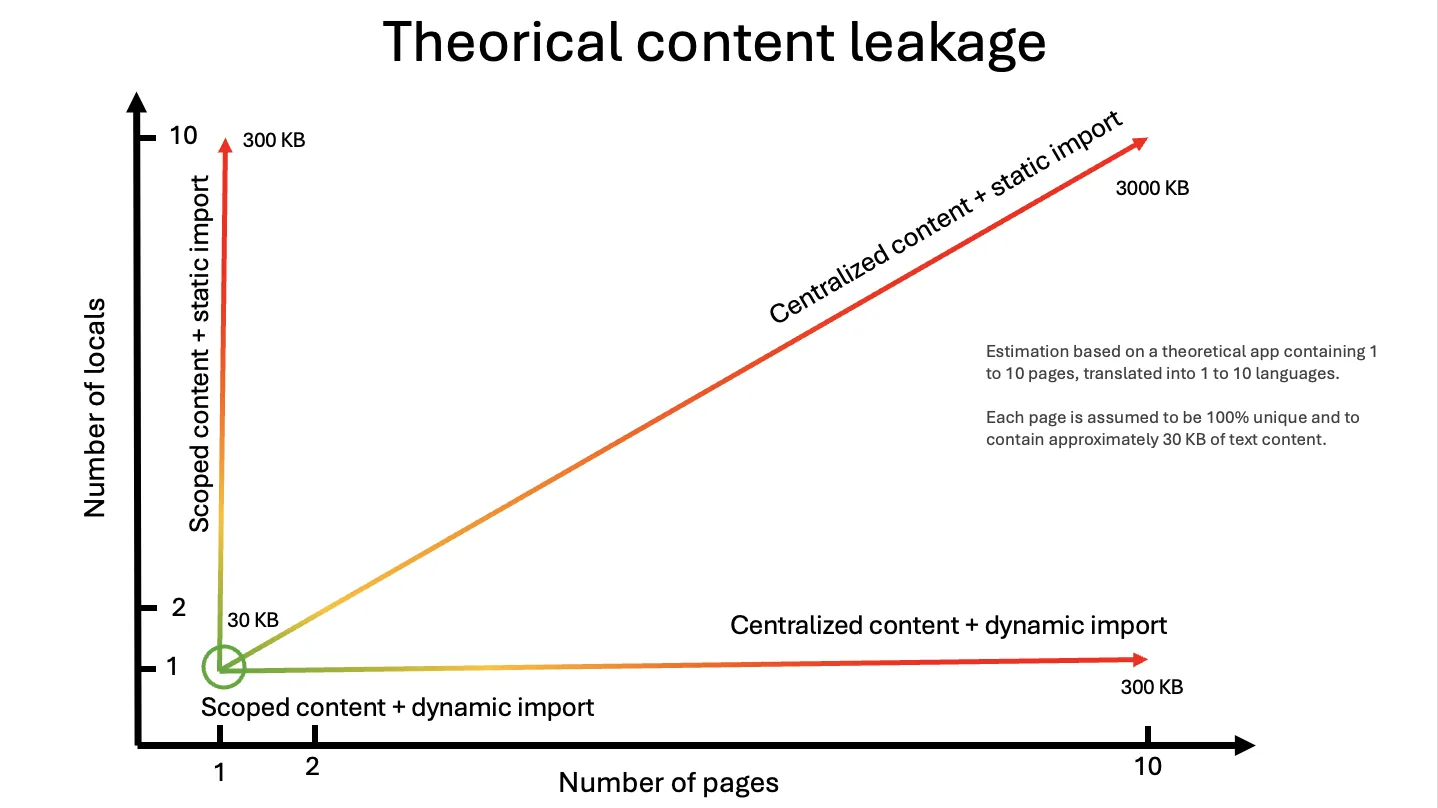
    この部分は開発者によってしばしば無視されますが、10ページで構成され、10言語に対応したアプリケーションの場合を考えてみましょう。計算を簡単にするために、各ページが100%ユニークなコンテンツを統合していると仮定します(実際には、ページタイトル、ヘッダー、フッターなど、ページ間で重複するコンテンツが多くあります)。

    /fr/about ページを訪れたいユーザーは、特定の言語で1ページ分のコンテンツを読み込みます。コンテンツの最適化を無視すると、アプリケーションのコンテンツの8,200% ((1 + (((10ページ - 1) × (10言語 - 1)))) × 100) を不必要に読み込むことになります。この問題がわかりますか?このコンテンツがテキストのままであっても、おそらくサイトの画像の最適化を考える方が多いでしょうが、無駄なコンテンツを世界中に送信し、ユーザーのコンピューターに無意味な処理をさせているのです。

    2つの重要な問題:

    • ルートによる分割:

      /about ページにいる場合、/home ページのコンテンツを読み込みたくない
    • ロケールによる分割:

      /fr/about ページにいる場合、/en/about ページのコンテンツを読み込みたくない

    改めて、これら3つのソリューションはこれらの問題を認識しており、これらの最適化を管理することができます。3つのソリューションの違いはDX(開発者体験)にあります。

    next-intl と next-i18next は翻訳を管理するために集中管理型のアプローチを使用しており、ロケールやサブファイルごとにJSONを分割することが可能です。next-i18next ではJSONファイルを「ネームスペース」と呼び、next-intl ではメッセージを宣言することができます。intlayer ではJSONファイルを「辞書」と呼びます。

    • next-intlの場合は、next-i18nextと同様に、コンテンツはページやレイアウトレベルで読み込まれ、その後このコンテンツがコンテキストプロバイダーに読み込まれます。つまり、開発者は各ページで読み込まれるJSONファイルを手動で管理する必要があります。
    実際には、開発者はこの最適化を省略し、単純さのためにページのコンテキストプロバイダーにすべてのコンテンツを読み込むことを好むことが多いです。
    • intlayerの場合は、すべてのコンテンツがアプリケーション内で読み込まれます。その後、プラグイン(@intlayer/babel / @intlayer/swc)がバンドルを最適化し、ページで使用されるコンテンツのみを読み込みます。したがって、開発者は読み込まれる辞書を手動で管理する必要がありません。これにより、より良い最適化、より良い保守性、そして開発時間の短縮が可能になります。

    アプリケーションが成長するにつれて(特に複数の開発者がアプリケーションに関わっている場合)、JSONファイルからもはや使用されていないコンテンツを削除し忘れることがよくあります。

    すべてのJSONはすべての場合に読み込まれることに注意してください(next-intl、next-i18next、intlayer)。

    これがIntlayerのアプローチがよりパフォーマンスに優れている理由です。コンポーネントがもはや使用されていない場合、その辞書はバンドルに読み込まれません。

    ライブラリがフォールバックをどのように処理するかも重要です。アプリケーションがデフォルトで英語であり、ユーザーが/fr/aboutページを訪れたとします。フランス語の翻訳が欠けている場合、英語のフォールバックが考慮されます。

    next-intl と next-i18next の場合、ライブラリは現在のロケールに関連する JSON に加えて、フォールバックロケールの JSON も読み込む必要があります。したがって、すべてのコンテンツが翻訳されていると仮定すると、各ページは 100% 不要なコンテンツを読み込むことになります。これに対して、intlayer は辞書のビルド時にフォールバックを処理します。したがって、各ページは使用されるコンテンツのみを読み込みます。

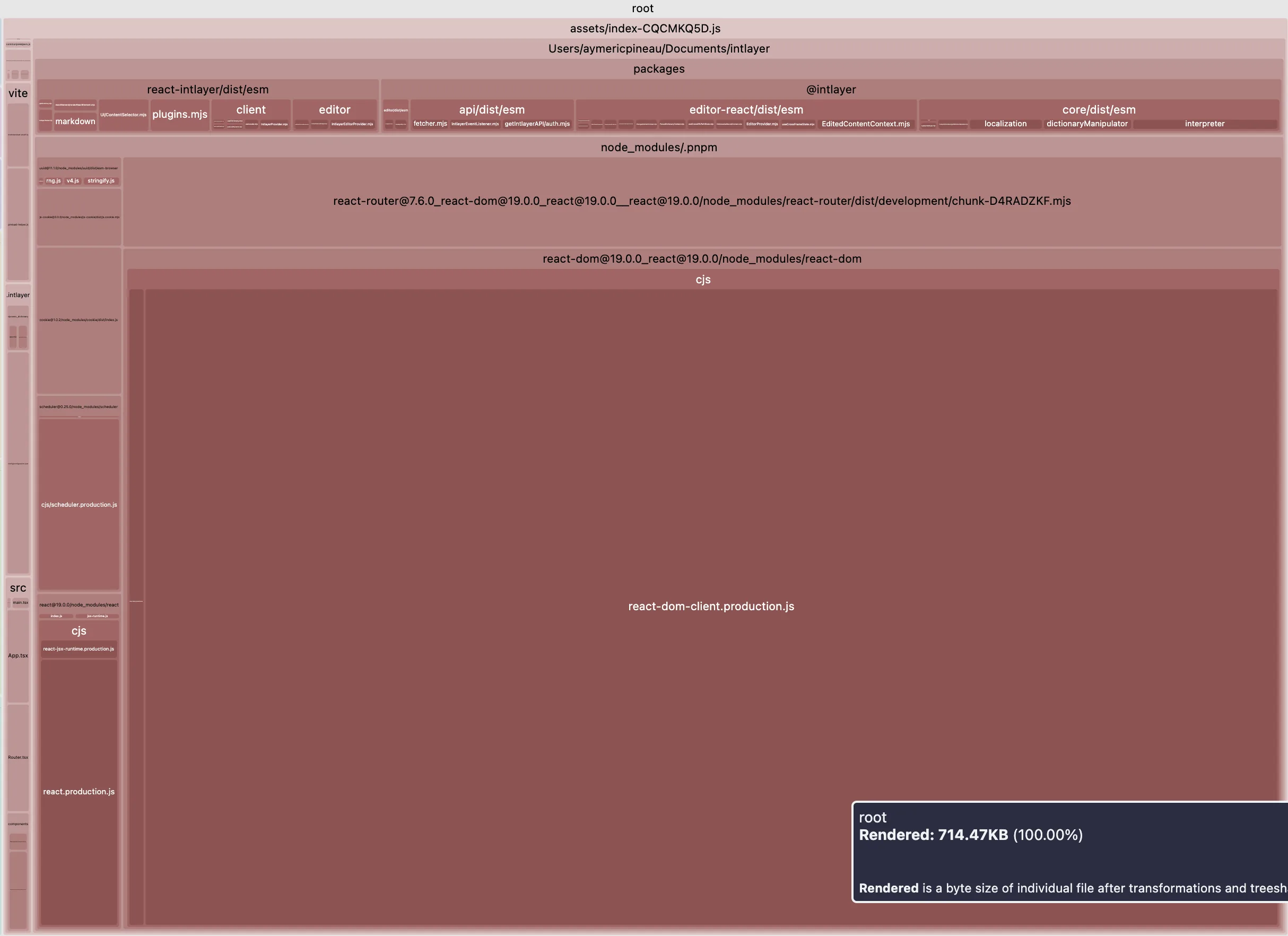
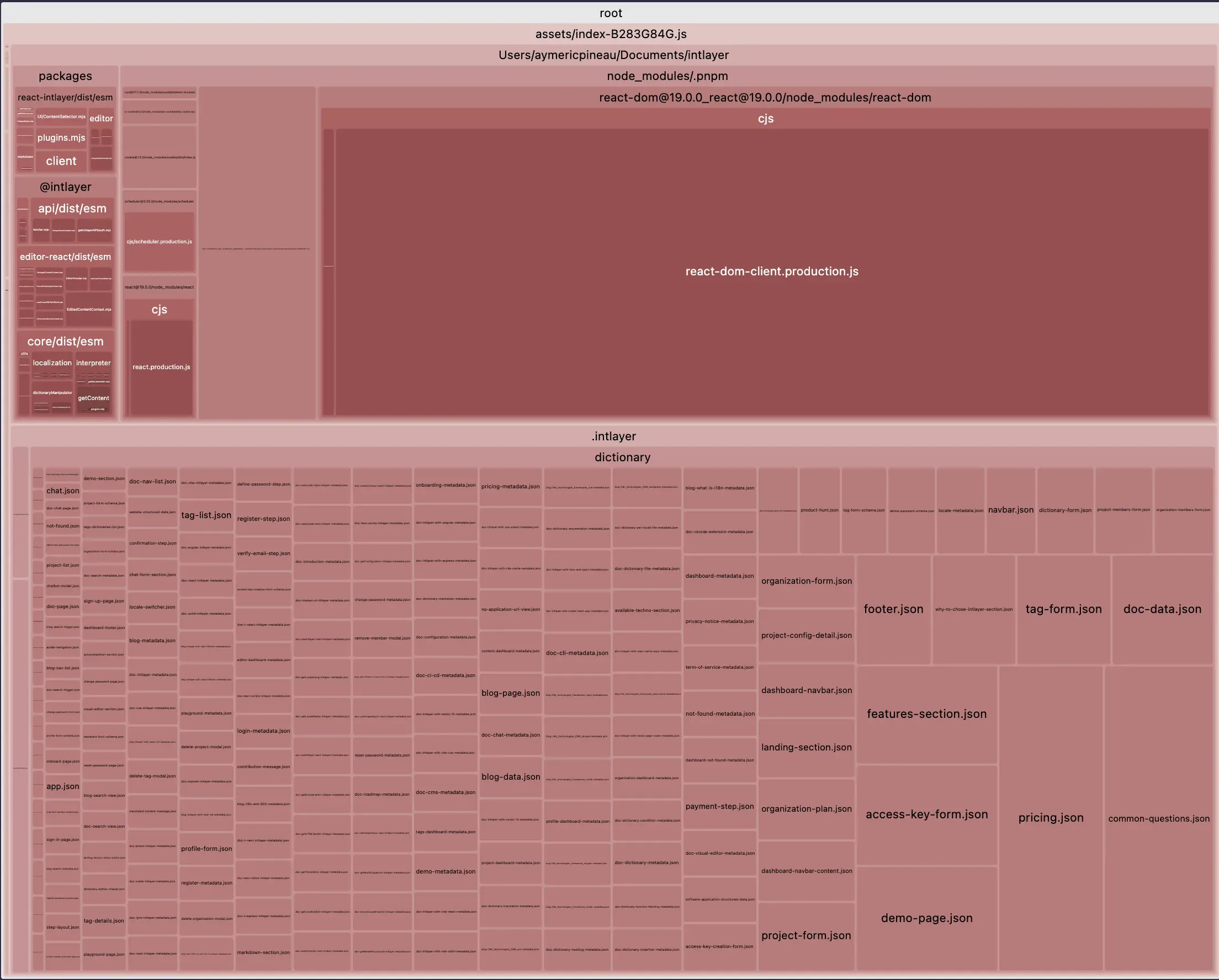
    以下は、vite + react アプリケーションで intlayer を使用したバンドルサイズ最適化の影響の例です:

    テーブルのすべての内容を表示

    テーブルをモーダルで開き、すべてのデータを明確に表示

    最適化されたバンドル 最適化されていないバンドル
    最適化されたバンドル 最適化されていないバンドル

    TypeScript と安全性

    next-intl

    • 安定した TypeScript サポートを提供しますが、キーはデフォルトで厳密に型付けされていません。安全性のパターンは手動で維持する必要があります。

    next-i18next

    • フックの基本的な型定義がありますが、厳密なキーの型付けには追加のツールや設定が必要です。

    intlayer

    • コンテンツから厳密な型を生成します。IDEのオートコンプリートやコンパイル時エラーにより、デプロイ前にタイプミスやキーの欠落を検出します。

    なぜ重要か: 強い型付けにより、失敗を右(実行時)ではなく左(CI/ビルド時)にシフトさせます。


    翻訳欠落の取り扱い

    next-intl

    • 実行時のフォールバックに依存(例:キーやデフォルトロケールを表示)。ビルドは失敗しません。

    next-i18next

    • 実行時のフォールバックに依存(例:キーやデフォルトロケールを表示)。ビルドは失敗しません。

    intlayer

    • ビルド時検出により、ロケールやキーの欠落に対して警告/エラーを出します。

    なぜ重要か: ビルド時に欠落を検出することで、本番環境での「謎の文字列」発生を防ぎ、厳格なリリースゲートに適合します。


    ルーティング、ミドルウェア & URL戦略

    next-intl

    • App Router上のNext.jsのローカライズされたルーティングに対応。

    next-i18next

    • App Router上のNext.jsのローカライズされたルーティングに対応。

    intlayer

    • 上記すべてに加え、i18nミドルウェア(ヘッダーやクッキーによるロケール検出)およびローカライズされたURLや<link rel="alternate" hreflang="…">タグを生成するヘルパーを提供。

    重要な理由: カスタムの接着層が減り、一貫したUXとクリーンなSEOをロケール間で実現。


    サーバーコンポーネント(RSC)対応

    next-intl

    • Next.js 13+をサポート。ハイブリッド構成では、t関数やフォーマッターをコンポーネントツリーに渡すことが多い。

    next-i18next

    • Next.js 13+ をサポート。翻訳ユーティリティを境界を越えて渡す際に類似の制約があります。

    intlayer

    • Next.js 13+ をサポートし、一貫した API と RSC 指向のプロバイダーで サーバー/クライアントの境界 をスムーズにし、フォーマッターや t-関数のやり取りを回避します。

    重要な理由: ハイブリッドツリーにおけるメンタルモデルがより明確になり、エッジケースが減少します。


    DX、ツール&メンテナンス

    next-intl

    • 外部のローカリゼーションプラットフォームや編集ワークフローと組み合わせて使われることが多いです。

    next-i18next

    • 外部のローカリゼーションプラットフォームや編集ワークフローと組み合わせて使われることが多いです。

    intlayer

    • 無料のビジュアルエディターとオプションのCMS(Git対応または外部化可能)を提供し、さらにVSCode拡張機能と、独自のプロバイダーキーを使用したAI支援翻訳も備えています。

    重要な理由: 運用コストを削減し、開発者とコンテンツ作成者間のフィードバックループを短縮します。

    ローカリゼーションプラットフォーム(TMS)との統合

    大規模な組織では、Crowdin、Phrase、Lokalise、Localizely、Localazyなどの翻訳管理システム(TMS)に依存することが多いです。

    • 企業が重視する理由

      • 協力と役割分担:複数の関係者が関与します。開発者、プロダクトマネージャー、翻訳者、レビュアー、マーケティングチームなど。
      • 規模と効率性:継続的なローカリゼーション、コンテキスト内レビュー。
    • next-intl / next-i18next

      • 通常は集中管理されたJSONカタログを使用するため、TMSとのエクスポート/インポートが簡単です。
      • 上記プラットフォーム向けの成熟したエコシステムや例/統合があります。
    • Intlayer

      • 分散型のコンポーネントごとの辞書を推奨し、TypeScript/TSX/JS/JSON/MDコンテンツをサポートします。
      • これによりコードのモジュール性が向上しますが、ツールが集中管理されたフラットなJSONファイルを期待する場合、プラグアンドプレイのTMS統合が難しくなることがあります。
      • Intlayerは代替手段を提供します:AI支援翻訳(ご自身のプロバイダーキーを使用)、ビジュアルエディター/CMS、およびギャップを検出して事前入力するためのCLI/CIワークフロー。
    注意: next-intl と i18next は TypeScript カタログも受け入れます。もしチームがメッセージを .ts ファイルに保存したり、機能ごとに分散管理している場合、同様の TMS の摩擦に直面することがあります。しかし、多くの next-intl のセットアップは locales/ フォルダに集中しており、TMS 用に JSON にリファクタリングするのが少し容易です。

    開発者体験

    この部分では、3つのソリューションを深く比較します。各ソリューションの「はじめに」ドキュメントに記載されている単純なケースを考慮するのではなく、より実際のプロジェクトに近い実用的なユースケースを考えます。

    アプリ構造

    アプリの構造は、コードベースの良好な保守性を確保するために重要です。

    bash
    コードをコピー

    コードをクリップボードにコピー

    .├── i18n.config.ts└── src  ├── locales  │   ├── en  │   │  ├── common.json  │   │  └── about.json  │   └── fr  │      ├── common.json  │      └── about.json  ├── app  │   ├── i18n  │   │   └── server.ts  │   └── [locale]  │       ├── layout.tsx  │       └── about.tsx  └── components      ├── I18nProvider.tsx      ├── ClientComponent.tsx      └── ServerComponent.tsx
    bash
    コードをコピー

    コードをクリップボードにコピー

    .├── i18n.ts├── locales│   ├── en│   │  ├── home.json│   │  └── navbar.json│   ├── fr│   │  ├── home.json│   │  └── navbar.json│   └── es│      ├── home.json│      └── navbar.json└── src  ├── middleware.ts  ├── app  │   ├── i18n  │   │   └── server.ts  │   └── [locale]  │       └── home.tsx  └── components      └── Navbar          └── index.tsx
    bash
    コードをコピー

    コードをクリップボードにコピー

    .├── intlayer.config.ts└── src  ├── middleware.ts  ├── app  │   └── [locale]  │       ├── layout.tsx  │       └── home  │           ├── index.tsx  │           └── index.content.ts  └── components      └── Navbar          ├── index.tsx          └── index.content.ts

    比較

    • next-intl / next-i18next: 集中管理されたカタログ(JSON; 名前空間/メッセージ)。構造が明確で翻訳プラットフォームとよく統合されるが、アプリが大きくなるとファイル間の編集が増える可能性がある。
    • Intlayer: コンポーネントごとに .content.{ts|js|json} 辞書がコンポーネントと同じ場所に配置されている。コンポーネントの再利用や局所的な理解が容易になるが、ファイルが増え、ビルド時のツールに依存する。

    セットアップとコンテンツの読み込み

    前述のように、各JSONファイルのインポート方法を最適化する必要があります。
    ライブラリがコンテンツの読み込みをどのように処理するかが重要です。

    next-i18next.config.js
    コードをコピー

    コードをクリップボードにコピー

    module.exports = {i18n: {  locales: ["en", "fr", "es"],  defaultLocale: "en",},};
    src/app/_app.tsx
    コードをコピー

    コードをクリップボードにコピー

    import { appWithTranslation } from "next-i18next";const MyApp = ({ Component, pageProps }) => <Component {...pageProps} />;export default appWithTranslation(MyApp);
    src/app/[locale]/about/page.tsx
    コードをコピー

    コードをクリップボードにコピー

    import type { GetStaticProps } from "next";import { serverSideTranslations } from "next-i18next/serverSideTranslations";import { useTranslation } from "next-i18next";import { I18nextProvider, initReactI18next } from "react-i18next";import { createInstance } from "i18next";import { ClientComponent, ServerComponent } from "@components";export default function HomePage({ locale }: { locale: string }) {// このコンポーネントで使用する名前空間を明示的に宣言しますconst resources = await loadMessagesFor(locale); // あなたのローダー(JSONなど)const i18n = createInstance();i18n.use(initReactI18next).init({  lng: locale,  fallbackLng: "en",  resources,  ns: ["common", "about"],  defaultNS: "common",  interpolation: { escapeValue: false },});const { t } = useTranslation("about");return (  <I18nextProvider i18n={i18n}>    <main>      <h1>{t("title")}</h1>      <ClientComponent />      <ServerComponent />    </main>  </I18nextProvider>);}export const getStaticProps: GetStaticProps = async ({ locale }) => {// このページに必要な名前空間のみをプリロードしますreturn {  props: {    ...(await serverSideTranslations(locale ?? "en", ["common", "about"])),  },};};
    i18n.ts
    コードをコピー

    コードをクリップボードにコピー

    import { getRequestConfig } from "next-intl/server";import { notFound } from "next/navigation";// 共有設定からインポート可能const locales = ["en", "fr", "es"];export default getRequestConfig(async ({ locale }) => {// 受け取った `locale` パラメータが有効か検証しますif (!locales.includes(locale)) notFound();return {  messages: (await import(`../messages/${locale}.json`)).default,};});
    src/app/[locale]/about/layout.tsx
    コードをコピー

    コードをクリップボードにコピー

    import { NextIntlClientProvider } from "next-intl";import { getMessages, unstable_setRequestLocale } from "next-intl/server";import pick from "lodash/pick";export default async function LocaleLayout({children,params,}: {children: React.ReactNode;params: { locale: string };}) {const { locale } = params;// このサーバーレンダリング(RSC)用にアクティブなリクエストロケールを設定しますunstable_setRequestLocale(locale);// メッセージは src/i18n/request.ts 経由でサーバー側で読み込まれます// (next-intl のドキュメント参照)。ここではクライアントコンポーネントに必要な// サブセットのみをクライアントに渡します(ペイロード最適化)。const messages = await getMessages();const clientMessages = pick(messages, ["common", "about"]);const rtlLocales = ["ar", "he", "fa", "ur"];return (  <html lang={locale} dir={rtlLocales.includes(locale) ? "rtl" : "ltr"}>    <body>      <NextIntlClientProvider locale={locale} messages={clientMessages}>        {children}      </NextIntlClientProvider>    </body>  </html>);}
    src/app/[locale]/about/page.tsx
    コードをコピー

    コードをクリップボードにコピー

    import { getTranslations } from "next-intl/server";import { ClientComponent, ServerComponent } from "@components";export default async function LandingPage({params,}: {params: { locale: string };}) {// 完全にサーバー側での読み込み(クライアント側でのハイドレーションなし)const t = await getTranslations("about");return (  <main>    <h1>{t("title")}</h1>    <ClientComponent />    <ServerComponent />  </main>);}
    intlayer.config.ts
    コードをコピー

    コードをクリップボードにコピー

    export default {internationalization: {  locales: ["en", "fr", "es"],  defaultLocale: "en",},};
    src/app/[locale]/layout.tsx
    コードをコピー

    コードをクリップボードにコピー

    import { getHTMLTextDir } from "intlayer";import {IntlayerClientProvider,generateStaticParams,type NextLayoutIntlayer,} from "next-intlayer";export const dynamic = "force-static";const LandingLayout: NextLayoutIntlayer = async ({ children, params }) => {const { locale } = await params;return (  <html lang={locale} dir={getHTMLTextDir(locale)}>    <IntlayerClientProvider locale={locale}>      {children}    </IntlayerClientProvider>  </html>);};export default LandingLayout;
    src/app/[locale]/about/page.tsx
    コードをコピー

    コードをクリップボードにコピー

    import { PageContent } from "@components/PageContent";import type { NextPageIntlayer } from "next-intlayer";import { IntlayerServerProvider, useIntlayer } from "next-intlayer/server";import { ClientComponent, ServerComponent } from "@components";const LandingPage: NextPageIntlayer = async ({ params }) => {const { locale } = await params;const { title } = useIntlayer("about", locale);return (  <IntlayerServerProvider locale={locale}>    <main>      <h1>{title}</h1>      <ClientComponent />      <ServerComponent />    </main>  </IntlayerServerProvider>);};export default LandingPage;

    比較

    3つすべてがロケールごとのコンテンツ読み込みとプロバイダーをサポートしています。

    • next-intl/next-i18next では、通常、ルートごとに選択されたメッセージや名前空間を読み込み、必要な場所にプロバイダーを配置します。

    • Intlayer では、ビルド時の解析を追加して使用状況を推測し、手動の配線を減らし、単一のルートプロバイダーを許可する場合があります。

    チームの好みに応じて、明示的な制御と自動化のどちらかを選択してください。

    クライアントコンポーネントでの使用例

    カウンターをレンダリングするクライアントコンポーネントの例を見てみましょう。

    翻訳(public/locales/... に実際のJSONファイルが必要です)

    public/locales/en/about.json
    コードをコピー

    コードをクリップボードにコピー

    {"counter": {  "label": "Counter",  "increment": "Increment"}}
    public/locales/fr/about.json
    コードをコピー

    コードをクリップボードにコピー

    {"counter": {  "label": "Compteur",  "increment": "Incrémenter"}}

    クライアントコンポーネント

    src/components/ClientComponentExample.tsx
    コードをコピー

    コードをクリップボードにコピー

    "use client";import React, { useMemo, useState } from "react";import { useTranslation } from "next-i18next";const ClientComponentExample = () => {const { t, i18n } = useTranslation("about");const [count, setCount] = useState(0);// next-i18nextはuseNumberを公開していないため、Intl.NumberFormatを使用const numberFormat = new Intl.NumberFormat(i18n.language);return (  <div>    <p>{numberFormat.format(count)}</p>    <button      aria-label={t("counter.label")}      onClick={() => setCount((count) => count + 1)}    >      {t("counter.increment")}    </button>  </div>);};

    ページの serverSideTranslations に "about" ネームスペースを追加するのを忘れないでください ここでは React 19.x.x のバージョンを使用していますが、より低いバージョンの場合は、重い関数であるためフォーマッターのインスタンスを保持するために useMemo を使用する必要があります

    翻訳(形状は再利用可能;お好みで next-intl のメッセージにロードしてください)

    locales/en/about.json
    コードをコピー

    コードをクリップボードにコピー

    {"counter": {  "label": "Counter",  "increment": "Increment"}}
    locales/fr/about.json
    コードをコピー

    コードをクリップボードにコピー

    {"counter": {  "label": "Compteur",  "increment": "Incrémenter"}}

    クライアントコンポーネント

    src/components/ClientComponentExample.tsx
    コードをコピー

    コードをクリップボードにコピー

    "use client";import React, { useState } from "react";import { useTranslations, useFormatter } from "next-intl";const ClientComponentExample = () => {// ネストされたオブジェクトに直接スコープを設定const t = useTranslations("about.counter");const format = useFormatter();const [count, setCount] = useState(0);return (  <div>    <p>{format.number(count)}</p>    <button      aria-label={t("label")}      onClick={() => setCount((count) => count + 1)}    >      {t("increment")}    </button>  </div>);};
    ページのクライアントメッセージに "about" メッセージを追加するのを忘れないでください

    コンテンツ

    src/components/ClientComponentExample/index.content.ts
    コードをコピー

    コードをクリップボードにコピー

    import { t, type Dictionary } from "intlayer";const counterContent = {key: "counter",content: {  label: t({ ja: "カウンター", en: "Counter", fr: "Compteur" }),  increment: t({ ja: "インクリメント", en: "Increment", fr: "Incrémenter" }),},} satisfies Dictionary;export default counterContent;

    クライアントコンポーネント

    src/components/ClientComponentExample/index.tsx
    コードをコピー

    コードをクリップボードにコピー

    "use client";import React, { useState } from "react";import { useNumber, useIntlayer } from "next-intlayer";const ClientComponentExample = () => {const [count, setCount] = useState(0);const { label, increment } = useIntlayer("counter"); // 文字列を返すconst { number } = useNumber();return (  <div>    <p>{number(count)}</p>    <button aria-label={label} onClick={() => setCount((count) => count + 1)}>      {increment}    </button>  </div>);};

    比較

    • 数値フォーマット

      • next-i18next: useNumber はなく、Intl.NumberFormat(または i18next-icu)を使用。
      • next-intl: useFormatter().number(value) を使用。
      • Intlayer: 組み込みの useNumber() を使用。
    • キー

      • ネストされた構造(about.counter.label)を維持し、フックのスコープを適切に設定する(useTranslation("about") + t("counter.label") または useTranslations("about.counter") + t("label"))。
    • ファイルの場所

      • next-i18next は public/locales/{lng}/{ns}.json に JSON を期待。
      • next-intl は柔軟で、設定に応じてメッセージをロード可能。
      • Intlayer は TS/JS の辞書にコンテンツを格納し、キーで解決。

    サーバーコンポーネントでの使用

    UIコンポーネントの場合を考えます。このコンポーネントはサーバーコンポーネントであり、クライアントコンポーネントの子として挿入できる必要があります。(ページ(サーバーコンポーネント) -> クライアントコンポーネント -> サーバーコンポーネント)。このコンポーネントはクライアントコンポーネントの子として挿入できるため、非同期にはできません。

    src/pages/about.tsx
    コードをコピー

    コードをクリップボードにコピー

    import type { GetStaticProps } from "next";import { useTranslation } from "next-i18next";type ServerComponentProps = {count: number;};const ServerComponent = ({ count }: ServerComponentProps) => {const { t, i18n } = useTranslation("about");const formatted = new Intl.NumberFormat(i18n.language).format(count);return (  <div>    <p>{formatted}</p>    <button aria-label={t("counter.label")}>{t("counter.increment")}</button>  </div>);};
    src/components/ServerComponent.tsx
    コードをコピー

    コードをクリップボードにコピー

    type ServerComponentProps = {count: number;t: (key: string) => string;formatter: Intl.NumberFormat;};const ServerComponent = ({ t, count, formatter }: ServerComponentProps) => {const formatted = formatter.format(count);return (  <div>    <p>{formatted}</p>    <button aria-label={t("label")}>{t("increment")}</button>  </div>);};

    サーバーコンポーネントは非同期にできないため、翻訳関数とフォーマッター関数をプロパティとして渡す必要があります。

    • const t = await getTranslations("about.counter");
    • const formatter = await getFormatter().then((formatter) => formatter.number());
    src/components/ServerComponent.tsx
    コードをコピー

    コードをクリップボードにコピー

    import { useIntlayer, useNumber } from "next-intlayer/server";const ServerComponent = ({ count }: { count: number }) => {const { label, increment } = useIntlayer("counter");const { number } = useNumber();return (  <div>    <p>{number(count)}</p>    <button aria-label={label}>{increment}</button>  </div>);};
    Intlayerはnext-intlayer/serverを通じてサーバーセーフなフックを提供します。動作するために、useIntlayerとuseNumberはクライアントフックに似たフックのような構文を使用しますが、内部的にはサーバーコンテキスト(IntlayerServerProvider)に依存しています。

    メタデータ / サイトマップ / ロボット

    コンテンツの翻訳は素晴らしいことです。しかし、多くの人は国際化の主な目的があなたのウェブサイトを世界により見えるようにすることだということを忘れがちです。I18nはあなたのウェブサイトの可視性を向上させるための非常に強力な手段です。

    以下は多言語SEOに関するベストプラクティスのリストです。

    • <head>タグ内にhreflangメタタグを設定する > これは検索エンジンがページで利用可能な言語を理解するのに役立ちます
    • sitemap.xml にすべてのページの翻訳を http://www.w3.org/1999/xhtml XML スキーマを使ってリストアップする >
    • robots.txt からプレフィックス付きページを除外するのを忘れない(例:/dashboard、および /fr/dashboard、/es/dashboard) >
    • カスタム Link コンポーネントを使って最もローカライズされたページへリダイレクトする(例:フランス語では <a href="/fr/about">A propos</a>) >

    開発者はしばしばロケール間でページを適切に参照することを忘れがちです。

    i18n.config.ts
    コードをコピー

    コードをクリップボードにコピー

    export const locales = ["en", "fr"] as const;export type Locale = (typeof locales)[number];export const defaultLocale: Locale = "en";export function localizedPath(locale: string, path: string) { return locale === defaultLocale ? path : "/" + locale + path;}const ORIGIN = "https://example.com";export function abs(locale: string, path: string) { return ORIGIN + localizedPath(locale, path);}
    src/app/[locale]/about/layout.tsx
    コードをコピー

    コードをクリップボードにコピー

    import type { Metadata } from "next";import { locales, defaultLocale, localizedPath } from "@/i18n.config";export async function generateMetadata({ params,}: { params: { locale: string };}): Promise<Metadata> { const { locale } = params; // 正しいJSONファイルを動的にインポートする const messages = (   await import("@/../public/locales/" + locale + "/about.json") ).default; const languages = Object.fromEntries(   locales.map((locale) => [locale, localizedPath(locale, "/about")]) ); return {   title: messages.title,   description: messages.description,   alternates: {     canonical: localizedPath(locale, "/about"),     languages: { ...languages, "x-default": "/about" },   }, };}export default async function AboutPage() { return <h1>概要</h1>; // 「About」の日本語訳}
    src/app/sitemap.ts
    コードをコピー

    コードをクリップボードにコピー

    import type { MetadataRoute } from "next";import { locales, defaultLocale, abs } from "@/i18n.config";export default function sitemap(): MetadataRoute.Sitemap { const languages = Object.fromEntries(   locales.map((locale) => [locale, abs(locale, "/about")]) ); return [   {     url: abs(defaultLocale, "/about"),     lastModified: new Date(),     changeFrequency: "monthly", // 更新頻度:毎月     priority: 0.7, // 優先度     alternates: { languages },   }, ];}
    src/app/robots.ts
    コードをコピー

    コードをクリップボードにコピー

    import type { MetadataRoute } from "next";import { locales, defaultLocale, localizedPath } from "@/i18n.config";const ORIGIN = "https://example.com";const expandAllLocales = (path: string) => [ localizedPath(defaultLocale, path), ...locales   .filter((locale) => locale !== defaultLocale)   .map((locale) => localizedPath(locale, path)),];export default function robots(): MetadataRoute.Robots { const disallow = [   ...expandAllLocales("/dashboard"),   ...expandAllLocales("/admin"), ]; return {   rules: { userAgent: "*", allow: ["/"], disallow },   host: ORIGIN,   sitemap: ORIGIN + "/sitemap.xml", };}
    src/app/[locale]/about/layout.tsx
    コードをコピー

    コードをクリップボードにコピー

    import type { Metadata } from "next";import { locales, defaultLocale } from "@/i18n";import { getTranslations } from "next-intl/server";function localizedPath(locale: string, path: string) { return locale === defaultLocale ? path : "/" + locale + path;}export async function generateMetadata({ params,}: { params: { locale: string };}): Promise<Metadata> { const { locale } = params; const t = await getTranslations({ locale, namespace: "about" }); const url = "/about"; const languages = Object.fromEntries(   locales.map((locale) => [locale, localizedPath(locale, url)]) ); return {   title: t("title"),   description: t("description"),   alternates: {     canonical: localizedPath(locale, url),     languages: { ...languages, "x-default": url },   }, };}// ... ページの残りのコード
    src/app/sitemap.ts
    コードをコピー

    コードをクリップボードにコピー

    import type { MetadataRoute } from "next";import { locales, defaultLocale } from "@/i18n";const origin = "https://example.com";const formatterLocalizedPath = (locale: string, path: string) => locale === defaultLocale ? origin + path : origin + "/" + locale + path;export default function sitemap(): MetadataRoute.Sitemap { const aboutLanguages = Object.fromEntries(   locales.map((l) => [l, formatterLocalizedPath(l, "/about")]) ); return [   {     url: formatterLocalizedPath(defaultLocale, "/about"),     lastModified: new Date(),     changeFrequency: "monthly",     priority: 0.7,     alternates: { languages: aboutLanguages },   }, ];}
    src/app/robots.ts
    コードをコピー

    コードをクリップボードにコピー

    import type { MetadataRoute } from "next";import { locales, defaultLocale } from "@/i18n";const origin = "https://example.com";const withAllLocales = (path: string) => [ path, ...locales   .filter((locale) => locale !== defaultLocale)   .map((locale) => "/" + locale + path),];export default function robots(): MetadataRoute.Robots { const disallow = [   ...withAllLocales("/dashboard"),   ...withAllLocales("/admin"), ]; return {   rules: { userAgent: "*", allow: ["/"], disallow },   host: origin,   sitemap: origin + "/sitemap.xml", };}
    src/app/[locale]/about/layout.tsx
    コードをコピー

    コードをクリップボードにコピー

    import { getIntlayer, getMultilingualUrls } from "intlayer";import type { Metadata } from "next";import type { LocalPromiseParams } from "next-intlayer";export const generateMetadata = async ({ params,}: LocalPromiseParams): Promise<Metadata> => { const { locale } = await params; const metadata = getIntlayer("page-metadata", locale); const multilingualUrls = getMultilingualUrls("/about"); return {   ...metadata,   alternates: {     canonical: multilingualUrls[locale as keyof typeof multilingualUrls],     languages: { ...multilingualUrls, "x-default": "/about" },   }, };};// ... ページの残りのコード
    src/app/sitemap.ts
    コードをコピー

    コードをクリップボードにコピー

    import { getMultilingualUrls } from "intlayer";import type { MetadataRoute } from "next";const sitemap = (): MetadataRoute.Sitemap => [ {   url: "https://example.com/about",   alternates: {     languages: { ...getMultilingualUrls("https://example.com/about") },   }, },];
    src/app/robots.ts
    コードをコピー

    コードをクリップボードにコピー

    import { getMultilingualUrls } from "intlayer";import type { MetadataRoute } from "next";const getAllMultilingualUrls = (urls: string[]) => urls.flatMap((url) => Object.values(getMultilingualUrls(url)) as string[]);const robots = (): MetadataRoute.Robots => ({ rules: {   userAgent: "*",   allow: ["/"],   disallow: getAllMultilingualUrls(["/dashboard"]), }, host: "https://example.com", sitemap: "https://example.com/sitemap.xml",});export default robots;
    Intlayerは、サイトマップ用の多言語URLを生成するためのgetMultilingualUrls関数を提供しています。

    そして勝者は…

    簡単ではありません。各オプションにはトレードオフがあります。私の見解は以下の通りです:

    next-intl

    • 最もシンプルで軽量、強制される決定が少ないです。最小限のソリューションを求めていて、集中管理されたカタログに慣れており、アプリが小規模から中規模の場合に適しています。

    next-i18next

    • 成熟しており、機能が豊富でコミュニティプラグインも多いですが、セットアップコストは高めです。i18nextのプラグインエコシステム(例:プラグイン経由の高度なICUルール)が必要で、チームがすでにi18nextを知っていて、柔軟性のためにより多くの設定を受け入れられる場合に適しています。

    Intlayer

    • モダンな Next.js 向けに構築されており、モジュラーコンテンツ、型安全性、ツール群、そしてボイラープレートの削減を実現しています。コンポーネント単位のコンテンツ管理、厳格な TypeScript、ビルド時の保証、ツリーシェイキング、そしてルーティング/SEO/エディターツールがバッテリー込みで提供されることを重視する場合、特に Next.js App Router、デザインシステム、そして大規模でモジュラーなコードベースに最適です。

    セットアップを最小限に抑え、多少の手動設定を許容できるなら next-intl が良い選択です。すべての機能が必要で複雑さを気にしないなら next-i18next が適しています。しかし、モダンでスケーラブル、モジュラーなソリューションをビルトインツールと共に求めるなら、Intlayer はそれをすぐに提供することを目指しています。

    エンタープライズチーム向けの代替案: Crowdin、Phrase、またはその他のプロフェッショナルな翻訳管理システムのような確立されたローカリゼーションプラットフォームと完全に連携する、実績のあるソリューションが必要な場合は、成熟したエコシステムと実証済みの統合を持つ next-intl または next-i18next を検討してください。
    今後のロードマップ: Intlayer は、i18next および next-intl ソリューションの上に動作するプラグインの開発も計画しています。これにより、Intlayer の自動化、構文、およびコンテンツ管理の利点を享受しつつ、これらの確立されたソリューションがアプリケーションコードに提供するセキュリティと安定性を維持できます。

    GitHub STARs

    GitHubのスターは、プロジェクトの人気、コミュニティの信頼、そして長期的な関連性を示す強力な指標です。技術的な品質の直接的な尺度ではありませんが、どれだけ多くの開発者がそのプロジェクトを有用と感じ、進捗を追い、採用する可能性が高いかを反映しています。プロジェクトの価値を評価する際、スターは代替案間のトラクションを比較し、エコシステムの成長に関する洞察を提供するのに役立ちます。

    スター履歴チャート


    結論

    3つのライブラリはすべてコアなローカリゼーションに成功しています。違いは、モダンな Next.js で堅牢でスケーラブルなセットアップを実現するために、どれだけの作業が必要かという点です。

    • Intlayer では、モジュラーコンテンツ、厳格なTS、ビルド時の安全性、ツリーシェイクされたバンドル、および 一流のApp Router + SEOツール が デフォルト であり、手間ではありません。
    • チームが多言語対応のコンポーネント駆動型アプリにおいて、保守性と速度を重視するなら、Intlayerは今日最も完全な体験を提供します。

    詳細は 'Why Intlayer?' ドキュメント を参照してください。

    vue-i18nを自動化
    react-i18next vs react-intl vs Intlayer
    Alt+→

    このページについて

      ディスカッションは匿名で、よくある問題に対処するために定期的に確認されます。機能のアイデア、ドキュメントへのフィードバック、Intlayerに関することなど、お気軽にお聞かせください, このフィードバックをロードマップの作成と製品の改善に活用しています。

      .├── i18n.config.ts└── src  ├── locales  │   ├── en  │   │  ├── common.json  │   │  └── about.json  │   └── fr  │      ├── common.json  │      └── about.json  ├── app  │   ├── i18n  │   │   └── server.ts  │   └── [locale]  │       ├── layout.tsx  │       └── about.tsx  └── components      ├── I18nProvider.tsx      ├── ClientComponent.tsx      └── ServerComponent.tsx
      .├── i18n.ts├── locales│   ├── en│   │  ├── home.json│   │  └── navbar.json│   ├── fr│   │  ├── home.json│   │  └── navbar.json│   └── es│      ├── home.json│      └── navbar.json└── src  ├── middleware.ts  ├── app  │   ├── i18n  │   │   └── server.ts  │   └── [locale]  │       └── home.tsx  └── components      └── Navbar          └── index.tsx
      .├── intlayer.config.ts└── src  ├── middleware.ts  ├── app  │   └── [locale]  │       ├── layout.tsx  │       └── home  │           ├── index.tsx  │           └── index.content.ts  └── components      └── Navbar          ├── index.tsx          └── index.content.ts
      module.exports = {i18n: {  locales: ["en", "fr", "es"],  defaultLocale: "en",},};
      import { appWithTranslation } from "next-i18next";const MyApp = ({ Component, pageProps }) => <Component {...pageProps} />;export default appWithTranslation(MyApp);
      import type { GetStaticProps } from "next";import { serverSideTranslations } from "next-i18next/serverSideTranslations";import { useTranslation } from "next-i18next";import { I18nextProvider, initReactI18next } from "react-i18next";import { createInstance } from "i18next";import { ClientComponent, ServerComponent } from "@components";export default function HomePage({ locale }: { locale: string }) {// このコンポーネントで使用する名前空間を明示的に宣言しますconst resources = await loadMessagesFor(locale); // あなたのローダー(JSONなど)const i18n = createInstance();i18n.use(initReactI18next).init({  lng: locale,  fallbackLng: "en",  resources,  ns: ["common", "about"],  defaultNS: "common",  interpolation: { escapeValue: false },});const { t } = useTranslation("about");return (  <I18nextProvider i18n={i18n}>    <main>      <h1>{t("title")}</h1>      <ClientComponent />      <ServerComponent />    </main>  </I18nextProvider>);}export const getStaticProps: GetStaticProps = async ({ locale }) => {// このページに必要な名前空間のみをプリロードしますreturn {  props: {    ...(await serverSideTranslations(locale ?? "en", ["common", "about"])),  },};};
      import { getRequestConfig } from "next-intl/server";import { notFound } from "next/navigation";// 共有設定からインポート可能const locales = ["en", "fr", "es"];export default getRequestConfig(async ({ locale }) => {// 受け取った `locale` パラメータが有効か検証しますif (!locales.includes(locale)) notFound();return {  messages: (await import(`../messages/${locale}.json`)).default,};});
      import { NextIntlClientProvider } from "next-intl";import { getMessages, unstable_setRequestLocale } from "next-intl/server";import pick from "lodash/pick";export default async function LocaleLayout({children,params,}: {children: React.ReactNode;params: { locale: string };}) {const { locale } = params;// このサーバーレンダリング(RSC)用にアクティブなリクエストロケールを設定しますunstable_setRequestLocale(locale);// メッセージは src/i18n/request.ts 経由でサーバー側で読み込まれます// (next-intl のドキュメント参照)。ここではクライアントコンポーネントに必要な// サブセットのみをクライアントに渡します(ペイロード最適化)。const messages = await getMessages();const clientMessages = pick(messages, ["common", "about"]);const rtlLocales = ["ar", "he", "fa", "ur"];return (  <html lang={locale} dir={rtlLocales.includes(locale) ? "rtl" : "ltr"}>    <body>      <NextIntlClientProvider locale={locale} messages={clientMessages}>        {children}      </NextIntlClientProvider>    </body>  </html>);}
      import { getTranslations } from "next-intl/server";import { ClientComponent, ServerComponent } from "@components";export default async function LandingPage({params,}: {params: { locale: string };}) {// 完全にサーバー側での読み込み(クライアント側でのハイドレーションなし)const t = await getTranslations("about");return (  <main>    <h1>{t("title")}</h1>    <ClientComponent />    <ServerComponent />  </main>);}
      export default {internationalization: {  locales: ["en", "fr", "es"],  defaultLocale: "en",},};
      import { getHTMLTextDir } from "intlayer";import {IntlayerClientProvider,generateStaticParams,type NextLayoutIntlayer,} from "next-intlayer";export const dynamic = "force-static";const LandingLayout: NextLayoutIntlayer = async ({ children, params }) => {const { locale } = await params;return (  <html lang={locale} dir={getHTMLTextDir(locale)}>    <IntlayerClientProvider locale={locale}>      {children}    </IntlayerClientProvider>  </html>);};export default LandingLayout;
      import { PageContent } from "@components/PageContent";import type { NextPageIntlayer } from "next-intlayer";import { IntlayerServerProvider, useIntlayer } from "next-intlayer/server";import { ClientComponent, ServerComponent } from "@components";const LandingPage: NextPageIntlayer = async ({ params }) => {const { locale } = await params;const { title } = useIntlayer("about", locale);return (  <IntlayerServerProvider locale={locale}>    <main>      <h1>{title}</h1>      <ClientComponent />      <ServerComponent />    </main>  </IntlayerServerProvider>);};export default LandingPage;
      {"counter": {  "label": "Counter",  "increment": "Increment"}}
      {"counter": {  "label": "Compteur",  "increment": "Incrémenter"}}
      "use client";import React, { useMemo, useState } from "react";import { useTranslation } from "next-i18next";const ClientComponentExample = () => {const { t, i18n } = useTranslation("about");const [count, setCount] = useState(0);// next-i18nextはuseNumberを公開していないため、Intl.NumberFormatを使用const numberFormat = new Intl.NumberFormat(i18n.language);return (  <div>    <p>{numberFormat.format(count)}</p>    <button      aria-label={t("counter.label")}      onClick={() => setCount((count) => count + 1)}    >      {t("counter.increment")}    </button>  </div>);};
      {"counter": {  "label": "Counter",  "increment": "Increment"}}
      {"counter": {  "label": "Compteur",  "increment": "Incrémenter"}}
      "use client";import React, { useState } from "react";import { useTranslations, useFormatter } from "next-intl";const ClientComponentExample = () => {// ネストされたオブジェクトに直接スコープを設定const t = useTranslations("about.counter");const format = useFormatter();const [count, setCount] = useState(0);return (  <div>    <p>{format.number(count)}</p>    <button      aria-label={t("label")}      onClick={() => setCount((count) => count + 1)}    >      {t("increment")}    </button>  </div>);};
      import { t, type Dictionary } from "intlayer";const counterContent = {key: "counter",content: {  label: t({ ja: "カウンター", en: "Counter", fr: "Compteur" }),  increment: t({ ja: "インクリメント", en: "Increment", fr: "Incrémenter" }),},} satisfies Dictionary;export default counterContent;
      "use client";import React, { useState } from "react";import { useNumber, useIntlayer } from "next-intlayer";const ClientComponentExample = () => {const [count, setCount] = useState(0);const { label, increment } = useIntlayer("counter"); // 文字列を返すconst { number } = useNumber();return (  <div>    <p>{number(count)}</p>    <button aria-label={label} onClick={() => setCount((count) => count + 1)}>      {increment}    </button>  </div>);};
      import type { GetStaticProps } from "next";import { useTranslation } from "next-i18next";type ServerComponentProps = {count: number;};const ServerComponent = ({ count }: ServerComponentProps) => {const { t, i18n } = useTranslation("about");const formatted = new Intl.NumberFormat(i18n.language).format(count);return (  <div>    <p>{formatted}</p>    <button aria-label={t("counter.label")}>{t("counter.increment")}</button>  </div>);};
      type ServerComponentProps = {count: number;t: (key: string) => string;formatter: Intl.NumberFormat;};const ServerComponent = ({ t, count, formatter }: ServerComponentProps) => {const formatted = formatter.format(count);return (  <div>    <p>{formatted}</p>    <button aria-label={t("label")}>{t("increment")}</button>  </div>);};
      import { useIntlayer, useNumber } from "next-intlayer/server";const ServerComponent = ({ count }: { count: number }) => {const { label, increment } = useIntlayer("counter");const { number } = useNumber();return (  <div>    <p>{number(count)}</p>    <button aria-label={label}>{increment}</button>  </div>);};
      export const locales = ["en", "fr"] as const;export type Locale = (typeof locales)[number];export const defaultLocale: Locale = "en";export function localizedPath(locale: string, path: string) { return locale === defaultLocale ? path : "/" + locale + path;}const ORIGIN = "https://example.com";export function abs(locale: string, path: string) { return ORIGIN + localizedPath(locale, path);}
      import type { Metadata } from "next";import { locales, defaultLocale, localizedPath } from "@/i18n.config";export async function generateMetadata({ params,}: { params: { locale: string };}): Promise<Metadata> { const { locale } = params; // 正しいJSONファイルを動的にインポートする const messages = (   await import("@/../public/locales/" + locale + "/about.json") ).default; const languages = Object.fromEntries(   locales.map((locale) => [locale, localizedPath(locale, "/about")]) ); return {   title: messages.title,   description: messages.description,   alternates: {     canonical: localizedPath(locale, "/about"),     languages: { ...languages, "x-default": "/about" },   }, };}export default async function AboutPage() { return <h1>概要</h1>; // 「About」の日本語訳}
      import type { MetadataRoute } from "next";import { locales, defaultLocale, abs } from "@/i18n.config";export default function sitemap(): MetadataRoute.Sitemap { const languages = Object.fromEntries(   locales.map((locale) => [locale, abs(locale, "/about")]) ); return [   {     url: abs(defaultLocale, "/about"),     lastModified: new Date(),     changeFrequency: "monthly", // 更新頻度:毎月     priority: 0.7, // 優先度     alternates: { languages },   }, ];}
      import type { MetadataRoute } from "next";import { locales, defaultLocale, localizedPath } from "@/i18n.config";const ORIGIN = "https://example.com";const expandAllLocales = (path: string) => [ localizedPath(defaultLocale, path), ...locales   .filter((locale) => locale !== defaultLocale)   .map((locale) => localizedPath(locale, path)),];export default function robots(): MetadataRoute.Robots { const disallow = [   ...expandAllLocales("/dashboard"),   ...expandAllLocales("/admin"), ]; return {   rules: { userAgent: "*", allow: ["/"], disallow },   host: ORIGIN,   sitemap: ORIGIN + "/sitemap.xml", };}
      import type { Metadata } from "next";import { locales, defaultLocale } from "@/i18n";import { getTranslations } from "next-intl/server";function localizedPath(locale: string, path: string) { return locale === defaultLocale ? path : "/" + locale + path;}export async function generateMetadata({ params,}: { params: { locale: string };}): Promise<Metadata> { const { locale } = params; const t = await getTranslations({ locale, namespace: "about" }); const url = "/about"; const languages = Object.fromEntries(   locales.map((locale) => [locale, localizedPath(locale, url)]) ); return {   title: t("title"),   description: t("description"),   alternates: {     canonical: localizedPath(locale, url),     languages: { ...languages, "x-default": url },   }, };}// ... ページの残りのコード
      import type { MetadataRoute } from "next";import { locales, defaultLocale } from "@/i18n";const origin = "https://example.com";const formatterLocalizedPath = (locale: string, path: string) => locale === defaultLocale ? origin + path : origin + "/" + locale + path;export default function sitemap(): MetadataRoute.Sitemap { const aboutLanguages = Object.fromEntries(   locales.map((l) => [l, formatterLocalizedPath(l, "/about")]) ); return [   {     url: formatterLocalizedPath(defaultLocale, "/about"),     lastModified: new Date(),     changeFrequency: "monthly",     priority: 0.7,     alternates: { languages: aboutLanguages },   }, ];}
      import type { MetadataRoute } from "next";import { locales, defaultLocale } from "@/i18n";const origin = "https://example.com";const withAllLocales = (path: string) => [ path, ...locales   .filter((locale) => locale !== defaultLocale)   .map((locale) => "/" + locale + path),];export default function robots(): MetadataRoute.Robots { const disallow = [   ...withAllLocales("/dashboard"),   ...withAllLocales("/admin"), ]; return {   rules: { userAgent: "*", allow: ["/"], disallow },   host: origin,   sitemap: origin + "/sitemap.xml", };}
      import { getIntlayer, getMultilingualUrls } from "intlayer";import type { Metadata } from "next";import type { LocalPromiseParams } from "next-intlayer";export const generateMetadata = async ({ params,}: LocalPromiseParams): Promise<Metadata> => { const { locale } = await params; const metadata = getIntlayer("page-metadata", locale); const multilingualUrls = getMultilingualUrls("/about"); return {   ...metadata,   alternates: {     canonical: multilingualUrls[locale as keyof typeof multilingualUrls],     languages: { ...multilingualUrls, "x-default": "/about" },   }, };};// ... ページの残りのコード
      import { getMultilingualUrls } from "intlayer";import type { MetadataRoute } from "next";const sitemap = (): MetadataRoute.Sitemap => [ {   url: "https://example.com/about",   alternates: {     languages: { ...getMultilingualUrls("https://example.com/about") },   }, },];
      import { getMultilingualUrls } from "intlayer";import type { MetadataRoute } from "next";const getAllMultilingualUrls = (urls: string[]) => urls.flatMap((url) => Object.values(getMultilingualUrls(url)) as string[]);const robots = (): MetadataRoute.Robots => ({ rules: {   userAgent: "*",   allow: ["/"],   disallow: getAllMultilingualUrls(["/dashboard"]), }, host: "https://example.com", sitemap: "https://example.com/sitemap.xml",});export default robots;