
अपने प्रश्न को पूछें और दस्तावेज़ का सारांश प्राप्त करें, इस पृष्ठ और आपके चुने हुए AI प्रदाता का उपयोग करके
इस पृष्ठ की सामग्री एक AI द्वारा अनुवादित की गई है।
अंग्रेजी में मूल सामग्री के अंतिम संस्करण देखेंअगर आपके पास इस दस्तावेज़ को सुधारने के लिए कोई विचार है, तो कृपया GitHub पर एक पुल अनुरोध सबमिट करके योगदान देने में संकोच न करें।
दस्तावेज़ के लिए GitHub लिंकदस्तावेज़ का Markdown को क्लिपबोर्ड पर कॉपी करें
vue-i18n बनाम @intlayer/vue-i18n: समान API, विभिन्न Bundle
@intlayer/vue-i18n एक compat adapter है: यह vue-i18n API (createI18n, useI18n, t(), d(), n(), $t, v-t, i18n.global.locale...) को expose करता है और इसे Intlayer द्वारा compiled dictionaries से serve करता है। आपकी .vue files नहीं बदलती हैं। जो t("footer.github") से bound है, वह बदलता है।
यह लेख एक ही Vite + Vue 3 एप्लिकेशन पर इस स्वैप को मापता है, एक बार vue-i18n के साथ और एक बार एडेप्टर के साथ निर्मित। संख्याएँ Benchmark Bloom से आती हैं। vue-i18n और Intlayer की तुलना लाइब्रेरी के रूप में करने के लिए, vue-i18n vs Intlayer और vue-i18n vs Intlayer benchmark पढ़ें। यह इस बारे में है कि जब आप अपने components को वैसे ही रखते हैं तो एडेप्टर क्या बदलता है।
tl;dr: एक ही Vite + Vue 3 ऐप्लिकेशन पर,vue-i18nको@intlayer/vue-i18nसे बदलने से प्रति-पृष्ठ JavaScript 134.9 KB से 47.0 KB gzip तक कम हो गया (i18n के बिना ऐप 41.3 KB वजन का है), runtime 24.3 KB से 7.9 KB, औसत component 196 KB से 8.4 KB, और foreign-page string leakage 90% से 0%, बिना किसी.vueफ़ाइल को संपादित किए।createI18n({ messages })fallback के रूप में काम करता रहता है; ऊपर दिए गए नंबर प्राप्त करने के लिए JSON imports हटाएं। SFC<i18n>blocks और runtimesetLocaleMessage()वे दो features हैं जो carry over नहीं होते हैं।
@intlayer/vue-i18n क्या है
vue-i18n एक runtime है। createI18n({ messages: { en, fr, ... } }) हर locale के हर message को hold करने वाला एक global instance बनाता है; useI18n() हर component को इससे bind करता है; t("footer.github") render time पर tree को traverse करता है। यह design SFC <i18n> blocks और setLocaleMessage() को संभव बनाता है, और यह भी है कि क्यों हर component का dependency graph पूरे tree को शामिल करता है।
@intlayer/vue-i18n API को keep करता है और tree को replace करता है:
- Import aliasing.
@intlayer/vue-i18n/pluginसेvueI18nVitePlugin()vite-intlayerको wrap करता है और एकresolve.aliasadd करता है ताकिvue-i18n@intlayer/vue-i18nको resolve करे। कोई import rename नहीं है। - JSON as source of truth. The
syncJSONplugin reads your existinglocales/{locale}.jsonwithformat: "vue-i18n"(so{name},{0}list interpolation and"car | cars"pipe plurals are parsed correctly) and writes translations back when the CLI or the CMS updates them. - Call-site binding. The Intlayer optimize pass rewrites
useI18n()call sites so the component receives the dictionaries its keys name, in the active locale, as imports the bundler can trace and split.
कोड को क्लिपबोर्ड पर कॉपी करें
कोड को क्लिपबोर्ड पर कॉपी करें
घटक अब वैश्विक संदेश ट्री तक नहीं पहुंचता है। यह footer तक पहुंचता है। यही कारण है कि नीचे दिए गए घटक-आकार स्तंभ 196 KB से 8 KB तक गिरता है।
एडेप्टर क्या रखता है, अनदेखा करता है, और प्रतिस्थापित नहीं करता है
सभी डेटा सामग्री को स्पष्ट रूप से देखने के लिए तालिका को मोडल में खोलें
vue-i18n API | @intlayer/vue-i18n के साथ |
|---|---|
useI18n() → { t, d, n, te, tm, rt, locale, availableLocales } | ✅ संरक्षित। t keys आपके dictionaries के विरुद्ध typed हैं |
t("key", { name }), t("key", [a, b]), t("key", count) | ✅ संरक्षित। {name}, {0} और pipe-separated plurals पहले की तरह resolve होते हैं |
d(date, "long"), n(value, "currency") | ✅ संरक्षित। createI18n() से datetimeFormats / numberFormats को सम्मानित किया जाता है, native Intl द्वारा backed |
i18n.global.locale.value = "fr" | ✅ रखा गया। एक WritableComputedRef जो Intlayer के क्लाइंट द्वारा समर्थित है; reactivity पहले की तरह व्यवहार करता है |
$t, $tc, $te, $tm, $rt, $d, $n, $i18n (Options API) | ✅ रखा गया। app.use(i18n) द्वारा app.config.globalProperties पर पंजीकृत |
v-t निर्देश | ✅ रखा गया |
legacy: true | ✅ स्वीकार किया गया |
createI18n({ messages }) | ⚠️ messages को runtime fallback के रूप में उपयोग किया जाता है जिसमें एक dev warning है। Bundle gains के लिए JSON imports को हटाएं |
setLocaleMessage(), mergeLocaleMessage() | ❌ चेतावनी दें और कुछ न करें। Runtime message loading को build-time dictionaries से बदल दिया गया है |
SFC <i18n> custom blocks | ❌ नहीं पढ़े गए। उन messages को locale JSON में (या component के बगल में .content.ts में) स्थानांतरित करें |
@nuxtjs/i18n | ⚠️ अलग adapter, Nuxt compat doc देखें |
बेंचमार्क
क्या मापा गया था
Benchmark Bloom suite एक ही Vite + Vue 3 एप्लिकेशन को प्रत्येक setup के साथ बनाता है: 10 pages (home, about, blog, careers, contact, FAQ, pricing, products, settings, team), 10 locales (en, fr, es, de, it, pt, zh, ja, ko, ru), identical components और identical content। Pages को en और fr में मापा जाता है।
दोनों को static configuration में बनाया गया था, वह configuration जो अधिकांश Vue projects ship करते हैं: vue-i18n के लिए, हर locale का JSON imported और createI18n({ messages }) को pass किया जाता है; adapter के लिए, vite.config.ts और intlayer.config.ts को बदले जाने के साथ same components और messages import को हटाया जाता है। Native vue-intlayer को reference के लिए शामिल किया गया है।
प्रत्येक build के लिए, suite निम्नलिखित को record करता है:
- Lib size: एक खाली component का gzip (और minified) size जो केवल i18n library को import करता है।
- Page JS: प्रति page download किया गया gzip JavaScript, सभी pages और locales पर averaged।
- Locale leak %: downloaded JS में translated strings का share जो एक locale के हैं जिसे user नहीं देख रहा है।
- Page leak %: downloaded JS में translated strings का share जो एक page के हैं जिस page पर user नहीं है।
- Component avg: प्रत्येक component का average gzip size जो isolation में compiled है।
- E2E reactivity: एक नया locale select करने और DOM में
html[lang]update होने के बीच wall-clock time (Playwright, 5 iterations)। - Page load:
PerformanceNavigationTiming.duration।
नीचे दी गई संख्याएं 2026-09-12 कोvue-i18n11.4.0 और@intlayer/vue-i18n9.5.1 के साथ चलाने से आई हैं। test application जानबूझकर छोटा है (प्रति locale कुछ दर्जन strings), इसलिए leakage percentages एक pattern का वर्णन करते हैं: ये आपकी content के साथ बढ़ते हैं जबकि runtime cost fixed रहता है।
Vite + Vue 3 पर परिणाम
वे मेट्रिक्स और लाइब्रेरी चुनें जिनकी आपको परवाह है:
मीट्रिक
डायनामिक JSON लोडिंग
रनटाइम पर आलस्य से अनुवाद लोड करता है
स्कोप्ड JSON (नेमस्पेसिंग)
प्रति-पृष्ठ अनुवाद नेमस्पेस
यह मीट्रिक क्या है?
अंतर्राष्ट्रीयकरण लाइब्रेरी बंडल का कुल gzip-संपीड़ित आकार। इसमें केवल ट्री-शेकिंग और मिनिफिकेशन के बाद प्रदाता और सामग्री पुनर्प्राप्ति तर्क शामिल हैं।
यह महत्वपूर्ण क्यों है?
एक छोटा लाइब्रेरी आकार प्रारंभिक जावास्क्रिप्ट पेलोड को कम करता है, जिससे क्लाइंट पर तेज़ डाउनलोड और निष्पादन समय होता है।
देखने का तरीका
सभी डेटा सामग्री को स्पष्ट रूप से देखने के लिए तालिका को मोडल में खोलें
| Setup | Strategy | Lib size (gz) | Lib size (min) | Page JS avg (gz) | Locale leak | Page leak | Component avg (gz) | E2E reactivity | Page load |
|---|---|---|---|---|---|---|---|---|---|
| base (कोई i18n नहीं) | - | 0.0 KB | 0.0 KB | 41.3 KB | 0.0% | - | 1.1 KB | 1.8 ms | 10.8 ms |
vue-i18n | static | 24.3 KB | 83.2 KB | 134.9 KB | 50.0% | 90.0% | 196.0 KB | 2.8 ms | 13.6 ms |
@intlayer/vue-i18n | static | 7.9 KB | 23.2 KB | 47.0 KB | 15.0% | 0.0% | 8.4 KB | 1.5 ms | 9.3 ms |
vue-intlayer (native) | static | 3.9 KB | 11.1 KB | 57.1 KB | 56.8% | 0.0% | 7.7 KB | 4.5 ms | 13.8 ms |
vue-intlayer (native) | dynamic | 3.9 KB | 11.1 KB | 59.8 KB | 50.0% | 0.0% | 6.5 KB | 4.0 ms | 15.8 ms |
base app का page-leak column खाली छोड़ा गया है: बिना i18n library के, fingerprinting shared chunks में hard-coded strings को pick करता है और संख्या meaningful नहीं होती है।
इसे कैसे पढ़ें
- 88 KB प्रति page कम, same components।
vue-i18napp को 41.3 KB से 134.9 KB तक ले जाता है। उसी components का adapter build 47.0 KB पर landing करता है, base app से 5.7 KB ऊपर। ज्यादातर अंतर 74.9 KB काsrc/localesहै जोcreateI18n({ messages })हर page में pull करता है और adapter कभी एक block के रूप में bundle नहीं करता है। - Runtime 3x सिकुड़ता है। एक खाली component जो केवल
vue-i18nimport करता है उसकी कीमत 24.3 KB gzip / 83.2 KB minified है:@intlify/core-base, message compiler और runtime। Adapter की कीमत 7.9 KB / 23.2 KB है, इसमें अधिकांश Intlayer का core औरvue-i18nAPI surface है। - Components: 23x छोटे। एक
useI18n()component जो isolation में compile होता है औसतन 196 KB होता है, क्योंकिtउस instance से bound होता है जो हर locale का हर message रखता है। Adapter के साथ, वही component औसतन 8.4 KB होता है: यह अपने dictionary तक पहुंचता है। - Leakage.
vue-i18nहर पेज पर हर locale और हर पेज की सभी strings को भेजता है: 50% locale leakage (दोनों fingerprinted locales पर; दस locales bundled होने पर वास्तविक waste अधिक है), 90% page leakage। Adapter page leakage को 0% तक कम करता है क्योंकि प्रत्येक component केवल अपने dictionaries को import करता है। Locale leakage इसstaticrun में 15% पर बैठी है;importMode: 'dynamic'वह setting है जो इसे हटाती है, और वह configuration इस Vue run का हिस्सा नहीं था। - Reactivity और page load. Locale switching दोनों के लिए सस्ता है (1.5-2.8 ms); Vue की reactivity system एक बार जब messages मेमोरी में हों तो ऐसा बनाती है। Page load 13.6 ms से 9.3 ms तक जाता है, जो 88 KB कम JavaScript parse करने के अनुरूप है।
- नेटिव पंक्तियों के बारे में।
vue-intlayerइस रन मेंstaticमोड में हर लोकेल को बंडल करता है और 3.9 KB रनटाइम के साथ 57.1 KB पर पहुंचता है; एडेप्टर के सिंक्रोनाइज़्ड डिक्शनरीज़ में कम विदेशी-लोकेल स्ट्रिंग्स थीं, इसलिए प्रति-पृष्ठ आंकड़ा कम है। नेटिव रनटाइम तीनों में सबसे हल्का रहता है, और इसका.content.tsमॉडल वह जगह है जहां SFC<i18n>ब्लॉक अपने समकक्ष को खोजते हैं।
पूरी तालिका, प्रत्येक लाइब्रेरी और रणनीति, Vue बेंचमार्क रिपोर्ट में।
संख्याएं क्यों बदलती हैं
src/components/ में कुछ भी नहीं बदला, इसलिए लाभ इसी से आते हैं कि useI18n किससे बंधा है।
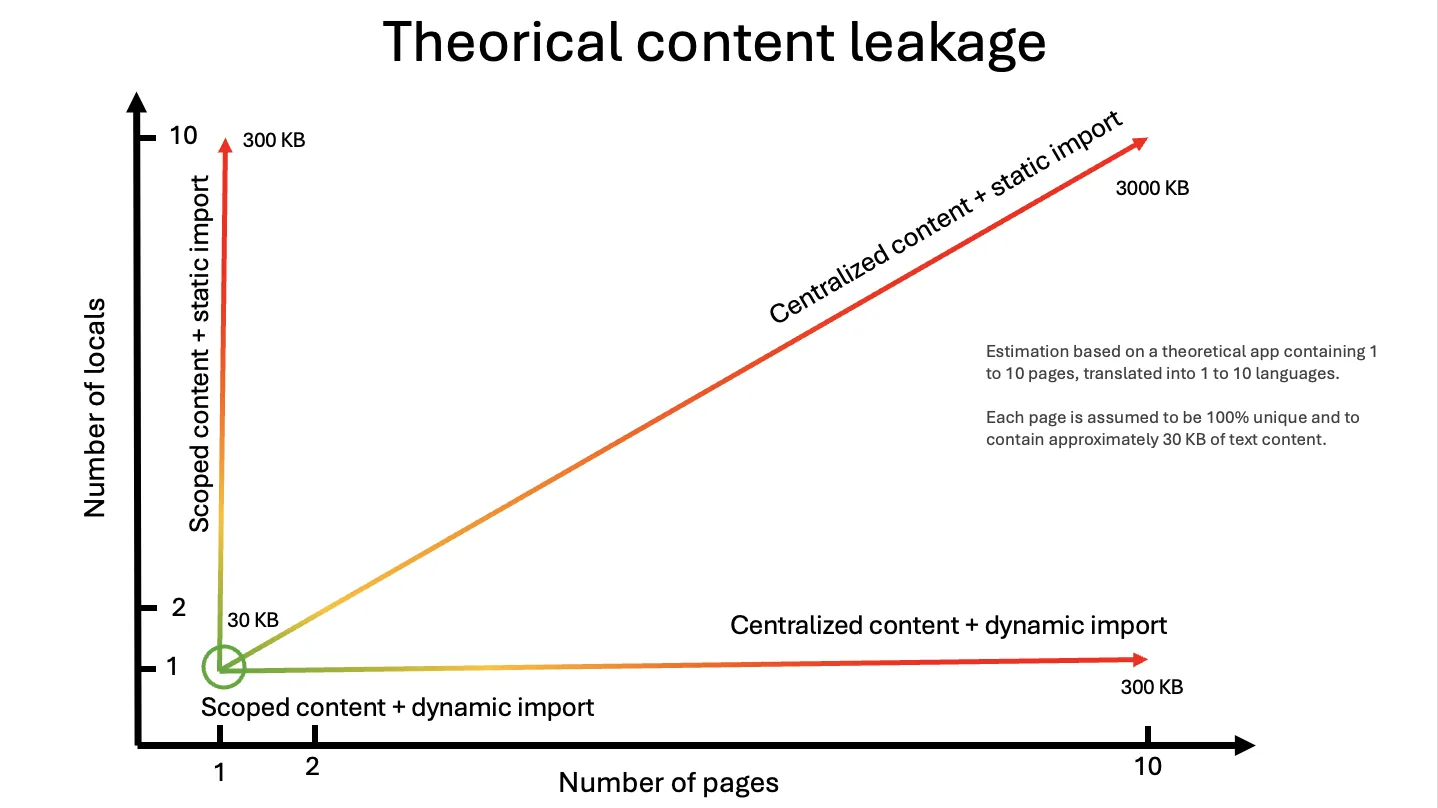
vue-i18n के साथ, binding global instance है। createI18n({ messages: { en, fr, ... } }) एक import है जो सब कुछ hold करता है; हर component जो useI18n() को call करता है वह सब कुछ तक पहुँच सकता है, इसलिए bundler instance के नीचे split नहीं कर सकता। Optimizing का मतलब है कि आप en.json को route से split करें, एक router guard में setLocaleMessage() को call करें, और जैसे components move हों वैसे route-to-file map को सही रखें। अपव्यय एक साथ दो अक्षों पर बढ़ता है, पेज और लोकेल:
कोड को क्लिपबोर्ड पर कॉपी करें
@intlayer/vue-i18n के साथ, binding dictionary है। syncJSON en.json की प्रत्येक top-level key को एक dictionary में बदल देता है; optimize pass component को उन्हें देता है जिनकी keys का नाम है, जैसे imports जिन्हें bundler trace करता है और प्रति पृष्ठ split करता है।
कोड को क्लिपबोर्ड पर कॉपी करें
i18n.ts में messages import वह एक पंक्ति है जिसे हटाना है। वह 88 KB है।
तीन चरणों में माइग्रेशन
इंस्टॉल करें
bashकोड कॉपी करेंकोड को क्लिपबोर्ड पर कॉपी करें
कमांड
vue-i18nका पता लगाता है,intlayer,vue-intlayer,@intlayer/vue-i18nऔर@intlayer/sync-json-pluginइंस्टॉल करता है, औरintlayer.config.tsको पहले से भरता है।vue-i18nको इंस्टॉल रखें: यह एक peer dependency है और types प्रदान करता है।Intlayer को अपनी लोकेल फाइलों की ओर इंगित करें
intlayer.config.tsकोड कॉपी करेंकोड को क्लिपबोर्ड पर कॉपी करें
locales/{locale}.jsonअपनी जगह पर रहता है। हर top-level key (footer,hero...) एक dictionary बन जाती है।प्लगइन जोड़ें और संदेशों के आयात को हटाएं
vite.config.tsकोड कॉपी करेंकोड को क्लिपबोर्ड पर कॉपी करें
src/i18n.tsकोड कॉपी करेंकोड को क्लिपबोर्ड पर कॉपी करें
vueI18nVitePlugin()vite-intlayerको लपेटता है (content watching, dictionary compilation, optimize pass) औरvue-i18nको adapter के रूप में alias करता है।messagesimport को हटाना ही 88 KB को छोड़ता है; इसे रखने से ऐप काम करता रहता है लेकिन दोनों को ship करता है।
आप बाद में क्या हटा सकते हैं
सभी डेटा सामग्री को स्पष्ट रूप से देखने के लिए तालिका को मोडल में खोलें
| File / pattern | Why |
|---|---|
import en from "./locales/en.json" और friends | Adapter द्वारा केवल फॉलबैक के रूप में उपयोग किया जाता है। यह वह जगह है जहां 88 KB था |
setLocaleMessage() in router guards | No-op। प्रति-route लोडिंग अब compiler का काम है |
@intlify/unplugin-vue-i18n | आवश्यक नहीं: यह messages को precompile करता है और SFC blocks को adapter नहीं पढ़ता है |
SFC <i18n> ब्लॉक्स | पढ़े नहीं जाते; उन्हें locale JSON या प्रति component .content.ts में ले जाएं |
आप बाइट्स से परे क्या हासिल करते हैं
- Typed keys।
t("footer.github")को compiledfooterdictionary के विरुद्ध type किया जाता है; एक गलत path TypeScript error है जो key को text के रूप में rendered करने के बजाय। npx intlayer testकिसी भी locale में एक missing key पर CI को विफल करता है।npx intlayer fillmissing ones को आपके own provider key (OpenAI, Anthropic, Mistral, Gemini...) से translate करता है और उन्हेंlocales/{locale}.jsonमें वापस लिखता है।- Visual Editor और CMS एक ही JSON पर operate करते हैं, इसलिए non-developers एक UI के माध्यम से edit करते हैं और files update हो जाती हैं।
.content.tsमें incremental move करें। कोई भी componentuseI18n()सेuseIntlayer("footer")में switch कर सकता है एक co-located content file के साथ। JSON और.content.tsdictionaries coexist करते हैं और merge होते हैं।
शुरू करने से पहले जानने योग्य सीमाएं
यदि आपके संदेश घटकों के भीतर हैं, तो उन्हें लोकेल फ़ाइलों में या उत्पन्न प्रकारों के साथ समान विचार वाले .content.ts में स्थानांतरित करने की आवश्यकता है।
setLocaleMessage() और mergeLocaleMessage() चेतावनी देते हैं और वापस लौट जाते हैं। रनटाइम पर CMS से लाए गए अनुवादों के लिए Intlayer CMS या intlayer pull / push कमांड की आवश्यकता होती है।
createI18n() में JSON आयात रखने से बंडल में 75 KB बना रहता है। intlayer test पास होने के बाद उन्हें हटा दें।
vue-intlayer के 3.9 KB के मुकाबले 7.9 KB। एक बार जब प्रत्येक घटक useIntlayer पर चला जाए, तो इसे हटा दें।
कौन सा कब उपयोग करें?
आपका ऐप SFC <i18n> ब्लॉक, रनटाइम setLocaleMessage() प्रवाह पर निर्भर करता है, या प्रति पेज 90 KB आपके दर्शकों के लिए कोई चिंता का विषय नहीं है।
आप vue-i18n पर हैं और बिना किसी .vue फ़ाइल को संपादित किए 88 KB की बचत, 23 गुना छोटे घटक, 0% पेज लीकेज, टाइप की गई कुंजियाँ और CI जांच चाहते हैं। यह मौजूदा vue-i18n कोडबेस के लिए प्रवेश बिंदु है।
नई परियोजनाओं के लिए, या एक बार जब एडाप्टर अपना काम कर ले। इसमें सबसे हल्का रनटाइम (3.9 KB) और प्रति-घटक .content.ts मॉडल है जो <i18n> ब्लॉक को टाइप की गई सामग्री से बदलता है। Vue के साथ Intlayer या Nuxt के साथ से शुरुआत करें।
अक्सर पूछे जाने वाले प्रश्न
नहीं। बेंचमार्क बिल्ड ने केवल vite.config.ts, intlayer.config.ts और src/i18n.ts में messages आयात की एक पंक्ति को बदला। प्रत्येक useI18n(), $t, v-t और Options API कॉल साइट वैसी ही रही।
क्योंकि useI18n() वैश्विक इंस्टेंस तक पहुंचना बंद कर देता है। createI18n({ messages }) प्रत्येक लोकेल के प्रत्येक संदेश को रखता है, इसलिए अलग से संकलित घटक 196 KB खींचता है। एडाप्टर के साथ यह केवल अपने स्वयं के शब्दकोश तक पहुंचता है: 8.4 KB।
बनाए रखा गया है। createI18n() को दिए गए datetimeFormats और numberFormats का सम्मान किया जाता है, जो नेटिव Intl API द्वारा समर्थित हैं। दिनांक, समय और संख्या फ़ॉर्मेटिंग देखें।
@intlayer/vue-i18n Vite + Vue को लक्षित करता है। @nuxtjs/i18n के लिए, Nuxt i18n संगतता एडाप्टर का उपयोग करें, और नेटिव सेटअप के लिए Nuxt के साथ Intlayer देखें।
हाँ। कोई भी घटक सह-स्थित सामग्री फ़ाइल के साथ useI18n() से useIntlayer("footer") पर स्विच कर सकता है। JSON और .content.ts शब्दकोश सह-अस्तित्व में रहते हैं और विलीन हो जाते हैं।
संबंधित तुलनाएं
समान एडाप्टर श्रृंखला:
लाइब्रेरी की आमने-सामने तुलना:
संदर्भ दस्तावेज़:
ये लाइब्रेरी कहाँ से आईं, यह समझने के लिए JavaScript i18n का इतिहास पढ़ें।
निष्कर्ष
@intlayer/vue-i18n useI18n() को जो है उससे बदलता है: एक global instance जो हर locale के हर message को hold करता है से एक dictionary में जो उस component के लिए compile है। Vite + Vue 3 app के 88 KB कम प्रति पृष्ठ, 3x छोटा runtime, 23x छोटे components और 0% पृष्ठ leakage के साथ, एक config file, एक plugin line और एक deleted import के लिए। SFC <i18n> blocks और runtime message loading ये दो चीजें हैं जो यह carry नहीं करता, और native vue-intlayer runtime अपने आकार का आधा रहता है।
Benchmark Bloom repository में सभी raw data, test apps और scripts हैं। इसे अपने आप चलाएं।
अधिक विवरण के लिए 'Why Intlayer?' doc देखें।
टिप्पणियाँ
अभी तक कोई टिप्पणी नहीं। अपने विचार साझा करने वाले पहले व्यक्ति बनें।