
अपने प्रश्न को पूछें और दस्तावेज़ का सारांश प्राप्त करें, इस पृष्ठ और आपके चुने हुए AI प्रदाता का उपयोग करके
इस पृष्ठ की सामग्री एक AI द्वारा अनुवादित की गई है।
अंग्रेजी में मूल सामग्री के अंतिम संस्करण देखेंअगर आपके पास इस दस्तावेज़ को सुधारने के लिए कोई विचार है, तो कृपया GitHub पर एक पुल अनुरोध सबमिट करके योगदान देने में संकोच न करें।
दस्तावेज़ के लिए GitHub लिंकदस्तावेज़ का Markdown को क्लिपबोर्ड पर कॉपी करें
next-intl VS @intlayer/next-intl: समान API, विभिन्न Bundle

@intlayer/next-intl एक compat adapter है: यह next-intl API (useTranslations, getTranslations, useLocale, t.rich(), ICU plurals, NextIntlClientProvider...) को expose करता है और इसे Intlayer द्वारा compiled dictionaries से serve करता है। application code नहीं बदलता है। bundle बदलता है।
यह article दोनों की तुलना एक ही Next.js application पर करता है, जो एक बार next-intl के साथ और एक बार adapter के साथ built है। नंबर Benchmark Bloom से आते हैं, एक open-source suite जो record करता है कि browser actually क्या download करता है। अगर आप next-intl vs Intlayer की तुलना libraries के रूप में चाहते हैं, तो next-intl vs Intlayer पढ़ें। यह एक इस बारे में है कि adapter क्या बदलता है जब आप अपने components को जैसे हैं वैसे ही रखते हैं।
tl;dr: एक ही Next.js ऐप्लिकेशन पर,next-intlको@intlayer/next-intlसे बदलने से प्रति-पृष्ठ JavaScript 153.6 KB से 147.5 KB gzip तक कम हो गया, औसत कंपोनेंट 21.8 KB से 8.1 KB तक, विदेशी-पृष्ठ स्ट्रिंग लीकेज ~90% से 0% तक, और हाइड्रेशन 14.7 ms से 12.8 ms तक, बिना किसी कंपोनेंट को संपादित किए। TanStack Start पर,use-intlसमकक्ष (@intlayer/use-intl) कंपोनेंट्स को 76-87 KB से 9-11 KB तक और लोकेल स्विचिंग को 7-21 ms से 4-9 ms तक कम कर देता है। एडेप्टर runtime के लिए 8.0 KB की लागत लेता है जबकिnext-intl14.7 KB और nativenext-intlayer5.5 KB की लागत लेते हैं। Navigation और middleware को Intlayer की routing config पर पुनः लागू किया गया है; localizedpathnamesएकमात्र सुविधा है जो स्थानांतरित नहीं की गई है।
@intlayer/next-intl क्या है
next-intl एक runtime है: getRequestConfig प्रति request messages/{locale}.json को load करता है, NextIntlClientProvider इसे client को भेजता है, और useTranslations("about") render time पर उस object से keys को read करता है। हर optimization (namespaces, pick(messages, [...]) per page, lazy loading) आपको लिखना होता है।
@intlayer/next-intl उस chain के पहले और आखिरी हिस्से को रखता है और बीच वाले को replace करता है। आपके components अभी भी useTranslations("about") को call करते हैं; जो वे receive करते हैं वह एक Intlayer dictionary से आता है जो build time पर compile होता है, उस component के लिए scoped होता है, केवल active locale में।
तीन mechanisms इसे काम करते हैं:
- Import aliasing.
createNextIntlPlugin()from@intlayer/next-intl/pluginwithIntlayerको wrap करता है और Webpack / Turbopack aliases जोड़ता है ताकिnext-intl,next-intl/server,next-intl/navigationऔरnext-intl/middleware@intlayer/next-intlको resolve करें। आपके codebase में कोई भी import rename नहीं है। - JSON as source of truth.
syncJSONplugin आपके existingmessages/{locale}.jsonको पढ़ता है, इसकी top-level keys को one dictionary per namespace में split करता है, और जब CLI या CMS उन्हें update करते हैं तो translations को same files में वापस लिखता है। आपके translators का workflow untouched रहता है। - कॉल-साइट बाइंडिंग। Intlayer optimize pass (Babel या SWC)
useTranslations("about")को एक कॉल में फिर से लिखता है जोaboutdictionary को सीधे प्राप्त करता है। कंपोनेंट अब global message tree तक नहीं पहुँचता; यह अपनी खुद की content तक पहुँचता है।
कोड को क्लिपबोर्ड पर कॉपी करें
कोड को क्लिपबोर्ड पर कॉपी करें
वह रीराइट ही है जिससे नीचे दिए गए component-size और page-leakage कॉलम आगे बढ़ते हैं: एक पेज केवल उन components के dictionaries को pull करता है जो वह render करता है, और केवल उस locale में जो serve किया जा रहा है।
adapter क्या रखता है, क्या नजरअंदाज करता है, और क्या replace नहीं करता
सभी डेटा सामग्री को स्पष्ट रूप से देखने के लिए तालिका को मोडल में खोलें
next-intl API | @intlayer/next-intl के साथ |
|---|---|
useTranslations("ns") / getTranslations("ns") | ✅ Kept। Build time पर ns dictionary से bound। Keys आपके content के विरुद्ध typed हैं। |
getTranslations({ locale, namespace }) | ✅ रखा गया |
t("key", { name }), t.rich(), t.markup(), t.raw() | ✅ रखा गया। ICU plurals, select, selectordinal, #, {ts, date, long} Intlayer के ICU resolver के माध्यम से चलते हैं |
useLocale() / getLocale() / setRequestLocale() / setLocale | ✅ रखा गया |
useFormatter() | ✅ रखा गया। dateTime, number, relativeTime, list, dateTimeRange native Intl को bridge करते हैं |
NextIntlClientProvider | ✅ रखा गया। messages, timeZone और now props स्वीकार किए जाते हैं लेकिन अनदेखा किए जाते हैं (एक dev warning आपको बताता है) |
getMessages() | ✅ संगतता के लिए रखा गया; अब आवश्यक नहीं है |
getRequestConfig() in src/i18n.ts | ⚠️ आवश्यक नहीं। Dictionaries build time पर संकलित होते हैं; कोई per-request message loading नहीं है |
defineRouting() | ✅ रखा गया। छोड़े गए fields (locales, defaultLocale, localePrefix) intlayer.config.ts से पढ़े जाते हैं |
createNavigation(), Link, redirect, usePathname, useRouter | ✅ रखा गया। Intlayer की routing कॉन्फ़िगरेशन पर फिर से लागू किया गया; routing argument स्वीकार किया जाता है लेकिन अनदेखा किया जाता है |
pathnames (स्थानीयकृत मार्ग नाम) | ❌ टाइपिंग के लिए स्वीकार किया जाता है, interpolated नहीं। सादे pathnames रखें या उस mapping को Intlayer के rewrite में स्थानांतरित करें |
createMiddleware() | ✅ रखा गया। Intlayer के proxy को return करता है; NEXT_LOCALE कुकी सेट करता है ताकि useLocale() और आपका switcher काम करता रहे |
NEXT_LOCALE कुकी | ✅ डिफ़ॉल्ट रूप से पढ़ा जाता है (जब तक आप routing.storage को स्वयं कॉन्फ़िगर न करें) |
बिना namespace के Bare useTranslations() | ⚠️ काम करता है, लेकिन call site bound नहीं है: यह runtime registry के माध्यम से resolve होता है। bundle gains के लिए एक namespace pass करें |
The benchmark
क्या मापा गया था
Benchmark Bloom suite एक ही application को प्रत्येक setup के साथ बनाता है: 10 pages (home, about, blog, careers, contact, FAQ, pricing, products, settings, team), 10 locales (en, fr, es, de, it, pt, zh, ja, ko, ru), समान components और समान content। Pages को en और fr में मापा जाता है।
next-intl को चार loading strategies के साथ बनाया गया था, naive setup (messages/{locale}.json पूरे को लोड किया गया) से optimal one (एक namespace प्रति route + प्रति-page pick())। adapter को naive setup के समान components पर बनाया गया था, केवल next.config.ts और intlayer.config.ts बदले गए। इसका कोई "scoped" variant नहीं है: compiler content को प्रति component scope करता है, इसलिए इसकी static और dynamic rows पहले से ही scoped हैं।
प्रत्येक build के लिए, suite निम्नलिखित को record करता है:
- Lib size: एक खाली component का gzip size जो केवल i18n library को import करता है। runtime की fixed cost।
- Page JS: प्रति page downloaded gzip JavaScript, सभी pages और locales में averaged।
- Locale leak %: डाउनलोड की गई JS में मिलीं अनुवादित स्ट्रिंग्स का हिस्सा जो एक locale की हैं जिसे उपयोगकर्ता नहीं देख रहा है।
- Page leak %: डाउनलोड की गई JS में मिलीं अनुवादित स्ट्रिंग्स का हिस्सा जो एक page की हैं जिस पर उपयोगकर्ता नहीं है।
- Component avg: अलगाव में compiled प्रत्येक component का औसत gzip size। दिखाता है कि एक single component i18n runtime और catalog में कितना खींचता है।
- E2E reactivity: नया locale चुनने और DOM में
html[lang]अपडेट होने के बीच wall-clock समय (Playwright, 5 iterations)। - Hydration: React hydration phase की अवधि।
नीचे दिए गए नंबर 2026-09-12 को चलाए गए से हैं जिसमेंnext-intl/use-intl4.14.2 और@intlayer/*9.5.1 के साथ हैं। टेस्ट एप्लिकेशन जानबूझकर छोटा है (प्रति locale कुछ दर्जन strings), इसलिए leakage प्रतिशत एक pattern का वर्णन करते हैं: वे आपकी content के साथ बढ़ते हैं जबकि runtime cost fixed रहती है।
Next.js पर परिणाम
उन मेट्रिक्स और लाइब्रेरीज़ को चुनें जिनकी आपको परवाह है:
मीट्रिक
डायनामिक JSON लोडिंग
रनटाइम पर आलस्य से अनुवाद लोड करता है
स्कोप्ड JSON (नेमस्पेसिंग)
प्रति-पृष्ठ अनुवाद नेमस्पेस
यह मीट्रिक क्या है?
अंतर्राष्ट्रीयकरण लाइब्रेरी बंडल का कुल gzip-संपीड़ित आकार। इसमें केवल ट्री-शेकिंग और मिनिफिकेशन के बाद प्रदाता और सामग्री पुनर्प्राप्ति तर्क शामिल हैं।
यह महत्वपूर्ण क्यों है?
एक छोटा लाइब्रेरी आकार प्रारंभिक जावास्क्रिप्ट पेलोड को कम करता है, जिससे क्लाइंट पर तेज़ डाउनलोड और निष्पादन समय होता है।
देखने का तरीका
सभी डेटा सामग्री को स्पष्ट रूप से देखने के लिए तालिका को मोडल में खोलें
| Setup | Strategy | Lib size (gz) | Page JS avg (gz) | Locale leak | Page leak | Component avg (gz) | E2E reactivity | Hydration |
|---|---|---|---|---|---|---|---|---|
| base (no i18n) | - | 0.0 KB | 141.0 KB | 0.0% | 0.0% | 0.9 KB | 13.4 ms | 11.8 ms |
next-intl | static | 14.7 KB | 153.6 KB | 4.2% | 89.8% | 21.8 KB | 16.0 ms | 14.7 ms |
next-intl | dynamic | 14.7 KB | 153.6 KB | 9.7% | 89.9% | 21.8 KB | 15.6 ms | 14.8 ms |
next-intl | scoped-static | 14.7 KB | 153.6 KB | 0.0% | 0.0% | 80.1 KB | 17.9 ms | 17.4 ms |
next-intl | scoped-dynamic | 14.7 KB | 153.6 KB | 0.0% | 0.0% | 22.9 KB | 17.8 ms | 16.8 ms |
@intlayer/next-intl | static | 8.0 KB | 147.5 KB | 0.0% | 0.0% | 8.1 KB | 14.5 ms | 12.8 ms |
@intlayer/next-intl | dynamic | 8.0 KB | 148.7 KB | 0.0% | 0.0% | 8.1 KB | 11.7 ms | 12.8 ms |
next-intlayer (native) | static | 5.5 KB | 141.3 KB | 0.0% | 0.0% | 8.5 KB | 15.5 ms | 16.9 ms |
next-intlayer (native) | dynamic | 5.5 KB | 141.3 KB | 0.0% | 0.0% | 6.9 KB | 15.3 ms | 15.9 ms |
इसे कैसे पढ़ें
- समान components, प्रति पृष्ठ 6 KB कम। adapter build की naive app 147.5 KB पर उतरती है, fully optimized one सहित हर
next-intlconfiguration के तहत (153.6 KB)। runtime स्वयं अंतर है: 8.0 KB बनाम 14.7 KB, हर पृष्ठ पर भुगतान किया गया। - बिना किसी component को छुए leakage 0% हो जाता है। naive
next-intlsetup हर page पर ~90% विदेशी-page strings भेजता है।next-intlके साथ 0% तक पहुंचने का मतलब हैscoped-*setups: एक namespace प्रति route, और प्रत्येक page मेंpick(messages, [...])का उपयोग करना। adapter naive code से 0% तक पहुंचता है क्योंकि optimize pass प्रत्येकuseTranslations("ns")को अपने dictionary से bind करता है। - Components 2.7x सिकुड़ते हैं। isolation में compile किया गया एक component
next-intlके साथ औसतन 21.8 KB और adapter के साथ 8.1 KB होता है।next-intlकेscoped-staticsetup में वह संख्या बढ़कर 80 KB हो जाती है, क्योंकि हर route की namespace file उस page से reachable हो जाती है जो इसे pick करता है। - Hydration 2 ms तेज़ है (12.8 vs 14.7 ms): RSC payload से React hydrate कर सकने से पहले deserialize करने के लिए कोई message object नहीं है।
- Adapter native runtime नहीं है।
next-intlayer141.3 KB पर बैठता है, base app के ऊपर +0.3 KB, एक 5.5 KB runtime के साथ। Adapternext-intlAPI surface (useFormatter,t.rich, ICU resolver) को Intlayer के core के शीर्ष पर ले जाता है, इसलिए 8.0 KB और page प्रति +6 KB। यह bridge है, destination नहीं।
Next.js बेंचमार्क रिपोर्ट में पूरी तालिका, प्रत्येक लाइब्रेरी और प्रत्येक रणनीति देखें।
TanStack Start पर परिणाम (use-intl)
use-intl next-intl का framework-agnostic core है। इसका adapter, @intlayer/use-intl, एक Vite plugin (@intlayer/use-intl/plugin) के साथ एक ही design का पालन करता है।
सभी डेटा सामग्री को स्पष्ट रूप से देखने के लिए तालिका को मोडल में खोलें
| सेटअप | रणनीति | लाइब साइज (gz) | पेज JS औसत (gz) | लोकेल लीक | पेज लीक | घटक औसत (gz) | E2E प्रतिक्रियाशीलता | हाइड्रेशन |
|---|---|---|---|---|---|---|---|---|
| base (कोई i18n नहीं) | - | 0.0 KB | 111.0 KB | 0.0% | 0.0% | 0.7 KB | 8.1 ms | 21.6 ms |
use-intl | static | 14.1 KB | 179.8 KB | 50.0% | 89.8% | 76.0 KB | 6.7 ms | 15.3 ms |
use-intl | dynamic | 14.1 KB | 119.4 KB | 0.0% | 89.8% | 75.9 KB | 7.0 ms | 15.4 ms |
use-intl | scoped-static | 14.1 KB | 128.7 KB | 0.0% | 0.0% | 87.1 KB | 20.9 ms | 24.8 ms |
use-intl | scoped-dynamic | 14.1 KB | 128.7 KB | 0.0% | 0.0% | 87.1 KB | 13.3 ms | 25.9 ms |
@intlayer/use-intl | static | 7.3 KB | 135.8 KB | 49.7% | 0.0% | 10.9 KB | 4.2 ms | 10.5 ms |
@intlayer/use-intl | dynamic | 7.3 KB | 129.7 KB | 0.0% | 0.0% | 9.3 KB | 8.7 ms | 16.1 ms |
intlayer (native) | static | 5.0 KB | 125.8 KB | 50.0% | 0.0% | 8.1 KB | 3.2 ms | 11.5 ms |
intlayer (native) | dynamic | 5.0 KB | 118.6 KB | 0.0% | 0.0% | 6.3 KB | 3.6 ms | 14.1 ms |
इसे कैसे पढ़ें
- प्रति-पृष्ठ बाइट्स अनुकूलित
use-intlके विरुद्ध समान हैं।dynamicमोड में@intlayer/use-intl(129.7 KB)use-intlकेscoped-dynamic(128.7 KB) के भीतर है, औरuse-intlके सादेdynamic(119.4 KB) से 10 KB ऊपर है। वह सादाdynamicपंक्ति अभी भी विदेशी-पृष्ठ स्ट्रिंग्स का 90% लीक करती है; बाइट गणना कम है क्योंकि परीक्षण ऐप्लिकेशन की सामग्री छोटी है। एडेप्टर का 0% वह है जो सामग्री बढ़ने के साथ सपाट रहता है। - Components 7-9 गुना छोटे हैं।
use-intlcomponents औसतन 76-87 KB हर strategy में हैं, क्योंकिuseTranslationsprovider के पूरे message object से bound है। Adapter औसतन 9-11 KB है। - Locale switching तेजी है। Optimized
use-intlsetups कोhtml[lang]अपडेट करने में 13-21 ms लगते हैं; adapter को 4-9 ms लगते हैं। कम components re-render होते हैं, और कुछ भी message tree से re-picked नहीं होता है। staticहर locale रखता है। Adapter कीstaticrow 49.7% locale leakage दिखाती है, native Intlayer केstaticmode के समान: सभी locales bundled हैं, केवल page के dictionaries हैं। Config की एक line (importMode: 'dynamic') इसे हटा देती है।
TanStack Start बेंचमार्क रिपोर्ट में पूरी तालिका देखें।
संख्याएं क्यों बदलती हैं
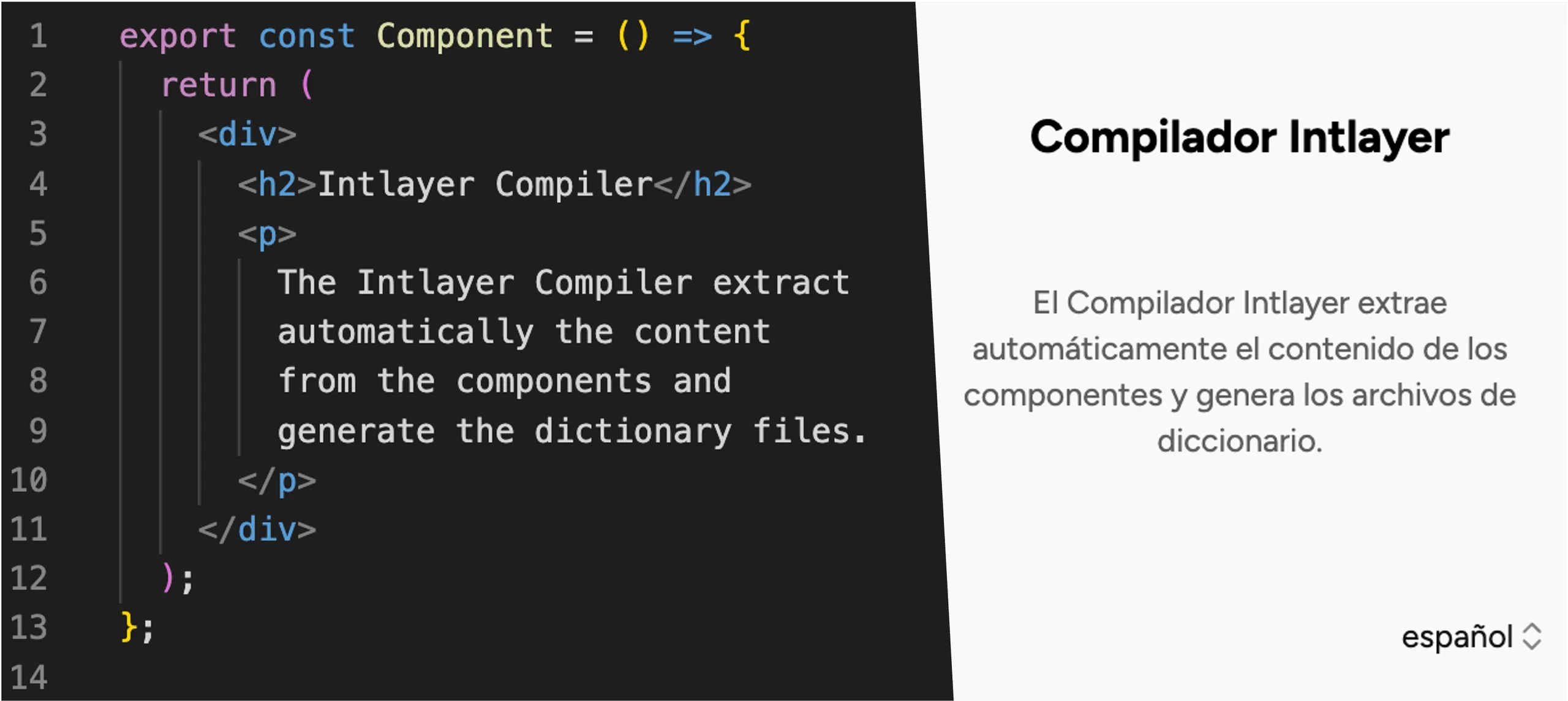
Component में कुछ नहीं बदला, इसलिए gains पूरी तरह से इस बात से आते हैं कि useTranslations किस चीज से bound है।
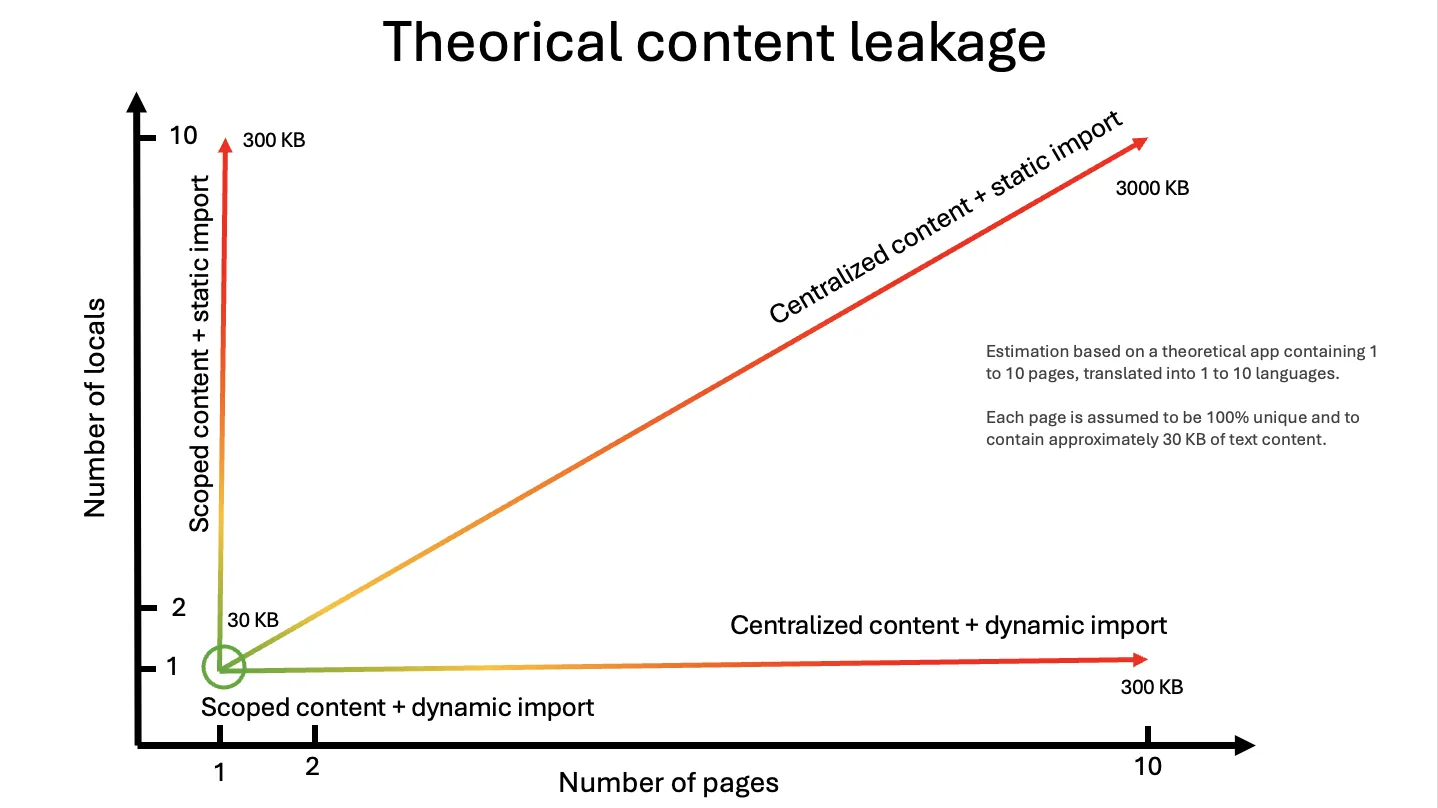
next-intl के साथ, binding provider है। NextIntlClientProvider पूरे locale के लिए संपूर्ण messages object प्राप्त करता है; हर useTranslations("about") इससे पढ़ता है। Bundler एक component को देखता है जो एक hook import करता है जो एक context पढ़ता है, और यह नहीं जान सकता कि केवल about branch का उपयोग किया जा रहा है। नीचे दिए गए routes सभी एक ही message object को साझा करते हैं, इसलिए page-leak column तब तक ~90% पढ़ता है जब तक आप स्वयं file को split न करें, और अपव्यय एक साथ दो अक्षों, पृष्ठों और भाषाओं पर बढ़ता है:
कोड को क्लिपबोर्ड पर कॉपी करें
@intlayer/next-intl के साथ, बाइंडिंग dictionary है। syncJSON messages/en.json को एक dictionary में बदल देता है top-level key के लिए; compiler resolve करता है कि कौन सा component useTranslations("about") को कॉल करता है और इसे about directly देता है, active locale में, एक import के रूप में जिसे bundler trace कर सकता है और split कर सकता है।
कोड को क्लिपबोर्ड पर कॉपी करें
src/i18n.ts और messages prop हट जाते हैं। बाकी सब कुछ समान है।
तीन चरणों में Migration
Install करें
bashकोड कॉपी करेंकोड को क्लिपबोर्ड पर कॉपी करें
यह कमांड
next-intlका पता लगाता है औरintlayer,next-intlayer,@intlayer/next-intlऔर@intlayer/sync-json-pluginको install करता है।next-intlको installed रखें: यह adapter का एक peer dependency है और types प्रदान करता है।Intlayer को अपने messages की ओर निर्देशित करें
intlayer.config.tsकोड कॉपी करेंकोड को क्लिपबोर्ड पर कॉपी करें
messages/{locale}.jsonअपनी जगह पर रहता है। प्रत्येक top-level key एक dictionary बन जाती है;useTranslations("about")aboutdictionary से मैप होता है।next.config.ts को wrap करें
next.config.tsकोड कॉपी करेंकोड को क्लिपबोर्ड पर कॉपी करें
createNextIntlPlugin()withIntlayerको compose करता है (content watching, dictionary compilation, the optimize pass) औरnext-intl→@intlayer/next-intlaliases को Webpack और Turbopack के लिए। Build करें, और ऊपर दी गई tables में संख्याएं आपकी होंगी।
आप बाद में क्या delete कर सकते हैं
सभी डेटा सामग्री को स्पष्ट रूप से देखने के लिए तालिका को मोडल में खोलें
| File / pattern | क्यों |
|---|---|
getRequestConfig in src/i18n.ts | कोई per-request message loading नहीं। File को केवल तभी रखें यदि यह createNavigation helpers को भी export करता है |
messages={...} on NextIntlClientProvider | adapter compiled output को पढ़ता है; prop को ignore किया जाता है और development में warning log होती है |
await getMessages() in layouts | Same reason |
Per-page pick(messages, [...]) | Compiler per component picking करता है |
What you gain beyond bytes
- Typed keys.
useTranslations("about")compiledaboutdictionary के विरुद्ध typed है।t("does.not.exist")एक TypeScript error है, runtime fallback नहीं। npx intlayer testCI विफल करता है जब किसी locale में कोई key गायब हो।npx intlayer fillअपनी पसंद के provider (OpenAI, Anthropic, Mistral, Gemini...) के साथ अपनी खुद की key का उपयोग करके गायब keys को translate करता है, और परिणाम कोmessages/{locale}.jsonमें वापस लिखता है।- Visual Editor और CMS एक ही dictionaries पर काम करते हैं, इसलिए गैर-डेवलपर्स एक UI के माध्यम से
messages/fr.jsonको edit कर सकते हैं और फ़ाइल अपडेट हो जाती है। .content.tsमें incremental move। कोई भी componentuseTranslations("about")सेuseIntlayer("about")में switch कर सकता है एक co-located content file के साथ, एक बार में एक। JSON और.content.tsdictionaries coexist करते हैं और merge होते हैं।
शुरुआत करने से पहले जानने योग्य सीमाएं
createNavigation(routing) और createMiddleware(routing) अपने सिग्नेचर बनाए रखते हैं लेकिन तर्क को अनदेखा करते हैं: भाषाएँ, डिफ़ॉल्ट भाषा और उपसर्ग रणनीति Intlayer के routing कॉन्फ़िग से आती हैं। यदि आप next-intl के स्थानीयकृत pathnames (/about से /a-propos) का उपयोग करते हैं, तो एडॉप्टर उन्हें इंटरपोलेट नहीं करता है; Intlayer का routing.rewrite उस मामले को कवर करता है लेकिन यह एक अलग बदलाव है।
ऑप्टिमाइज़ पास को यह जानने के लिए एक स्थिर नेमस्पेस की आवश्यकता होती है कि किस डिक्शनरी को आयात करना है। बिना नेमस्पेस वाला कॉल अभी भी काम करता है, एक रनटाइम रजिस्ट्री के माध्यम से जो प्रत्येक डिक्शनरी को संदर्भित करती है, जो वास्तव में वही रिसाव है जिसे आप हटाने की कोशिश कर रहे थे। नेमस्पेस पास करें।
next-intlayer के 5.5 KB के मुकाबले 8.0 KB का रनटाइम, और नेटिव बिल्ड पर प्रति पृष्ठ +6-7 KB। यह next-intl API सतह की कीमत चुकाता है। यदि आप उस बिंदु पर पहुँचते हैं जहाँ प्रत्येक घटक को useIntlayer में स्थानांतरित कर दिया गया है, तो एडॉप्टर को हटा दें।
फॉर्मेटर्स नेटिव Intl द्वारा समर्थित हैं और केवल भाषा उनके आउटपुट को प्रभावित करती है। यदि आप हाइड्रेशन-स्थिर तिथियों के लिए मजबूर समय क्षेत्र या एक निश्चित now पर भरोसा करते हैं, तो इसे कॉल साइट पर संभालें। दिनांक, समय और संख्या स्वरूपण देखें।
कौन सा उपयोग करें?
यदि आपका ऐप छोटा है, आपका बंडल चिंता का विषय नहीं है, और आपकी टीम प्रति पृष्ठ नेमस्पेस और pick() का प्रबंधन करने में सहज है।
यदि आप आज next-intl पर हैं और बिना दोबारा लिखे बंडल, रिसाव और हाइड्रेशन लाभ, टाइप की गई कुंजियाँ और CLI / CMS टूल चाहते हैं। यह किसी भी मौजूदा next-intl कोडबेस के लिए अनुशंसित प्रवेश बिंदु है।
नई परियोजनाओं के लिए, या एक बार एडॉप्टर द्वारा अपना काम पूरा कर लेने के बाद। यह तीनों में सबसे हल्का है (5.5 KB, +0.3 KB प्रति पृष्ठ) और सिंक्रोनस सर्वर घटकों, प्रति-घटक .content.ts फाइलों और पूर्ण फीचर सेट को अनलॉक करता है। Next.js के साथ Intlayer से शुरुआत करें।
FAQ
Next.js पर, घटकों के लिए हाँ: बेंचमार्क बिल्ड ने केवल next.config.ts और intlayer.config.ts को बदला। src/i18n.ts में getRequestConfig, प्रदाता पर messages प्रॉप और प्रति-पृष्ठ pick() कॉल डेड कोड बन जाते हैं जिन्हें आप बाद में हटा सकते हैं।
वे काम करते रहते हैं। t("key", { count }), t.rich(), t.markup(), select, selectordinal, # और {ts, date, long} Intlayer के ICU रिज़ॉल्वर द्वारा हल किए जाते हैं। ICU संदेश प्रारूप देखें।
यह Intlayer के कोर के ऊपर next-intl API सतह को ले जाता है: useFormatter, t.rich, ICU रिज़ॉल्वर, नेविगेशन हेल्पर्स। यह 5.5 KB के मुकाबले 8.0 KB है, और प्रति पृष्ठ +6 KB है। यह एक पुल है, गंतव्य नहीं।
हाँ। कोई भी घटक सह-स्थित .content.ts के साथ useTranslations("about") से useIntlayer("about") पर स्विच कर सकता है। JSON और .content.ts डिक्शनरी सह-अस्तित्व में रहती हैं और विलीन हो जाती हैं।
next-intl के pathnames के माध्यम से नहीं: एडॉप्टर टाइपिंग के लिए इसे स्वीकार करता है लेकिन इसे इंटरपोलेट नहीं करता है। इसके बजाय Intlayer के routing.rewrite का उपयोग करें।
संबंधित तुलनाएं
समान एडॉप्टर श्रृंखला:
लाइब्रेरीज़ की आमने-सामने तुलना:
संदर्भ दस्तावेज़:
ये लाइब्रेरी कहाँ से आईं, यह समझने के लिए JavaScript i18n का इतिहास पढ़ें।
निष्कर्ष
@intlayer/next-intl एक काम करता है: यह useTranslations को एक provider से बांधता है जो हर संदेश को रखता है, एक dictionary के लिए जो उस component के लिए संकलित है। एक ही Next.js ऐप पर जो प्रति पृष्ठ 6 KB के लायक है, 2.7x छोटे components, 0% leakage और 2 ms of hydration, इससे पहले कि कोई component फ़ाइल खोले। Navigation और middleware अपना API Intlayer के routing config के शीर्ष पर रखते हैं, और native next-intlayer runtime अभी भी हल्का रहता है।
सभी raw data, test apps और scripts Benchmark Bloom repository में हैं। इसे स्वयं चलाएं।
अधिक विवरण के लिए 'Why Intlayer?' doc देखें।
टिप्पणियाँ
अभी तक कोई टिप्पणी नहीं। अपने विचार साझा करने वाले पहले व्यक्ति बनें।