
Ask your question and get a summary of the document by referencing this page and the AI provider of your choice
If you have an idea for improving this documentation, please feel free to contribute by submitting a pull request on GitHub.
GitHub link to the documentationCopy doc Markdown to clipboard
Is next-intl Outdated in 2026?
When Vercel introduced the App Router and phased out built-in Pages Router i18n, next-intl quickly filled the gap. Jan Amann delivered great documentation and timely App Router support, making it the community default.
So why question whether it's showing its age?
Web architecture shifted rapidly over the past three years, but next-intl’s foundational model didn't.
While Next.js moved toward React Server Components (RSC), streaming, and compiler-level optimization, next-intl still treats internationalization as a runtime concern: passing large JSON objects through client providers, running ICU formatters in browser bundles, and relying on manual namespace curation to curb bundle bloat.
Key Takeaways
Maintenance plateau:
In the past 12 months, next-intl recorded ~187 commits, mainly focused on Next.js compatibility bumps and patch maintenance.
Client runtime tax:
Mounting NextIntlClientProvider with useTranslations() adds ~12.8 KB gzipped (51 KB minified) before rendering a single word, roughly 3x next-intlayer (4.3 KB).
The 90% copy leak:
In typical setups, 89.8% of the translation payload sent to a page belongs to other routes. Landing on /contact downloads /pricing and /dashboard copy as well.
Manual namespace overhead:
Avoiding copy bloat requires manually mapping namespaces per route by hand, increasing the likelihood of production misses.
Commercial sponsorship:
As an official partner of Crowdin, there is little incentive to build a free, local AI translation command directly into the CLI.
Maintenance vs. Modern Tooling
Commit activity across the past twelve months:
Open the table in a modal to view all data content clearly
| Repository | Stars | Total commits | Commits / year | Last commit |
|---|---|---|---|---|
amannn/next-intl |  |  |  |  |
aymericzip/intlayer |  |  |  |  |
Trailing 12-month activity:
amannn/next-intl: 187 commits (mostly patch updates and peer dependency bumps).aymericzip/intlayer: 4,343 commits (active work across compilers, IDE extensions, MCP servers, and translation engines).
- amannn/next-intl
- aymericzip/intlayer
Commits on the default branch, source: GitHub API.
A small library can be complete and stable. But frontend i18n has moved forward: compilers can now prune unreferenced copy at build time, LLMs can automate localization directly in CI, and editors rely on dedicated Language Servers (LSP) and AI agents. A maintenance-mode library cannot easily absorb this evolution.
To understand where these libraries come from, read the history of JavaScript i18n.
npm downloads
- next-intl
- next-intlayer
Source: npm registry downloads API.
Downloads reward the oldest solutions, not the best ones. A library released years ago is still installed by every project that picked it back then, by every CI run and by every package that depends on it. The count measures inertia more than a fresh choice.
AI assistants amplify the effect. next-intl, i18next and vue-i18n are everywhere in the code they were trained on, so they suggest them by default, without comparing the alternatives. Each suggestion adds downloads, which feeds the next suggestion. Compare on the benchmark rather than on the download count.
Measuring Next.js 16 App Router Performance
We benchmarked a standard App Router application with 10 routes and 10 locales:
Metric
Dynamic JSON loading
Lazy-loads translations at runtime
Scoped JSON (namespacing)
Per-page translation namespaces
What is this metric?
The total gzip-compressed size of the internationalization library bundle. It only includes the provider and content retrieval logic after tree-shaking and minification.
Why is it important?
A smaller library size reduces the initial JavaScript payload, leading to faster download and execution times on the client.
View as
Tested in real browser environments using production gzip compression. Details in the Next.js benchmark report.
Core Library Footprint
Client footprint before adding any content:
Open the table in a modal to view all data content clearly
| Library | Gzipped | Minified |
|---|---|---|
next-intl@4.9.1 | 12.8 KB | 51.0 KB |
next-intlayer@8.7.12 | 4.3 KB | 13.3 KB |
Page Weight and Leakage
Open the table in a modal to view all data content clearly
| Setup | Page JS avg (gz) | Locale leak | Other-page leak | Avg component (gz) |
|---|---|---|---|---|
| Base (no i18n) | 150.8 KB | 0.0% | 0.0% | 0.7 KB |
next-intl (static) | 163.5 KB | 4.2% | 89.8% | 20.5 KB |
next-intl (dynamic) | 163.4 KB | 9.7% | 89.9% | 20.5 KB |
next-intlayer | 152.1 KB | 0.0% | 0.0% | 7.2 KB |
Why Other-Page Leakage Happens
In standard next-intl setups, root layouts load all messages upfront:
Copy the code to the clipboard
Because messages is passed to the client provider at the root, the browser receives the full translation dictionary on every page. Visiting /login forces the user to download FAQ, documentation, and dashboard copy as well.
You can prevent this by splitting JSON files into namespaces and loading them conditionally per route. But maintaining that route-to-namespace map manually is tedious and prone to missing keys in production.
The graph below estimates the payload for a theoretical app of 1 to 10 pages in 1 to 10 locales, with about 30 KB of text per page. Loading messages dynamically per locale removes one axis, splitting them per route removes the other, and only the combination keeps the payload flat.
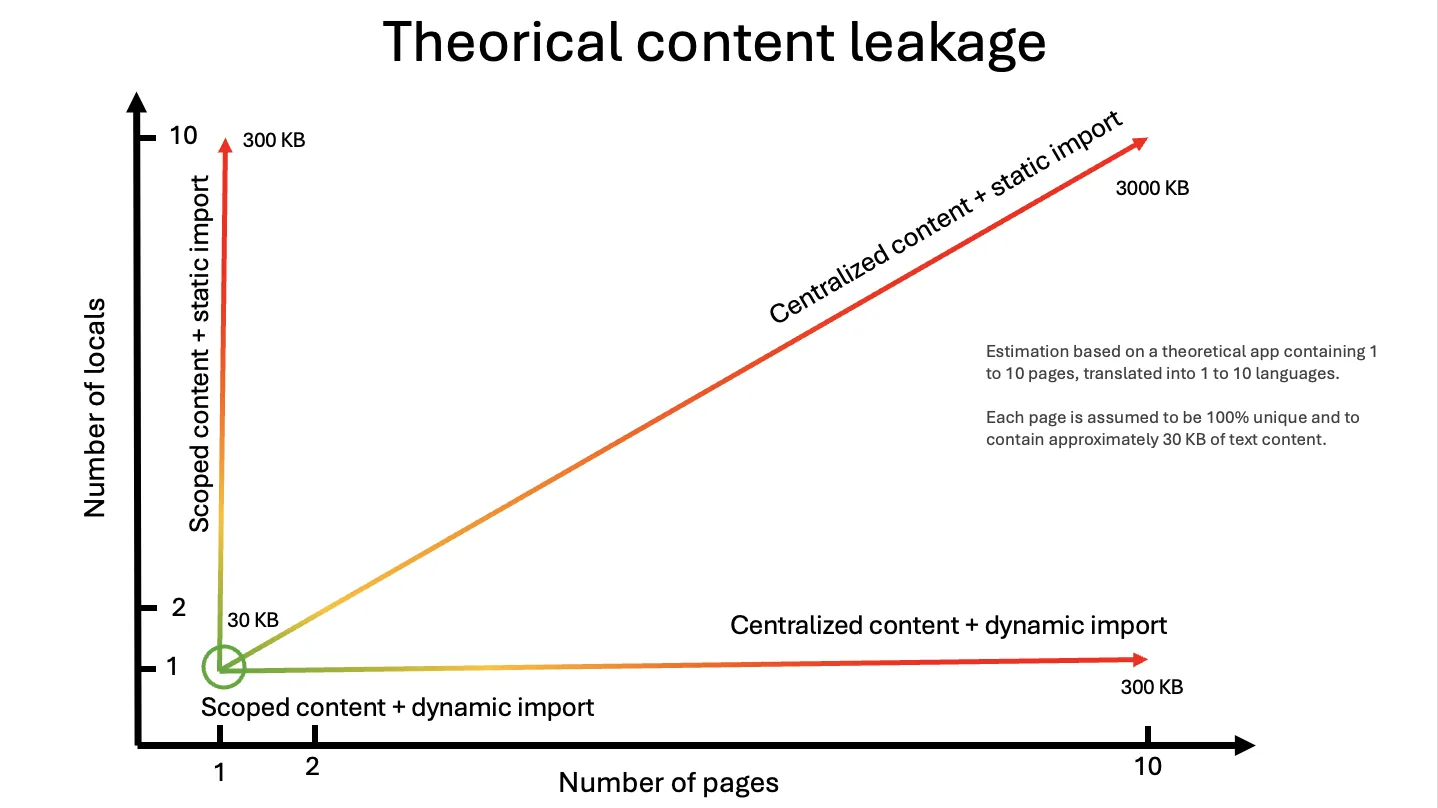
Intlayer solves this via static analysis: the Intlayer compiler bundles only the copy actually referenced on that route, driving other-page leakage to 0.0%.
Why next-intl Cannot Be Tree-Shaken
The API relies on dynamic runtime string calls:
Copy the code to the clipboard
Copy the code to the clipboard
Turbopack and Webpack cannot verify which keys inside UserProfile are actually called at runtime. To prevent missing-key errors, the bundler must include the entire namespace in the client chunk. Intlayer's destructured properties allow the compiler to track references directly and strip unused fields during compilation. See bundle optimization for details.
Developer Experience
Disconnected JSON vs. Co-Location
With next-intl, copy is separated across multiple JSON files in a distant messages/ folder. Intlayer co-locates content declarations right beside components:
Copy the code to the clipboard
Copy the code to the clipboard
Copy the code to the clipboard
Copy the code to the clipboard
Copy the code to the clipboard
When you delete or refactor AuthModal.tsx, its translations are refactored or removed with it.
Autocomplete vs. Strict Type Constraints
Augmenting IntlMessages in next-intl provides editor autocomplete based on your primary language file:
Copy the code to the clipboard
However, it only checks your canonical locale. If you delete a key from fr.json, TypeScript raises no warning, leaving your CI green while French users encounter fallbacks or missing text.
Intlayer infers types from all content declarations. Enabling strictMode turns missing translations in any locale into hard compile errors.
Tooling & AI Agent Workflows
Open the table in a modal to view all data content clearly
| Feature | next-intl | Intlayer |
|---|---|---|
| VS Code Extension | ❌ None | ✅ First-party extension |
| Language Server (LSP) | ❌ None | ✅ Integrated LSP |
| MCP Server (for AI Agents) | ❌ None | ✅ Built-in MCP Server |
| Agent Skills | ❌ None | ✅ Ready-to-use skills |
| Visual In-Context CMS | ❌ None | ✅ Free & Open Source |
An integrated LSP and MCP server enable AI code assistants to inspect your project's content graph, complete strings across languages, and update dictionaries accurately.
The Crowdin Partnership and Tooling
next-intl is officially partnered with Crowdin. Sponsorships keep open source healthy, but this commercial relationship naturally shapes roadmap priorities: next-intl is designed as a client for external TMS platforms, meaning a free, local AI translation command is unlikely to be prioritized.
Intlayer provides built-in tools:
Local AI auto-fill (intlayer fill):
Automatically detects and translates missing keys via your own OpenAI, Anthropic, Mistral, or Gemini API keys.
Self-hostable visual CMS:
Use the Intlayer CMS to give non-technical contributors visual editing that commits back to Git.
Permissive open-source license:
The entire stack is Apache 2.0.
Where next-intl Still Fits
If your project relies heavily on intricate plurals, select ordinals, and complex nested formatters, next-intl's ICU implementation is mature and reliable.
If your team already uses Crowdin pipelines, next-intl slots into that workflow seamlessly.
If your codebase is running cleanly and client bundle sizes meet performance targets, a migration may not be necessary.
How to Improve My Existing next-intl Setup?
Intlayer provides a drop-in compatibility package that preserves the exact function signatures and hooks of next-intl (such as useTranslations, getTranslations, and routing helpers). You do not need to rewrite your pages or components to start taking advantage of compiler-level optimizations.
Setup takes a single command:
Copy the code to the clipboard
This interactive CLI:
- Installs the
@intlayer/next-intlcompatibility package. - Configures bundler aliases so your existing imports (
next-intl,next-intl/server) route directly to Intlayer, allowing you to remove the old library frompackage.json. - Sets up out-of-the-box IDE language server (LSP) diagnostics, build-time tree-shaking (eliminating cross-route translation leakage), and local AI translation workflows without a large refactor.
For step-by-step instructions, explore our dedicated guides:
- Drop-in Compatibility: Keep your existing code using the
next-intlcompatibility layer. - Automated Migration: Convert legacy JSON files into structured dictionaries with our next-intl migration guide.
- Hybrid Setup: Keep
next-intlfor runtime rendering while using Intlayer alongside next-intl for local AI translation.
Check your live Next.js application's payload and leakage with the free i18n SEO Scanner:
Further Reading
Comments
No comments yet. Be the first to share your thoughts.