
Ask your question and get a summary of the document by referencing this page and the AI provider of your choice
If you have an idea for improving this documentation, please feel free to contribute by submitting a pull request on GitHub.
GitHub link to the documentationCopy doc Markdown to clipboard
i18next VS @intlayer/i18next: Same API, Different Bundle

@intlayer/i18next, @intlayer/react-i18next and @intlayer/next-i18next are compat adapters. They expose the i18next API your code already uses (useTranslation, t(), <Trans>, i18n.changeLanguage(), getFixedT, serverSideTranslations...) and serve it from dictionaries compiled by Intlayer. The components do not change. The runtime underneath them does.
This article measures that swap on the same Next.js application, built once with next-i18next and once with @intlayer/next-i18next. The numbers come from Benchmark Bloom. For i18next and Intlayer compared as libraries, read i18next vs Intlayer. This one is about what the adapter changes when you keep your code as it is.
tl;dr: On the same Next.js app, replacingnext-i18nextwith@intlayer/next-i18nexttook the per-page JavaScript from 218.5 KB to 150.7 KB gzip (naive setup) and beat the fully optimizednext-i18nextsetup (163.4 KB) by 12.7 KB. The average component went from 78.5 KB to 9.7 KB, foreign-page string leakage from ~90% to 0%, hydration from 15.6 ms to 11.3 ms, and the runtime from 19.7 KB to 9.4 KB. No component was edited; one provider file was.i18nextplugins (backends, language detectors) are accepted but do nothing: there is nothing left to load or detect at runtime.
What @intlayer/i18next is
i18next is a runtime. i18n.init({ resources }) or a backend plugin loads locales/{lng}/{ns}.json into a global instance; useTranslation("about") subscribes the component to it; t("title") looks the key up at render time. Namespaces, lazy loading, per-page namespace lists and type safety are all yours to configure and maintain.
The adapters keep the API and replace the instance:
- Import aliasing.
createNextI18nPlugin()from@intlayer/next-i18next/plugin(orwithI18next) wrapswithIntlayerand adds Webpack / Turbopack aliases so thatnext-i18next,react-i18nextandi18nextresolve to their@intlayer/*counterparts. On Vite,reactI18nextVitePlugin()from@intlayer/react-i18next/plugindoes the same. No import is renamed. - JSON as source of truth. The
syncJSONplugin reads your existinglocales/{lng}/{ns}.jsonwithformat: "i18next"(so{{name}},$t()nesting,_one/_otherand context suffixes are parsed correctly) and writes translations back when the CLI or the CMS updates them. - Call-site binding. The Intlayer optimize pass rewrites
useTranslation("about")into a call that receives theaboutdictionary directly, in the active locale. The component stops reaching the global store.
Copy the code to the clipboard
Copy the code to the clipboard
That rewrite is what moves the component-size and page-leakage columns below.
What the adapters keep, ignore, and do not replace
Open the table in a modal to view all data content clearly
i18next API | With @intlayer/* |
|---|---|
useTranslation("ns"), useTranslation("ns", { keyPrefix }) | ✅ Kept. Bound to the ns dictionary at build time; keys typed against your content |
t("key", { name }), {{interpolation}}, $t(key) nesting | ✅ Kept |
key_one / key_other plurals, key_male context, returnObjects | ✅ Kept. Plurals evaluated with Intl.PluralRules |
<Trans> with components, <1>...</1> numbered tags, values | ✅ Kept |
withTranslation, Translation, I18nContext | ✅ Kept |
i18n.changeLanguage(), i18n.language, i18n.dir(), on("languageChanged") | ✅ Kept. changeLanguage drives Intlayer's locale |
getFixedT(lng, ns, keyPrefix), i18n.exists(), hasLoadedNamespace() | ✅ Kept |
i18n.use(Backend).use(LanguageDetector).init({...}) | ⚠️ use() calls the plugin's init and returns; backends and detectors have nothing to load or detect |
init({ resources }), addResourceBundle() | ⚠️ resources is ignored with a dev warning; remove the JSON imports to get the bundle gains |
I18nextProvider i18n={i18n} | ⚠️ Renders an IntlayerProvider; the i18n prop is ignored. On App Router, pass the locale (see below) |
serverSideTranslations(locale, ["common"]) (next-i18next) | ⚠️ Returns the expected shape and loads nothing. Safe to keep, safe to delete |
appWithTranslation(App) (next-i18next) | ✅ Kept |
next-i18next.config.js | ⚠️ Not read. Locales come from intlayer.config.ts |
Bare useTranslation() with no namespace | ✅ Works against the whole-file translation dictionary (splitKeys: false) |
The benchmark
What was measured
The Benchmark Bloom suite builds the same application with each setup: 10 pages (home, about, blog, careers, contact, FAQ, pricing, products, settings, team), 10 locales (en, fr, es, de, it, pt, zh, ja, ko, ru), identical components and identical content. Pages are measured in en and fr.
next-i18next was built in four loading strategies, from every locale's JSON imported into resources (static) to one namespace per route, lazily loaded through a backend (scoped-dynamic). The adapter was built on the same components as the naive setup, with next.config.ts, intlayer.config.ts and the provider file changed. It has no "scoped" variant: the compiler scopes content per component.
For each build, the suite records:
- Lib size: gzip size of an empty component that only imports the i18n library.
- Page JS: gzip JavaScript downloaded per page, averaged over all pages and locales.
- Locale leak %: share of translated strings in the downloaded JS that belong to a locale the user is not viewing.
- Page leak %: share of translated strings in the downloaded JS that belong to a page the user is not on.
- Component avg: average gzip size of each component compiled in isolation.
- E2E reactivity: wall-clock time between selecting a new locale and
html[lang]updating in the DOM (Playwright, 5 iterations). - Hydration: React hydration phase duration.
Numbers below come from the run dated 2026-09-12 withnext-i18next16.3.0 (react-i18next17.0.13,i18next26.4.2) and@intlayer/next-i18next9.5.1. The test application is deliberately small (a few dozen strings per locale), so leakage percentages describe a pattern: they grow with your content while the runtime cost stays fixed.
Results on Next.js
Pick the metrics and the libraries you care about:
Metric
Dynamic JSON loading
Lazy-loads translations at runtime
Scoped JSON (namespacing)
Per-page translation namespaces
What is this metric?
The total gzip-compressed size of the internationalization library bundle. It only includes the provider and content retrieval logic after tree-shaking and minification.
Why is it important?
A smaller library size reduces the initial JavaScript payload, leading to faster download and execution times on the client.
View as
Open the table in a modal to view all data content clearly
| Setup | Strategy | Lib size (gz) | Page JS avg (gz) | Locale leak | Page leak | Component avg (gz) | E2E reactivity | Hydration |
|---|---|---|---|---|---|---|---|---|
| base (no i18n) | - | 0.0 KB | 141.0 KB | 0.0% | 0.0% | 0.9 KB | 13.4 ms | 11.8 ms |
next-i18next | static | 19.7 KB | 218.5 KB | 0.0% | 89.8% | 78.5 KB | 16.4 ms | 15.6 ms |
next-i18next | dynamic | 19.7 KB | 169.5 KB | 50.0% | 89.8% | 26.1 KB | 15.4 ms | 27.7 ms |
next-i18next | scoped-static | 19.7 KB | 220.1 KB | 0.0% | 89.8% | 78.9 KB | 16.4 ms | 14.7 ms |
next-i18next | scoped-dynamic | 19.7 KB | 163.4 KB | 0.0% | 0.0% | 27.1 KB | 15.9 ms | 15.1 ms |
@intlayer/next-i18next | static | 9.4 KB | 150.7 KB | 0.0% | 0.0% | 9.7 KB | 10.7 ms | 11.3 ms |
@intlayer/next-i18next | dynamic | 9.4 KB | 150.7 KB | 0.0% | 0.0% | 9.7 KB | 11.9 ms | 10.6 ms |
next-intlayer (native) | static | 5.5 KB | 141.3 KB | 0.0% | 0.0% | 8.5 KB | 15.5 ms | 16.9 ms |
next-intlayer (native) | dynamic | 5.5 KB | 141.3 KB | 0.0% | 0.0% | 6.9 KB | 15.3 ms | 15.9 ms |
How to read it
- 68 KB less per page from the naive setup.
resources: { en, fr, ... }ships every locale and every namespace on every page: 218.5 KB. The adapter build of the same components lands at 150.7 KB. It also beatsnext-i18next's best configuration (163.4 KB, one namespace per route, lazily loaded) by 12.7 KB, because thei18nextruntime alone weighs 19.7 KB against 9.4 KB. - Leakage goes to 0% without touching a component. Every
next-i18nextsetup except the fully scoped one ships ~90% of foreign-page strings. Thedynamicrow is worse than it looks: it drops page leakage nowhere and gains 50% locale leakage, because the per-locale backend still pulls the wholetranslationnamespace. The adapter reaches 0% / 0% from the naive code. - Components: 8x smaller. A
useTranslation()component compiled in isolation averages 78.5 KB withresourcesinlined and 26-27 KB with a backend, becausetis bound to the global store. With the adapter it averages 9.7 KB. - Hydration and switching are faster. Hydration goes from 15.6 ms to 11.3 ms (and from 27.7 ms in the
dynamicsetup, where the backend fetch sits on the critical path). Locale switching goes from 15-16 ms to 11-12 ms. - The adapter is not the native runtime.
next-intlayerlands at 141.3 KB, +0.3 KB over the base app. The adapter carries thei18nextAPI surface (interpolation dialect, plural and context suffix resolution,<Trans>tag parsing) on top of Intlayer's core: 9.4 KB and +9.4 KB per page over native. It is the bridge, not the destination.
Full table, every library and every strategy, in the Next.js benchmark report.
Results on TanStack Start (react-i18next)
For Vite and TanStack Start, the benchmark measures plain react-i18next against intlayer:
Open the table in a modal to view all data content clearly
| Library | Strategy | Lib size (gz) | Page JS avg (gz) | Locale leak | Page leak | Component avg (gz) | E2E reactivity | Hydration |
|---|---|---|---|---|---|---|---|---|
| base (no i18n) | - | 0.0 KB | 111.0 KB | 0.0% | 0.0% | 0.7 KB | 8.1 ms | 21.6 ms |
react-i18next | dynamic | 18.4 KB | 136.4 KB | 23.1% | 89.8% | 24.8 KB | 123.1 ms | 32.9 ms |
intlayer | dynamic | 5.0 KB | 118.6 KB | 0.0% | 0.0% | 6.3 KB | 3.6 ms | 14.1 ms |
Full table in the TanStack Start benchmark report.
Thereact-i18nextadapter on Vite / TanStack Start was not part of this run. Thereact-i18nextbaseline on TanStack Start is in i18next vs Intlayer: 127-184 KB per page and a 123-185 ms locale switch when the backend is lazy.
Why the numbers move
Nothing in components/ changed, so the gains come from what useTranslation is bound to.
With i18next, the binding is the global instance. Whatever was loaded into it (all locales in static, the active locale's whole namespace in dynamic) is reachable from every component that calls useTranslation(). The bundler cannot split below what the instance holds, and the runtime cannot know which keys a component will ask for.
Copy the code to the clipboard
Whatever the instance holds ships to every page, and the waste grows on two axes, pages and locales:
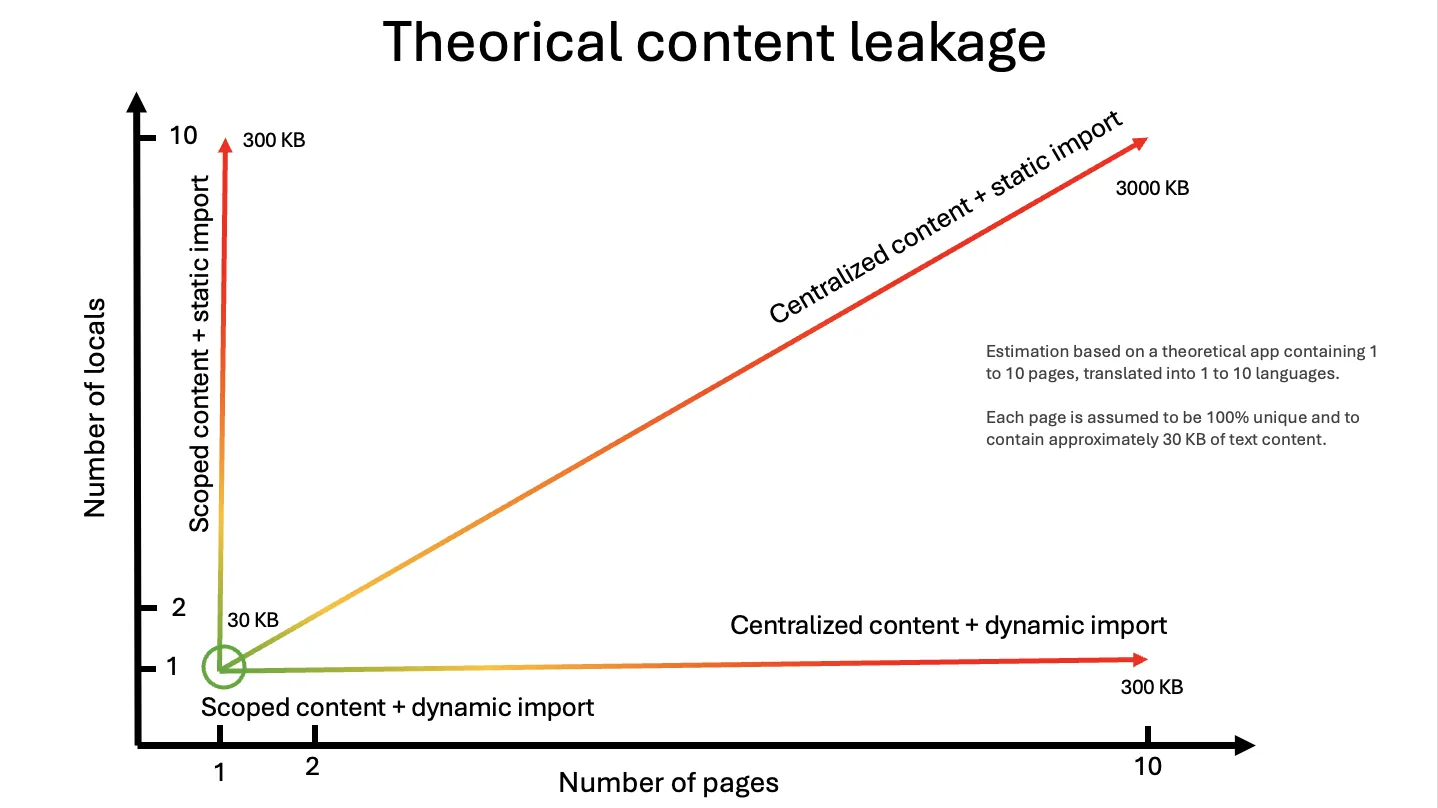
With @intlayer/next-i18next, the binding is the dictionary. syncJSON turns each namespace file into a dictionary; the optimize pass hands the component the dictionary it names, as an import the bundler can trace and split per page and per locale.
Copy the code to the clipboard
i18n/i18n.ts and its resources import become dead code. That is the 68 KB.
Migration in three steps
Install
bashCopy codeCopy the code to the clipboard
The command detects
i18next/react-i18next/next-i18next, installsintlayer, the framework package (next-intlayerorreact-intlayer), the matching@intlayer/*adapter and@intlayer/sync-json-plugin, and pre-fillsintlayer.config.ts. Keep the original packages installed: they are peer dependencies and provide the types.Point Intlayer at your locale files
intlayer.config.tsCopy codeCopy the code to the clipboard
If you have a single
translation.jsonper locale (i18next's default namespace), setsplitKeys: falseso the whole file stays one dictionary and a bareuseTranslation()keeps resolving.Add the plugin
next.config.tsCopy codeCopy the code to the clipboard
On the App Router, client components get their locale from the
[locale]segment. The adapter'sI18nextProvidertakes no locale, so replace it once in your provider file:components/AppProviders.tsxCopy codeCopy the code to the clipboard
Every component below it still calls
useTranslation().vite.config.tsCopy codeCopy the code to the clipboard
reactI18nextVitePlugin()wrapsvite-intlayerand aliasesreact-i18nextandi18next. For a non-React project,i18nextVitePlugin()from@intlayer/i18next/pluginaliasesi18nextalone.
What you can delete afterwards
Open the table in a modal to view all data content clearly
| File / pattern | Why |
|---|---|
resources: { en, fr, ... } and the JSON imports | Ignored by the adapter. This is where the 68 KB was |
i18next-http-backend, i18next-resources-to-backend | Nothing to fetch at runtime |
i18next-browser-languagedetector | Locale detection is Intlayer's routing config (URL prefix, cookie, header) |
serverSideTranslations() in getStaticProps | Returns an empty shape; harmless, but dead |
next-i18next.config.js | Not read. Locales live in intlayer.config.ts |
Per-page ns: [...] lists | The compiler picks namespaces per component |
What you gain beyond bytes
- Typed keys.
useTranslation("about")is typed against the compiledaboutdictionary;t("does.not.exist")is a TypeScript error instead of a returned key string. npx intlayer testfails CI on a missing key in any locale.npx intlayer filltranslates the missing ones with your own provider key (OpenAI, Anthropic, Mistral, Gemini...) and writes them back intolocales/{lng}/{ns}.json.- Visual Editor and CMS operate on the same JSON, so translators edit through a UI and the files update.
- Incremental move to
.content.ts. Any component can switch fromuseTranslation("about")touseIntlayer("about")with a co-located content file. JSON and.content.tsdictionaries coexist.
Limits to know before you start
i18n.use(HttpBackend) calls the plugin's init and nothing else. If your app relied on fetching translations from a CMS at runtime, that flow is gone; use the Intlayer CMS or the intlayer pull / push commands instead. Locale detection becomes Intlayer's routing config (URL prefix, cookie, header).
Unlike some other adapters, @intlayer/i18next does not use inline resources as a fallback. Every key must exist in the synced dictionaries, which intlayer test verifies.
One file, shown above. Pages Router with appWithTranslation needs nothing.
localePath, fallbackLng, reloadOnPrerender and friends have no equivalent; locales and fallback come from intlayer.config.ts.
9.4 KB of runtime and +9.4 KB per page over next-intlayer. Once every component has moved to useIntlayer, drop it.
Feature comparison
Beyond bytes, what each option gives you:
Open the table in a modal to view all data content clearly
| Feature | i18next / react-i18next / next-i18next | @intlayer/* adapters | Native Intlayer |
|---|---|---|---|
Your t(), useTranslation, <Trans> calls | ✅ | ✅ Unchanged | ❌ Moved to useIntlayer |
| Runtime size (gzip, Next.js) | 19.7 KB | 9.4 KB | 5.5 KB |
| Other-page leak without manual namespaces | ~90% | 0% | 0% |
| Typed keys | ⚠️ Manual declaration | ✅ From compiled dictionaries | ✅ Auto-generated |
| Runtime backends and plugins | ✅ Full plugin ecosystem | ❌ Inert | ❌ Not applicable, use the CMS |
| Content co-located with components | ❌ Centralized JSON | ⚠️ JSON, .content.ts can coexist | ✅ .content.ts next to each component |
| Missing translations in CI | ⚠️ Not built-in | ✅ npx intlayer test | ✅ npx intlayer test |
| AI translation | ❌ No | ✅ npx intlayer fill | ✅ npx intlayer fill |
| Visual editor / CMS | ❌ Via external platforms | ✅ On the same JSON | ✅ Yes |
| Ecosystem / community | ✅ Very large | ⚠️ Smaller, growing fast | ⚠️ Smaller, growing fast |
Runtime sizes come from the Next.js run described above.
When to use which?
Your app depends on runtime backends (translations served by a CMS at request time), on the plugin ecosystem, or on a non-React target the adapters do not cover.
You are on react-i18next / next-i18next and want the 68 KB, the 8x smaller components, 0% leakage, typed keys and CI checks without a rewrite. This is the entry point for an existing i18next codebase.
For new projects, or once the adapter has done its job. It is the lightest of the three (5.5 KB, +0.3 KB per page) and unlocks synchronous server components and per-component .content.ts files. Start with Intlayer with Next.js or with Vite and React.
FAQ
From resources: { en, fr, ... }. The naive next-i18next setup imports every locale's JSON into init(), so every page carries every namespace in every language: 218.5 KB per page. The adapter never bundles that block; it hands each component the dictionary it names, in the active locale.
Yes, with components, numbered <1>...</1> tags and values. So do {{interpolation}}, $t(key) nesting, key_one / key_other plurals (evaluated with Intl.PluralRules), context suffixes and returnObjects.
Set splitKeys: false in the syncJSON plugin. The whole file stays one dictionary and a bare useTranslation() keeps resolving against it.
No, it is the bridge. The adapter keeps the i18next API and costs 9.4 KB of runtime; native next-intlayer costs 5.5 KB and adds synchronous server components and co-located .content.ts files. You can move component by component, since JSON and .content.ts dictionaries coexist.
Yes. locales/{lng}/{ns}.json stays the source of truth: syncJSON reads it with the i18next dialect and writes translations back when the CLI or the CMS updates them.
Related comparisons
Same adapter series:
The libraries compared head to head:
Reference docs:
Compat adapters:
Migration guides:
Benchmark reports:
To understand where these libraries come from, read the history of JavaScript i18n.
Conclusion
i18next is the heaviest runtime in this benchmark, and the adapters remove most of it without asking you to leave its API. On the same Next.js app that is 68 KB less per page than the naive setup, 12.7 KB less than the best hand-optimized one, 8x smaller components, 0% leakage and 4 ms of hydration, for a config file, a plugin line and one provider edit. Backends and detectors become no-ops, resources is ignored rather than merged, and the native next-intlayer runtime remains 9 KB lighter still.
All the raw data, the test apps and the scripts are in the Benchmark Bloom repository. Run it yourself.
Refer to the 'Why Intlayer?' doc for more details.
Comments
No comments yet. Be the first to share your thoughts.