
Ask your question and get a summary of the document by referencing this page and the AI provider of your choice
If you have an idea for improving this documentation, please feel free to contribute by submitting a pull request on GitHub.
GitHub link to the documentationCopy doc Markdown to clipboard
Is vue-i18n Outdated in 2026?
In the Vue community, few libraries are as widely adopted as vue-i18n. Maintained by Kazupon since Vue 2, it powers @nuxtjs/i18n and serves as the default choice for virtually every multilingual Vue app.
Yet in our 2026 benchmarks, we ran into an unexpected finding: vue-i18n was the single heaviest localization runtime across all frontend frameworks tested.
On a clean 31.5 KB Vite + Vue baseline, adding vue-i18n pushed average page JavaScript to 136.4 KB, more than quadrupling the payload.
How did a framework known for being lightweight and nimble end up with such a heavy internationalization stack? And does its classic runtime model still make sense today?
Key Takeaways
Heaviest runtime benchmarked:
At 24.3 KB gzipped (83.2 KB minified) before adding any content, vue-i18n is roughly 9x heavier than intlayer's 2.7 KB runtime.
A 330% payload penalty:
vue-i18n swelled a 31.5 KB baseline Vue page to 136.4 KB. Intlayer produced 59.3 KB, a 56% smaller page payload.
The hidden runtime compiler:
By default, unless you configure specific bundler aliases, vue-i18n ships an entire message compiler to the browser to parse strings on the fly.
Maintenance velocity:
Over the past year, vue-i18n recorded ~259 commits, focused on patch fixes and Vue core compatibility.
No first-party modern tooling:
Missing first-party Language Server (LSP) support, AI MCP servers, or automated CLI translation pipelines.
Maintenance vs. Modern Tooling
Open the table in a modal to view all data content clearly
| Repository | Stars | Total commits | Commits / year | Last commit |
|---|---|---|---|---|
intlify/vue-i18n |  |  |  |  |
aymericzip/intlayer |  |  |  |  |
Trailing twelve months:
intlify/vue-i18n: 259 commits (routine patches and Vue 3 / Nuxt dependency maintenance).aymericzip/intlayer: 4,343 commits (active work across compiler optimizations, LSP tools, and AI agents).
- intlify/vue-i18n
- aymericzip/intlayer
Commits on the default branch, source: GitHub API.
A mature library can be complete. But modern frontends now leverage build-time AST transformations, bundler dead-code elimination, and AI-driven localization. A runtime-bound architecture cannot easily adopt these paradigms.
To understand where these libraries come from, read the history of JavaScript i18n.
npm downloads
- vue-i18n
- vue-intlayer
Source: npm registry downloads API.
Downloads reward the oldest solutions, not the best ones. A library released years ago is still installed by every project that picked it back then, by every CI run and by every package that depends on it. The count measures inertia more than a fresh choice.
AI assistants amplify the effect. next-intl, i18next and vue-i18n are everywhere in the code they were trained on, so they suggest them by default, without comparing the alternatives. Each suggestion adds downloads, which feeds the next suggestion. Compare on the benchmark rather than on the download count.
Measuring Performance in Vite + Vue
We benchmarked a 10-page, 10-locale application built with Vite and Vue 3:
Metric
Dynamic JSON loading
Lazy-loads translations at runtime
Scoped JSON (namespacing)
Per-page translation namespaces
What is this metric?
The total gzip-compressed size of the internationalization library bundle. It only includes the provider and content retrieval logic after tree-shaking and minification.
Why is it important?
A smaller library size reduces the initial JavaScript payload, leading to faster download and execution times on the client.
View as
Tested in a real browser using production gzip compression. Full data in the Vue benchmark documentation.
Baseline Framework Overhead
Overhead before adding any translation strings:
Open the table in a modal to view all data content clearly
| Library | Gzipped | Minified |
|---|---|---|
vue-i18n@11.4.0 | 24.3 KB | 83.2 KB |
intlayer@8.7.12 | 2.7 KB | 7.6 KB |
vue-i18n’s runtime alone weighs 24.3 KB gzipped, nearly the weight of Vue core itself. Intlayer adds just 2.7 KB.
Page Weight and Leakage
Open the table in a modal to view all data content clearly
| Setup | Page JS avg (gz) | Locale leak | Other-page leak | Avg component (gz) |
|---|---|---|---|---|
| Base (no i18n) | 31.5 KB | 0.0% | 90.0% | 0.9 KB |
vue-i18n | 136.4 KB | 50.2% | 90.0% | 196.0 KB |
| Intlayer | 59.3 KB | 51.1% | 0.0% | 6.5 KB |
Key Findings
Substantial relative bloat:
Because baseline Vue is so lean (~31 KB), vue-i18n more than quadruples the page payload.
Other-page leakage:
By default, 90% of localized text sent to a route belongs to other pages. Intlayer strips this entirely to 0.0%.
Isolated component weight:
Components compiled with localized scopes averaged 196 KB with vue-i18n because catalogs were duplicated inside them, versus 6.5 KB with Intlayer.
How leakage scales:
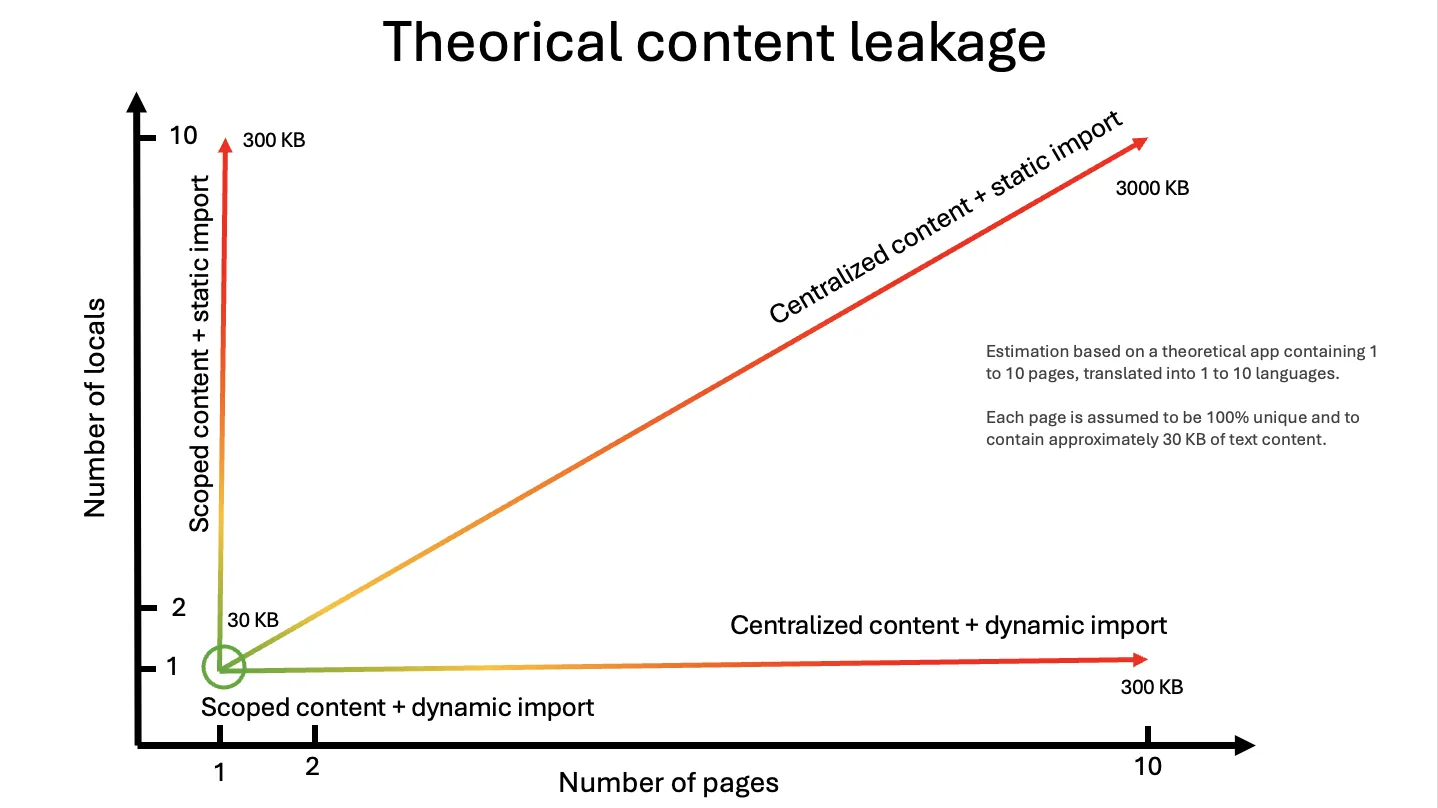
The benchmark is a single data point. On a theoretical app of 1 to 10 pages in 1 to 10 locales (about 30 KB of text per page), a centralized catalog with static imports grows with both axes. Lazy-loading per locale removes one axis, scoping content per component removes the other, and only the combination stays flat.
Why Is vue-i18n Heavy?
An AST Compiler Shipped to the Browser
vue-i18n contains its own message format compiler. Plural rules and interpolations are parsed into Abstract Syntax Trees at runtime.
Avoiding this requires configuring bundler aliases for vue-i18n/dist/vue-i18n.runtime.esm-bundler.js and pre-compiling catalogs via @intlify/unplugin-vue-i18n. Many projects miss this step, inadvertently shipping an entire compiler to end users.
Monolithic Feature Set
vue-i18n includes number and datetime engines, linked message resolvers, legacy Options API bridges ($t, v-t), and reactive message proxies. Even if you only need plain string translations in <script setup>, you pay for the entire suite.
Dynamic Keys Defeat Tree-Shaking
Because "home.hero.title" is evaluated at runtime, bundlers cannot verify which keys are accessed. Unused strings in your message files cannot be tree-shaken.
Copy the code to the clipboard
Copy the code to the clipboard
The Intlayer compiler tracks exact properties and removes unreferenced content before building client chunks. See bundle optimization for details.
Developer Experience
Disconnected Catalogs vs. Co-Location
With vue-i18n, copy lives in a separate locales/ directory. Intlayer co-locates typed content files directly beside components:
Copy the code to the clipboard
Copy the code to the clipboard
Copy the code to the clipboard
Copy the code to the clipboard
Copy the code to the clipboard
When Hero.vue is deleted or refactored, its content file moves or gets removed with it.
Autocomplete vs. Strict Completeness
DefineLocaleMessage provides IDE autocomplete against a canonical schema. However, it does not guarantee translation completeness. Omitting a key from fr.json raises no TypeScript error at build time.
With Intlayer, dictionaries are validated strictly. Enabling strictMode turns missing translations in any locale into hard compile errors.
Modern Tooling for AI & IDEs
Open the table in a modal to view all data content clearly
| Feature | vue-i18n | Intlayer |
|---|---|---|
| VS Code Extension | Third-party (i18n Ally) | ✅ First-party extension |
| Language Server (LSP) | ❌ None | ✅ Integrated LSP |
| MCP Server for AI | ❌ None | ✅ Built-in MCP Server |
| Agent Skills | ❌ None | ✅ Autonomous agent skills |
| Visual In-Context CMS | ❌ None | ✅ Free & Open Source CMS |
Translation Pipelines
vue-i18n does not offer a native translation command. Teams typically export JSON to third-party platforms like Crowdin or Phrase.
Intlayer provides built-in tools:
Local AI auto-fill (intlayer fill):
Automatically translates missing keys using your own OpenAI, Anthropic, Mistral, or Gemini API keys.
Self-hostable visual CMS:
Use the Intlayer CMS to let non-developers edit copy while changes commit directly to Git.
Permissive open-source license:
The entire toolkit is Apache 2.0.
When vue-i18n is Still the Right Choice
If your routing architecture is deeply coupled to @nuxtjs/i18n and running stably, a rewrite may not provide an immediate return on investment.
If you rely extensively on linked messages, complex datetime formatters, or intricate custom plural rules.
If bundle size is not a constraint for your use case.
How to Improve My Existing vue-i18n Setup?
Intlayer offers drop-in compatibility packages that preserve the exact function signatures of vue-i18n and @nuxtjs/i18n (useI18n, $t, <i18n-t>). You do not need to rewrite your templates or composables to start benefiting from a lightweight, compiler-driven architecture.
Setup takes a single command:
Copy the code to the clipboard
This interactive CLI:
- Installs the
@intlayer/vue-i18nor@intlayer/nuxt-i18ncompatibility package. - Configures Vite or Nuxt bundler aliases so your existing imports and template usages route seamlessly to Intlayer, allowing you to remove
vue-i18nfrompackage.json. - Instantly enables language server (LSP) diagnostics, eliminates the 24 KB runtime AST parser from your client bundle, and unlocks local AI translation workflows without a major refactor.
For step-by-step instructions, explore our dedicated guides:
- Drop-in Compatibility: Keep existing templates using the
vue-i18ncompatibility layer or@nuxtjs/i18ncompatibility layer. - Automated Migration Guides: Convert legacy JSON files into structured dictionaries with our guides: from vue-i18n or from @nuxtjs/i18n.
- Hybrid Setup: Keep
vue-i18nat runtime while using Intlayer alongside vue-i18n for local type safety and AI translation.
Scan your live website for payload and leakage with the free i18n SEO Scanner:
Further Reading
Comments
No comments yet. Be the first to share your thoughts.