
Ask your question and get a summary of the document by referencing this page and the AI provider of your choice
Version History
- "Add WebMCP support for browser AI agents"v9.5.139/30/2026
- "Init history"v9.5.69/22/2026
If you have an idea for improving this documentation, please feel free to contribute by submitting a pull request on GitHub.
GitHub link to the documentationCopy doc Markdown to clipboard
Chrome & Firefox Extension: i18n & SEO Scanner
Overview
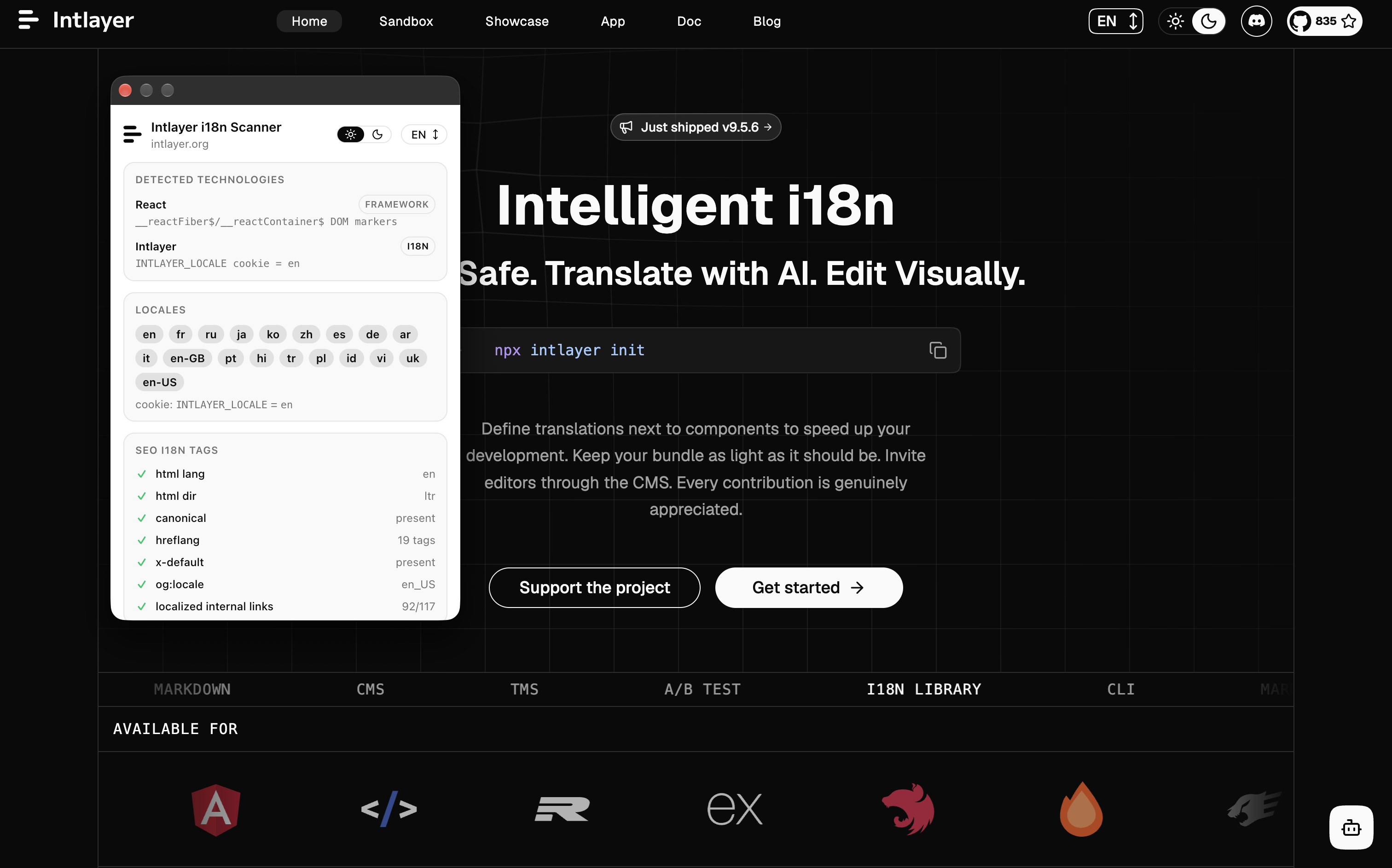
Intlayer i18n Scanner is the official Chrome extension for Intlayer. Open it on any website to see how the site handles internationalization: which framework and i18n library it uses, which locales it exposes, and whether its multilingual SEO tags are set up correctly.
It works on every website, whether or not it uses Intlayer.
Features
- Technology detection: identifies the framework (Next.js, Nuxt, Astro, SvelteKit, Angular, Vue.js, Qwik, React, Gatsby, WordPress) and the i18n library (Intlayer, i18next, Vue I18n, @nuxtjs/i18n, Angular @angular/localize, next-intl / next-i18next, Weglot, Localize, WPML, Polylang). Each detection shows the evidence that triggered it, such as a global variable, a cookie or a DOM marker.
- Locales: lists the locales found in the
langattribute, hreflang andog:localetags, the URL locale prefix, and locale cookies or storage entries. - SEO i18n tags: checks
html lang,html dir, the canonical link, hreflang tags,x-default,og:localeand the ratio of localized internal links. - Navigate across locales: switches the current page to any of its localized versions in one click, based on its hreflang tags.
- Search in sitemap: searches every page listed in the site's sitemap and opens it in the current tab.
- Full audit: runs the same audit as the i18n SEO Scanner and shows a live score.
- AI agent tools (WebMCP): lets an AI agent running in the browser inspect, navigate and audit the current website for you.
Installation
Install Intlayer i18n Scanner from the Chrome Web Store, then pin it to your toolbar.
The extension works in Chrome and in any Chromium based browser that supports Chrome Web Store extensions (Edge, Brave, Arc, Opera).
Install Intlayer i18n Scanner from Firefox Add-ons, then pin it to your toolbar.
Usage
Inspect a page
- Open the website you want to inspect.
- Click the Intlayer i18n Scanner icon in the toolbar.
- The popup shows the Detected technologies, Locales and SEO i18n tags sections for the current page.
Detection runs locally in your browser, on the current tab only.
Navigate between locales
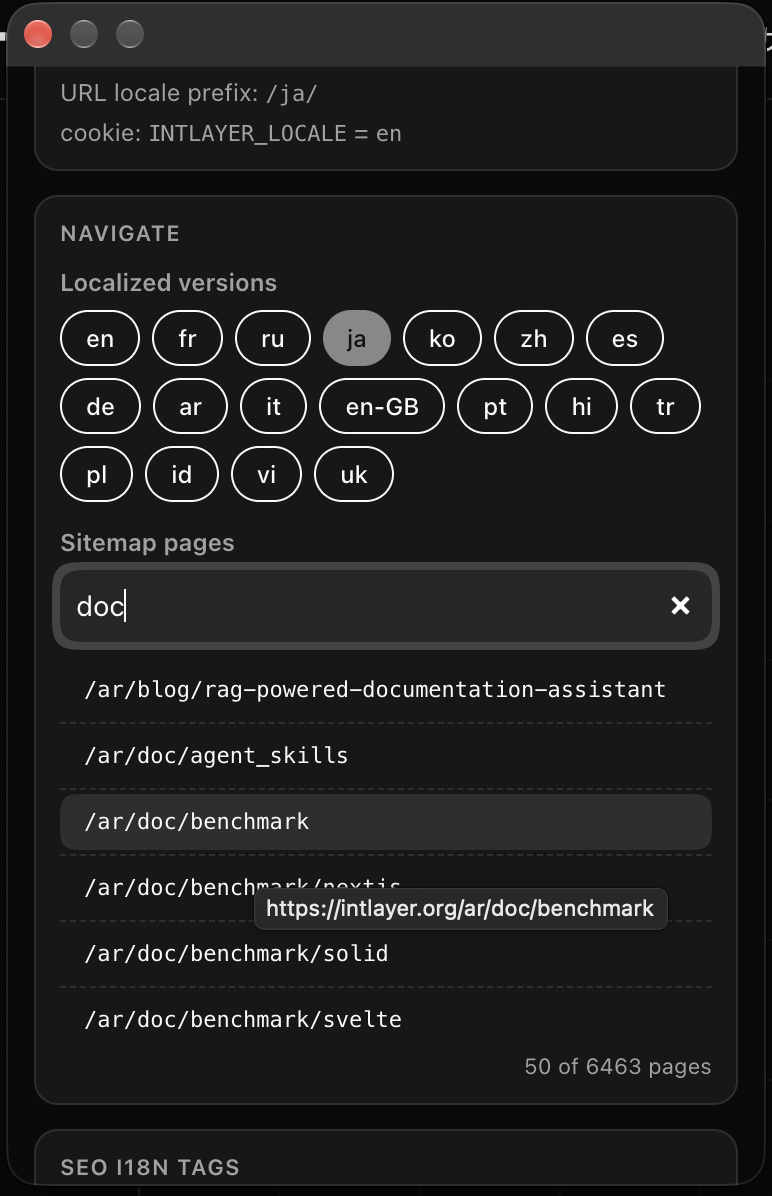
The Navigate section lists the Localized versions of the current page, read from its hreflang tags. Click a locale to open that version in the current tab.
Under Sitemap pages, type to search the URLs of the site's sitemap, then click a result to open it.
Run a full audit
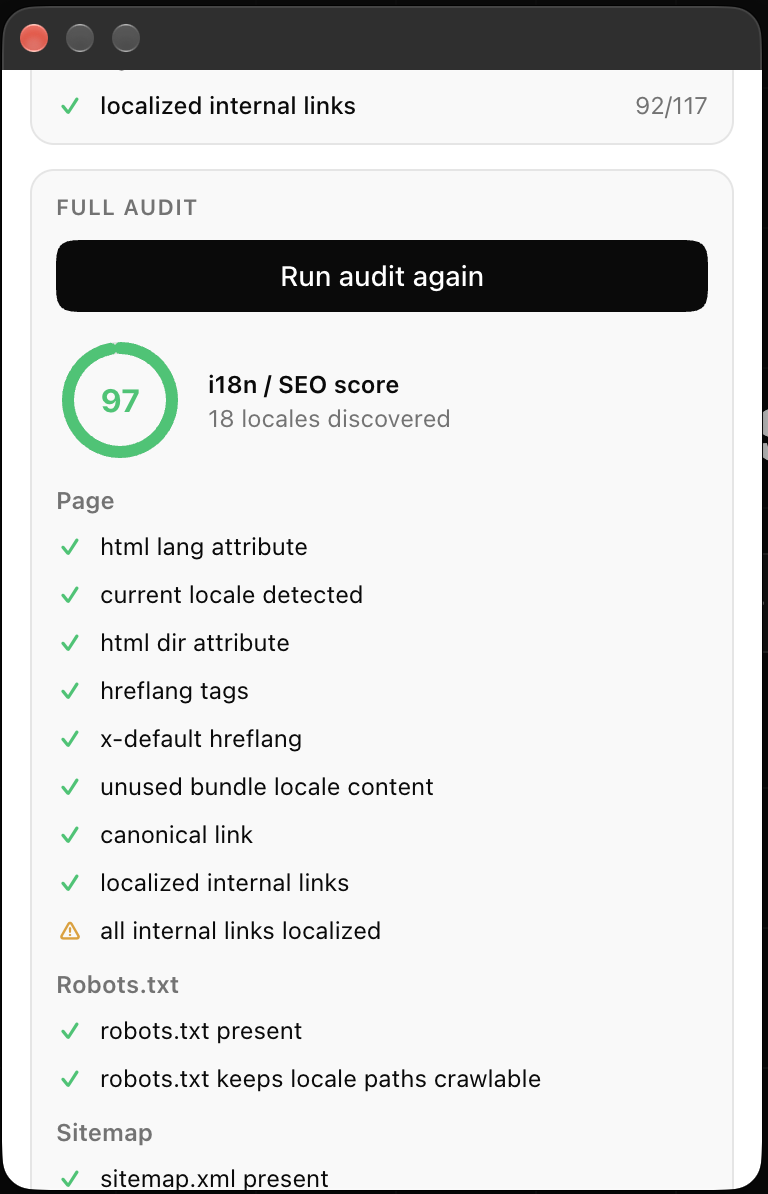
Scroll to the Full audit section and click Run full i18n audit. Results stream in as each check completes, grouped into:
- Page:
html langanddirattributes, current locale, hreflang tags,x-default, canonical link, localized internal links, language selector, flag icons, and unused locale content shipped in the JavaScript bundle. - Robots.txt: presence, and whether locale paths stay crawlable.
- Sitemap: presence, every locale listed, alternate links and
x-default. - Domain: number of locales discovered across the site.
Each check is marked as passed, warning or failed, and the score summarizes the overall i18n SEO health of the page.
Use with an AI agent (WebMCP)
The extension supports WebMCP, the browser standard that lets websites and extensions expose tools to AI agents running in the browser. While the popup is open, an agent can use the extension the same way you do, for example to:
- Explain how the current website handles internationalization, and which Intlayer migration guide fits its i18n library.
- Browse the site: switch to a localized version of the page, or find and open a page listed in the sitemap.
- Run a full audit, summarize the failing checks and suggest how to fix them.
- Answer questions about Intlayer from its documentation.
Privacy and permissions
The extension requests minimal permissions:
- activeTab and scripting: the detector runs only on the tab you are viewing, and only when you open the popup.
- back.intlayer.org: used only when you run a full audit. The URL of the current page is sent to the Intlayer API to be scanned.
- mcp.intlayer.org: contacted only when a WebMCP browser agent is available, to load the Intlayer documentation tools.
No browsing history is collected and nothing runs in the background.
FAQ
No. The extension inspects any website, whatever framework or i18n library it uses.
Detection relies on what the page exposes in the browser: global variables, cookies, meta tags and DOM markers. Some production builds strip these markers, so a library can be in use without leaving a visible trace.
Most checks map to a routing or metadata setting. With Intlayer, hreflang, canonical, x-default, localized links, sitemap and robots.txt are generated from your configuration. See the integration guide for your framework, for example Next.js, Nuxt or TanStack Start.