
Ask your question and get a summary of the document by referencing this page and the AI provider of your choice
The content of this page was translated using an AI.
See the last version of the original content in EnglishIf you have an idea for improving this documentation, please feel free to contribute by submitting a pull request on GitHub.
GitHub link to the documentationCopy doc Markdown to clipboard
Is i18next Outdated in 2026?
i18next launched in 2011, long before React components, Webpack bundling, or TypeScript became standard. It won the ecosystem by being flexible and omnipresent, earning plugins for every stack and an answer on StackOverflow for every possible bug.
It isn't abandoned; patches still land regularly. But there is a real difference between keeping an older engine running and actively evolving with modern frontend architecture.
Over the last few years, frontend moved toward build-time compilation, React Server Components (RSC), aggressive tree-shaking, and AI-driven workflows. i18next's core remains what it was over a decade ago: a runtime singleton resolving string keys on the client.
Key Takeaways
Maintenance mode:
Over the past year, next-i18next logged ~63 commits (roughly one a week) and react-i18next ~157, mostly for dependency bumps and minor fixes.
Heavy runtime penalty:
react-i18next and next-i18next inject ~17–18 KB gzipped (~60 KB minified) before rendering a single translated word, nearly 4x next-intlayer (~4.7 KB).
Severe bundle leakage:
In default static setups, up to 89.8% of the localisation payload sent to a page belongs to other routes or unread languages.
Tree-shaking is impossible:
Dynamic string calls like t("home.hero.title") cannot be analysed by bundlers, forcing entire JSON catalogues into the client chunk.
Business incentives:
The maintainers run Locize. Building a zero-cost, local AI translation pipeline directly into the CLI would directly compete with their primary revenue stream.
Maintenance vs. Active Evolution
GitHub stars reflect historical adoption rather than current architectural momentum.
Open the table in a modal to view all data content clearly
| Repository | Stars | Total commits | Commits / year | Last commit |
|---|---|---|---|---|
i18next/i18next |  |  |  |  |
i18next/react-i18next |  |  |  |  |
i18next/next-i18next |  |  |  |  |
aymericzip/intlayer |  |  |  |  |
Activity across the trailing twelve months:
Open the table in a modal to view all data content clearly
| Project | Lifetime commits | Last 12 months | Focus |
|---|---|---|---|
next-i18next | 1,311 | 63 | Next.js compatibility bumps & patch fixes |
react-i18next | 1,988 | 157 | Types & maintenance |
i18next core | 2,626 | 259 | Minor patches |
| Intlayer | 7,156 | 4,343 | Compiler, IDE tooling & AI engine |
- i18next/i18next
- i18next/react-i18next
- i18next/next-i18next
- aymericzip/intlayer
Commits on the default branch, source: GitHub API.
A small library can be complete and stable. But i18n tooling didn't freeze: modern bundlers now eliminate unreferenced copy at build time, LLMs handle translations instantly in CI, and editors rely on dedicated Language Servers (LSP) and AI agents. Because i18next relies on an open runtime plugin model, compilers cannot inspect it, leaving it stuck in place.
To understand where these libraries come from, read the history of JavaScript i18n.
npm downloads
- i18next
- react-i18next
- next-i18next
- intlayer
Source: npm registry downloads API.
Downloads reward the oldest solutions, not the best ones. A library released years ago is still installed by every project that chose it back then, by every CI run and by every package that depends on it. The count measures inertia more than a fresh choice.
AI assistants amplify the effect. next-intl, i18next and vue-i18n are everywhere in the code they were trained on, so they suggest them by default, without comparing the alternatives. Each suggestion adds downloads, which feeds the next suggestion. Compare on the benchmark rather than on the download count.
Measuring the Bundle Cost
Metric
Dynamic JSON loading
Lazy-loads translations at runtime
Scoped JSON (namespacing)
Per-page translation namespaces
What is this metric?
The total gzip-compressed size of the internationalisation library bundle. It only includes the provider and content retrieval logic after tree-shaking and minification.
Why is it important?
A smaller library size reduces the initial JavaScript payload, leading to faster download and execution times on the client.
View as
Measured in a production browser build across 10 routes and 10 locales with gzip compression. Details in the i18n benchmark report.
Baseline Framework Overhead
Footprint before adding any translated text:
Open the table in a modal to view all data content clearly
| Library | Gzipped | Minified |
|---|---|---|
next-i18next@16.0.5 | 17.8 KB | 61.2 KB |
react-i18next@17.0.2 | 17.3 KB | 59.8 KB |
intlayer@8.7.12 | 4.7 KB | 12.8 KB |
Page Weight and Leakage
Tested in React / TanStack Start (static strategy):
Open the table in a modal to view all data content clearly
| Library | Page JS avg (gz) | Locale leak | Other-page leak | Avg component (gz) | Hydration |
|---|---|---|---|---|---|
react-i18next | 180.3 KB | 50.0% | 89.8% | 24.3 KB | 85.1 ms |
| Intlayer | 127.8 KB | 50.0% | 0.8% | 7.1 KB | 24.1 ms |
| Intlayer (scoped dyn) | 118.1 KB | 0.0% | 0.8% | 4.6 KB | 23.7 ms |
On Next.js:
Open the table in a modal to view all data content clearly
| Library | Page JS avg (gz) | Other-page leak | Avg component (gz) |
|---|---|---|---|
| Base (no i18n) | 150.8 KB | 0.0% | 0.7 KB |
next-i18next | 227.5 KB | 89.8% | 24.5 KB |
next-intlayer | 152.1 KB | 0.0% | 7.2 KB |
Key Findings
Page weight:
On Next.js, next-i18next adds 76.7 KB gzipped over baseline, a ~50% jump. next-intlayer adds just 1.3 KB.
Copy leakage:
In default setups, nearly 90% of localised text sent to a route belongs to other pages. Manual namespacing helps, but requires brittle route-by-route bookkeeping.
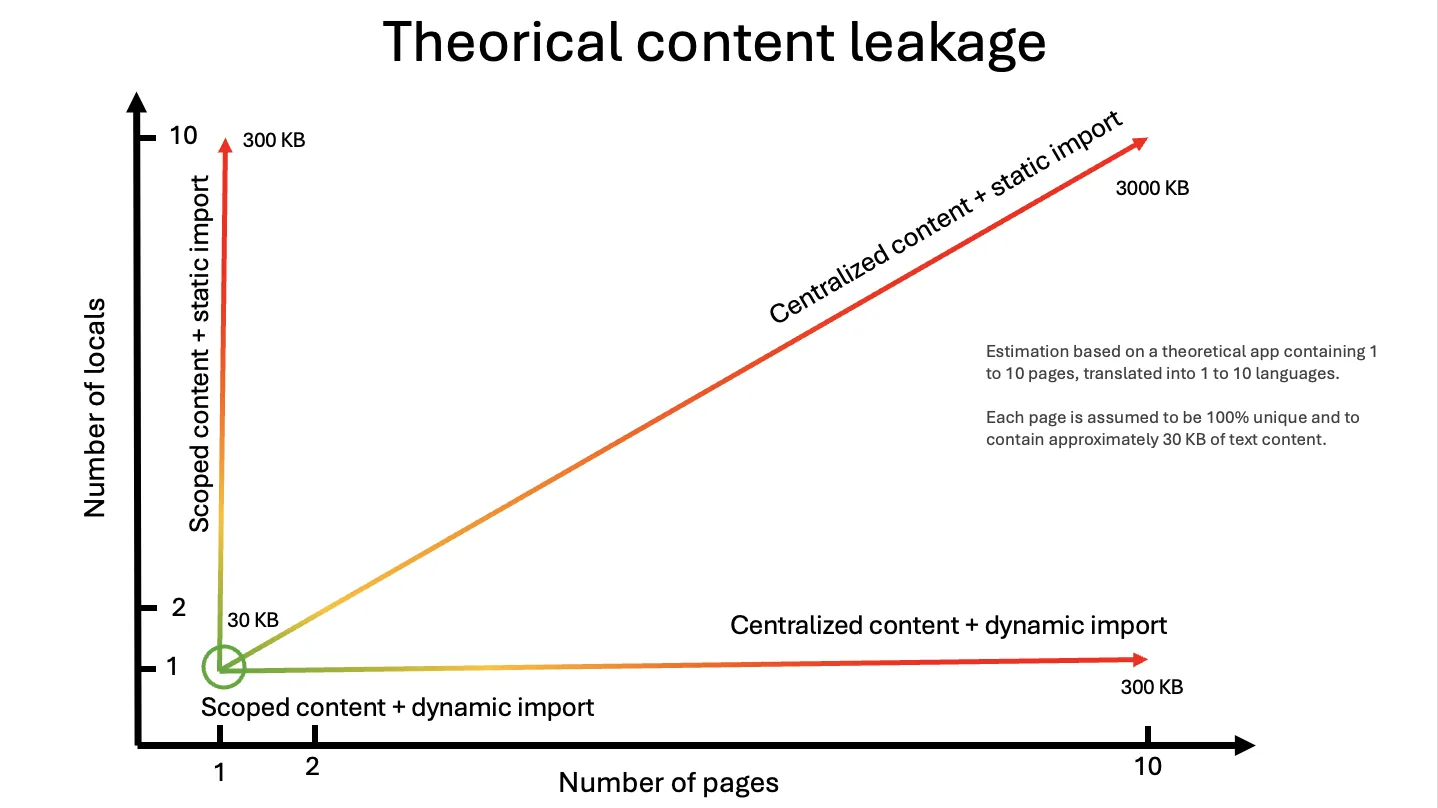
The graph below generalizes this to a theoretical app of 1 to 10 pages in 1 to 10 locales, with about 30 KB of text per page. Lazy backends remove the locale axis, namespaces scoped per route or component remove the page axis, and only the combination keeps the payload flat.
Hydration lag:
Components using react-i18next took 85 ms to hydrate versus 24 ms with Intlayer. Passing large message trees to client components hurts time-to-interactive.
Why Is i18next Heavy?
Decades of Runtime Feature Creep
Operating purely in the browser means shipping every capability upfront: interpolation, pluralisation rules, context resolution, formatting registries, and event buses. Even basic string swaps pay for the entire engine.
Dynamic String Keys Break Tree-Shaking
Because "hero.title" is evaluated dynamically at runtime, bundlers cannot verify which keys are accessed. Unused strings in your message files cannot be tree-shaken.
Copy the code to the clipboard
Copy the code to the clipboard
The Intlayer compiler inspects what Hero.tsx actually consumes and tree-shakes unreferenced fields before emitting client bundles. See bundle optimisation for architectural details.
Developer Experience
Disconnected JSON vs. Co-Location
i18next separates copy from code across multiple JSON directories and hook calls. Intlayer co-locates content declarations right beside components.
Copy the code to the clipboard
Copy the code to the clipboard
Copy the code to the clipboard
Copy the code to the clipboard
Copy the code to the clipboard
When you move or delete Hero.tsx, its copy moves or gets deleted alongside it.
Autocomplete vs. Strict Type Safety
Augmenting CustomTypeOptions gives IDE autocomplete for keys, but does not guarantee safety. Deleting a key from fr/home.json won't fail your build; it only triggers a runtime fallback.
Intlayer infers types directly from content declarations, and strictMode turns missing translations into strict build errors.
Tooling Comparison
Open the table in a modal to view all data content clearly
| Feature | i18next Ecosystem | Intlayer |
|---|---|---|
| VS Code Extension | Third-party only | ✅ First-party extension |
| Language Server (LSP) | ❌ None | ✅ Dedicated LSP |
| MCP Server (for AI) | ❌ None | ✅ Built-in MCP server |
| Agent Skills | ❌ None | ✅ Agent skills |
| Visual In-Context CMS | Locize (Paid SaaS) | ✅ Free & Open Source |
Translation and the Locize Incentive
Locize is the official commercial service created by the makers of i18next. While open source needs sustainable funding, this business model creates an obvious incentive: a library monetised through a SaaS translation platform has little reason to build a free, local AI translation command into its CLI.
Intlayer takes an open approach:
intlayer fillfills missing translations in your terminal or CI using your own OpenAI, Anthropic, Mistral, or Gemini API keys.- The Intlayer CMS is open source and self-hostable via Docker Compose.
- The compiler, CLI, editor, and CMS are all Apache 2.0.
Where i18next Still Fits
If your app runs smoothly and bundle size isn't a bottleneck, rewriting it isn't urgent.
i18next's vast plugin ecosystem supports setups (Electron, older jQuery apps, custom native bridges) modern compilers don't target.
An established StackOverflow and GitHub footprint helps with niche edge cases.
How to Improve My Existing i18next Setup?
Intlayer offers drop-in compatibility packages that preserve the exact function signatures of i18next libraries (i18next, react-i18next, and next-i18next). You do not need to rewrite your components to start benefiting from a compiler-driven architecture.
Setup takes a single command:
Copy the code to the clipboard
This interactive CLI:
- Installs the
@intlayer/i18nextcompatibility package. - Configures bundler aliases so your existing imports (
useTranslation,Trans,t) route to Intlayer, allowing you to remove the old library frompackage.json. - Sets up out-of-the-box IDE language server (LSP) diagnostics, build-time tree-shaking optimizations, and local AI translation workflows.
For step-by-step instructions, explore our dedicated guides:
- Compatibility shims: Keep your current syntax with the i18next compatibility layer, react-i18next compatibility layer, or next-i18next compatibility layer.
- Full catalogue migration: Convert legacy JSON files into type-safe dictionaries using our guides: from i18next, from react-i18next, or from next-i18next.
- Hybrid approach: Retain your existing runtime while using Intlayer alongside i18next to generate and translate catalogues automatically.
Scan your live website with the i18n SEO Scanner:
Related Reading
Comments
No comments yet. Be the first to share your thoughts.