
Ask your question and get a summary of the document by referencing this page and the AI provider of your choice
The content of this page was translated using an AI.
See the last version of the original content in EnglishIf you have an idea for improving this documentation, please feel free to contribute by submitting a pull request on GitHub.
GitHub link to the documentationCopy doc Markdown to clipboard
next-intl VS Intlayer

next-intl is the most popular i18n library for Next.js. Intlayer is a compiler-based, component-scoped alternative. Both localise an App Router application. The question is what each one costs once the app is built.
This article is not a tutorial. It's a comparison backed by numbers from Benchmark Bloom, an open-source benchmark suite that builds the same application with each library and measures what the browser actually downloads and executes.
tl;dr: On the same Next.js app,next-intladds +12.6 KB gzip of JavaScript on every page, versus +0.3 KB for Intlayer. Without extra work,next-intlships ~90% of foreign-page strings with every page. Reaching 0% leakage withnext-intlrequires namespace scoping and per-pagepick(messages, [...]). Intlayer reaches 0% by default, because its compiler scopes content per component. If you want thenext-intlAPI with Intlayer's output, the@intlayer/next-intladapter measured 147.5 KB per page versus 153.6 KB with the original.
In short
- next-intl - Lightweight, well-documented, ICU message format, first-class App Router support with middleware, formatters and navigation helpers. Content lives in centralised JSON catalogues; performance optimisations (namespaces, per-page message picking, lazy loading) are your responsibility.
- Intlayer - Component-centric content model.
.content.tsdictionaries sit next to the component they serve, a build-time compiler tree-shakes and lazy-loads them per component and per locale, strict TypeScript types are generated from your content, and missing translations fail at build time. Ships middleware, SEO helpers, a Visual Editor / CMS and AI-assisted translation.
Open the table in a modal to view all data content clearly
| Library | GitHub Stars | Total Commits | Last Commit | First Version | NPM Version | NPM Downloads |
|---|---|---|---|---|---|---|
aymericzip/intlayer |  |  |  | April 2024 |  |  |
amannn/next-intl |  |  |  | Nov 2020 |  |  |
Badges update automatically. Snapshots will vary over time.
Side-by-side feature comparison
Open the table in a modal to view all data content clearly
| Feature | next-intlayer (Intlayer) | next-intl |
|---|---|---|
| Translations near components | ✅ Yes, .content.ts collocated with each component | ❌ No, centralised messages/{locale}.json |
| TypeScript integration | ✅ Strict types auto-generated from content | ✅ Good, keys typed via global.d.ts augmentation |
| Missing translation detection | ✅ TypeScript error + build-time error/warning | ⚠️ Runtime fallback + console warning |
| Rich content (JSX / Markdown / components) | ✅ Direct support | ⚠️ t.rich() / t.markup() with tag placeholders |
| ICU support | ⚠️ WIP | ✅ Yes |
| Formatting (dates, numbers, currencies) | ✅ useNumber, useDate, ... (Intl under the hood) | ✅ useFormatter() (Intl under the hood) |
| Localised routing & middleware | ✅ Built-in proxy/middleware, getMultilingualUrls | ✅ Built-in middleware, Link, redirect, usePathname |
| SEO helpers (hreflang, sitemap, robots) | ✅ Built-in helpers | ⚠️ Manual, based on routing config |
| Synchronous server components | ✅ useIntlayer from next-intlayer/server works in any child server component | ⚠️ getTranslations is async; sync children need t passed as props |
| Static rendering | ✅ Does not block static rendering | ⚠️ Requires setRequestLocale(); namespaced catalogues still opted pages out of static rendering in our tests |
| Tree-shaking (ship only used content) | ✅ Per component, per locale, automated by the compiler | ⚠️ Manual: namespaces + pick(messages, [...]) per page |
| Lazy loading | ✅ importMode: 'dynamic' (one line of config) | ⚠️ Manual dynamic imports in getRequestConfig |
| Purge unused content | ✅ Dead dictionaries are dropped at build time | ❌ Not built-in |
| Testing missing translations (CLI / CI) | ✅ npx intlayer content test | ⚠️ Not built-in; docs suggest npx @lingual/i18n-check |
| AI-powered translation | ✅ Built-in, uses your own provider keys | ❌ No |
| Visual Editor / CMS | ✅ Free Visual Editor + optional CMS | ❌ No (external localisation platforms) |
| MCP server & Agent Skills | ✅ Yes | ❌ No |
| Ecosystem / community | ⚠️ Smaller but growing fast | ✅ Large, the Next.js reference |
The benchmark
What was measured
The Benchmark Bloom suite builds the same application with each library: 10 pages (home, about, blog, careers, contact, FAQ, pricing, products, settings, team), 10 locales (en, fr, es, de, it, pt, zh, ja, ko, ru), identical components and identical content. Pages are measured in en and fr. Each library is implemented in up to four loading strategies, from the naïve setup to the optimal one:
Open the table in a modal to view all data content clearly
| Strategy | Description | Who does this |
|---|---|---|
| static | Every locale and every page bundled together | Quick prototypes, AI-generated code |
| dynamic | Only the active locale is loaded, but all pages at once | Most projects |
| scoped-static | Per-route namespaces, no lazy loading | Rare |
| scoped-dynamic | Per-route namespaces + lazy loading. Only the current page in the current locale is sent | Apps with a strict performance budget |
Intlayer has no "scoped" variant: the compiler scopes content per component automatically, so its static and dynamic rows are already scoped.
For each build, the suite records:
- Lib size: gzip size of an empty component that only imports the i18n library. The fixed cost of the runtime.
- Page JS: gzip JavaScript downloaded per page, averaged over all pages and locales.
- Locale leak %: share of translated strings found in the downloaded JS that belong to a locale the user is not viewing (fingerprinted on
enandfr, so 50% means "the other measured locale is fully present"; with 10 locales bundled, the real waste is higher). - Page leak %: share of translated strings found in the downloaded JS that belong to a page the user is not on.
- Component avg: average gzip size of each component compiled in isolation. Shows how much i18n runtime a single component drags in.
- E2E reactivity: wall-clock time between selecting a new locale and
html[lang]updating in the DOM (Playwright, 5 iterations). - Hydration: React hydration phase duration.
Numbers below come from the run dated 2026-09-12 withnext-intl4.14.2,use-intl4.14.2 andintlayer9.5.1. The test application is deliberately small (a few dozen strings per locale), so leakage percentages describe a pattern: they grow with your content whilst the runtime cost stays fixed.
Results on Next.js (App Router)
Pick the metrics and the libraries you care about:
Metric
Dynamic JSON loading
Lazy-loads translations at runtime
Scoped JSON (namespacing)
Per-page translation namespaces
What is this metric?
The total gzip-compressed size of the internationalisation library bundle. It only includes the provider and content retrieval logic after tree-shaking and minification.
Why is it important?
A smaller library size reduces the initial JavaScript payload, leading to faster download and execution times on the client.
View as
Open the table in a modal to view all data content clearly
| Library | Strategy | Lib size (gz) | Page JS avg (gz) | Locale leak | Page leak | Component avg (gz) | E2E reactivity | Hydration |
|---|---|---|---|---|---|---|---|---|
| base (no i18n) | - | 0.0 KB | 141.0 KB | 0.0% | 0.0% | 0.9 KB | 13.4 ms | 11.8 ms |
next-intl | static | 14.7 KB | 153.6 KB | 4.2% | 89.8% | 21.8 KB | 16.0 ms | 14.7 ms |
next-intl | dynamic | 14.7 KB | 153.6 KB | 9.7% | 89.9% | 21.8 KB | 15.6 ms | 14.8 ms |
next-intl | scoped-static | 14.7 KB | 153.6 KB | 0.0% | 0.0% | 80.1 KB | 17.9 ms | 17.4 ms |
next-intl | scoped-dynamic | 14.7 KB | 153.6 KB | 0.0% | 0.0% | 22.9 KB | 17.8 ms | 16.8 ms |
next-intlayer | static | 5.5 KB | 141.3 KB | 0.0% | 0.0% | 8.5 KB | 15.5 ms | 16.9 ms |
next-intlayer | dynamic | 5.5 KB | 141.3 KB | 0.0% | 0.0% | 6.9 KB | 15.3 ms | 15.9 ms |
@intlayer/next-intl (compat) | static | 8.0 KB | 147.5 KB | 0.0% | 0.0% | 8.1 KB | 14.5 ms | 12.8 ms |
@intlayer/next-intl (compat) | dynamic | 8.0 KB | 148.7 KB | 0.0% | 0.0% | 8.1 KB | 11.7 ms | 12.8 ms |
How to read it
- Runtime cost. The base application weighs 141.0 KB per page.
next-intlbrings it to 153.6 KB (+12.6 KB gzip on every page), Intlayer to 141.3 KB (+0.3 KB). This gap does not depend on how many strings you have: it is the library runtime. - Leakage. In the two setups most teams actually ship (
staticanddynamic),next-intldelivers ~90% of foreign-page strings with every page: the wholeen.jsongoes into the client provider. Getting to 0% requires thescoped-*setups: split catalogues into namespaces, thenpick()the right ones in every page. Intlayer is at 0% in both rows without any of that. - Per-page JS did not move for
next-intlbetween strategies. The test content is small, so the ~90% leak is only a few KB here. On a real app with hundreds of strings per page, that ratio becomes the dominant cost. Meanwhile the +12.6 KB runtime is paid in every configuration. - Component size. A component that calls
useTranslations()compiles to 21.8 KB on average; the same component withuseIntlayer()compiles to 6.9 KB. In thescoped-staticsetup thenext-intlcomponents jump to 80.1 KB because each one inlines its namespace catalogue. - Reactivity and hydration are in the same ballpark for both libraries on Next.js (15-18 ms). Neither one is a bottleneck here.
Full table, every library and every strategy, in the Next.js benchmark report.
Results on TanStack Start (use-intl)
use-intl is the framework-agnostic core of next-intl. Same API, same message format. Comparing it against intlayer on TanStack Start removes the Next.js-specific parts of the equation.
Open the table in a modal to view all data content clearly
| Library | Strategy | Lib size (gz) | Page JS avg (gz) | Locale leak | Page leak | Component avg (gz) | E2E reactivity |
|---|---|---|---|---|---|---|---|
| base (no i18n) | - | 0.0 KB | 111.0 KB | 0.0% | 0.0% | 0.7 KB | 8.1 ms |
use-intl | static | 14.1 KB | 179.8 KB | 50.0% | 89.8% | 76.0 KB | 6.7 ms |
use-intl | dynamic | 14.1 KB | 119.4 KB | 0.0% | 89.8% | 75.9 KB | 7.0 ms |
use-intl | scoped-static | 14.1 KB | 128.7 KB | 0.0% | 0.0% | 87.1 KB | 20.9 ms |
use-intl | scoped-dynamic | 14.1 KB | 128.7 KB | 0.0% | 0.0% | 87.1 KB | 13.3 ms |
intlayer | static | 5.0 KB | 125.8 KB | 50.0% | 0.0% | 8.1 KB | 3.2 ms |
intlayer | dynamic | 5.0 KB | 118.6 KB | 0.0% | 0.0% | 6.3 KB | 3.6 ms |
@intlayer/use-intl (compat) | dynamic | 7.3 KB | 129.7 KB | 0.0% | 0.0% | 9.3 KB | 8.7 ms |
How to read it
- The naive
use-intlsetup ships 68.8 KB more JS per page than the base app, with half of the strings belonging to the wrong locale and 90% to the wrong page. use-intlindynamicmode lands at 119.4 KB, close to Intlayer's 118.6 KB, but still carries 89.8% page leakage: all pages' strings for the active locale are loaded on every page. Scoping them per route (scoped-*) removes the leak but costs another ~9 KB of chunk overhead.- Intlayer's
staticrow already has 0% page leakage: the compiler only bundles the dictionaries used by the components on the page. EnablingimportMode: 'dynamic'(one line inintlayer.config.ts) removes the locale leakage too. - Component size is where the architecture shows: 76-87 KB per component with
use-intlversus 6-8 KB with Intlayer.useTranslations()binds each component to the global message tree;useIntlayer()binds it to its own dictionary. - Locale switch is 2x-4x faster with Intlayer (3 ms vs 7-21 ms).
Full table in the TanStack Start benchmark report.
Why the gap? Centralised catalogues vs. compiled dictionaries
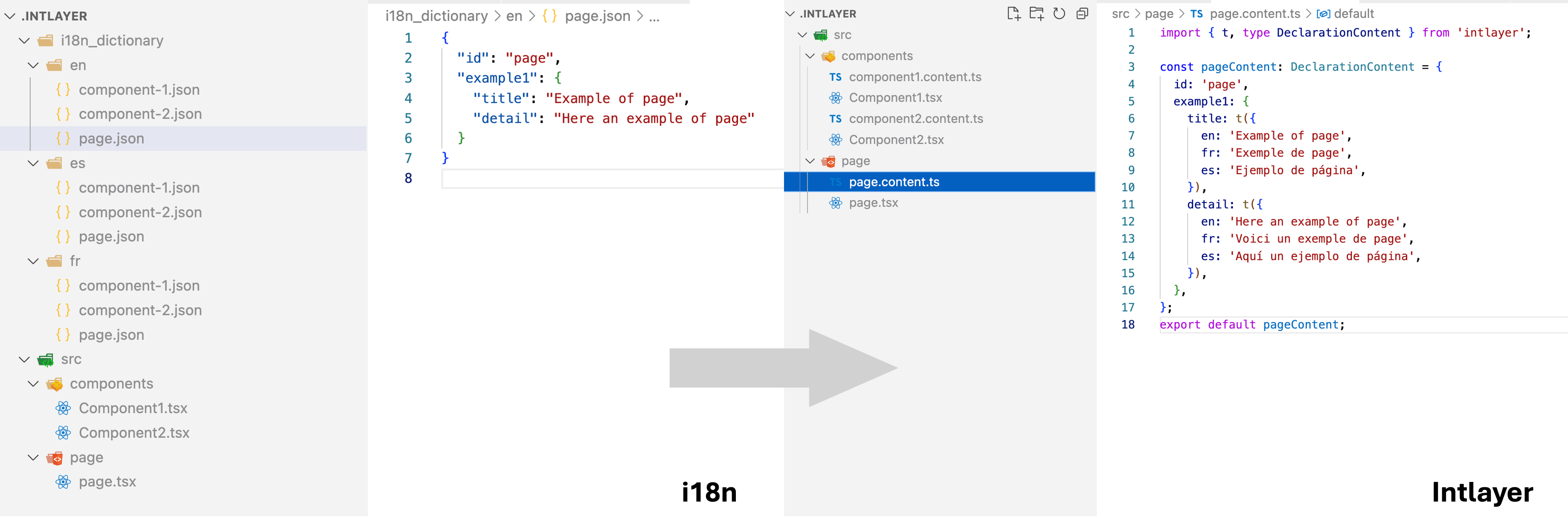
next-intl follows the classic model: one JSON per locale, loaded in getRequestConfig, pushed into a NextIntlClientProvider, read through t("namespace.key").
Copy the code to the clipboard
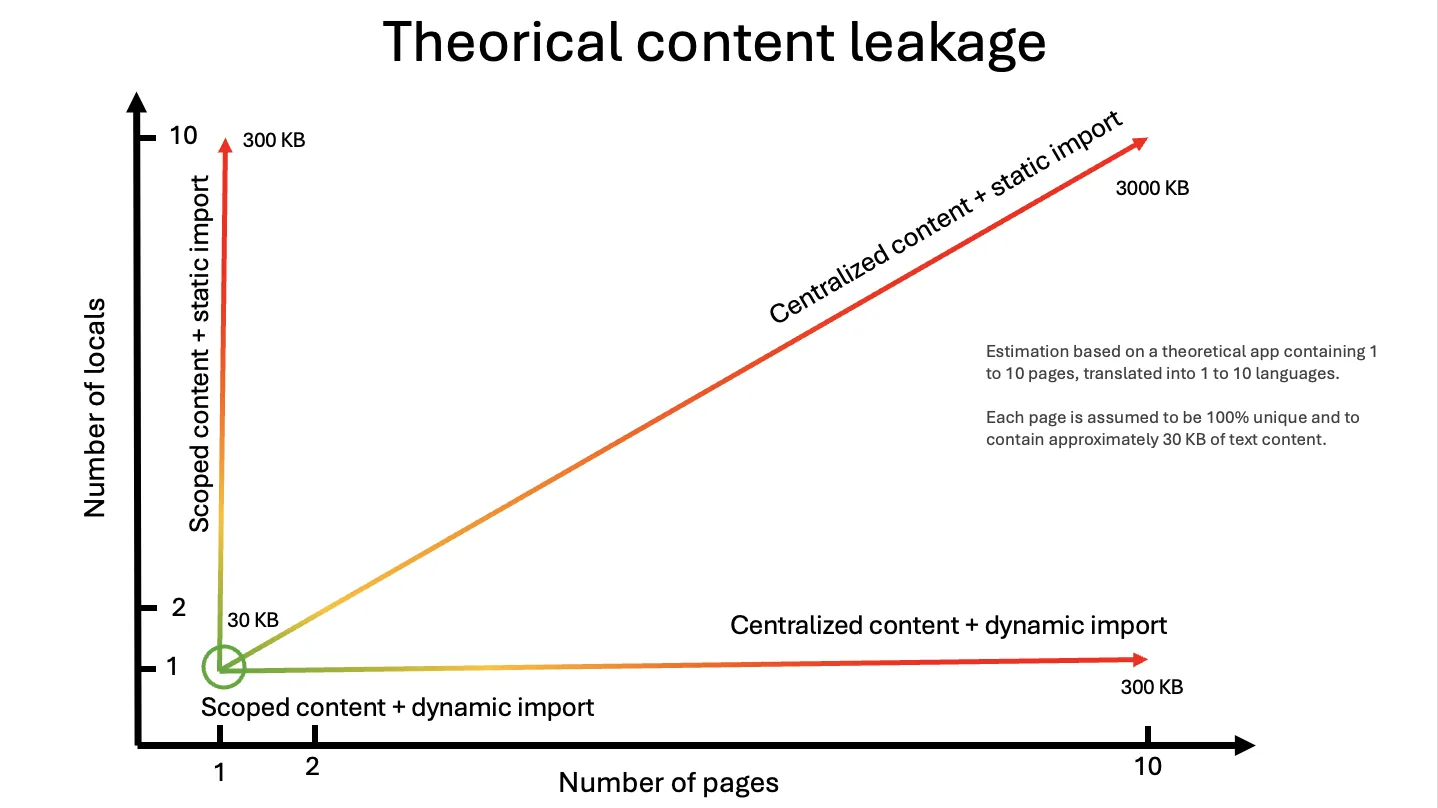
The runtime cannot know which keys a page will use, so the safe default is to send the whole catalogue. Optimising means you split the catalogue into namespaces, you decide which namespaces each page needs, and you keep that mapping in sync as components move around. The benchmark's scoped-dynamic row is the reward for that work, and most teams never get there.
The cost of not getting there grows on two axes at once, pages and locales:
Intlayer flips the responsibility. Content is declared next to the component:
Copy the code to the clipboard
During build time, the compiler (@intlayer/swc / @intlayer/babel) observes which component imports which dictionary. It bundles only those dictionaries, only for the active locale, and removes the ones that nothing imports. The "scoped-dynamic" pattern becomes the output of the build instead of a discipline the team has to maintain.
To obtain thedynamicrow's numbers, setdictionary.importMode: 'dynamic'inintlayer.config.ts. See the bundle optimisation documentation.
Developer experience
Client component
Copy the code to the clipboard
Copy the code to the clipboard
Remember to include thecounternamespace in the messages passed toNextIntlClientProvideron every page that renders this component.
Copy the code to the clipboard
Copy the code to the clipboard
Nothing to register on the page: the component brings its own content.
Synchronous server component
Design-system pieces (navbar, footer, cards) are often server components rendered as children of client components, so they cannot be async.
Copy the code to the clipboard
The page has to await getTranslations("counter") and await getFormatter(), then thread the results down as props. The component is no longer self-contained.
Copy the code to the clipboard
Metadata
Copy the code to the clipboard
Copy the code to the clipboard
Keep the next-intl API, get Intlayer's output
You don't have to rewrite components to get the benchmark numbers above. @intlayer/next-intl is a drop-in adapter: it keeps useTranslations, getTranslations, useFormatter, t.rich(), ICU plurals and the next-intl/navigation helpers, and serves them from Intlayer dictionaries compiled by the Intlayer compiler.
Copy the code to the clipboard
In the benchmark, the compat build of the same app went from 153.6 KB to 147.5 KB per page, from 21.8 KB to 8.1 KB per component, and from ~90% page leakage to 0%, with the application code untouched. Your existing messages/{locale}.json files can stay the source of truth through the JSON sync plugin.
See the next-intl migration guide for the step-by-step.
When to choose which?
You want the ecosystem standard for Next.js, you rely on ICU MessageFormat, your app is small to mid-size, or you integrate with a translation platform (Crowdin, Phrase, Lokalise...) that expects centralized JSON. Budget the time to namespace catalogs and pick() messages per page if performance matters.
You want component-scoped content, strict TypeScript, build-time missing-key errors, zero-effort tree-shaking and lazy loading, synchronous server components, and built-in editorial tooling (Visual Editor, CMS, AI translation, MCP server). Especially relevant for large, modular codebases and design systems.
You are already on next-intl and want the bundle gains without a rewrite. The compat adapter keeps your imports and your messages/{locale}.json as the source of truth. Measured side by side in next-intl vs @intlayer/next-intl.
FAQ
Not at render time. The difference is what ships: next-intl costs +12.6 KB gzip of runtime on every page and, in the setups most teams run, sends ~90% of foreign-page strings with each page. Locale switching and hydration are comparable on Next.js (15-18 ms); on TanStack Start, use-intl takes 7-21 ms against 3-4 ms for Intlayer.
Yes, with the scoped-dynamic setup: split messages/{locale}.json into one namespace per route, then pick(messages, [...]) in every page and keep that mapping correct as components move. The benchmark's scoped-* rows are exactly that work. Intlayer reaches 0% without it because the compiler scopes content per component. See bundle optimization.
No. @intlayer/next-intl keeps useTranslations, getTranslations, useFormatter, t.rich(), ICU plurals and the navigation helpers, and serves them from compiled dictionaries. One plugin line in next.config.ts. Step by step in the next-intl migration guide.
ICU support is a work in progress on the native API. The compat adapters (@intlayer/next-intl, @intlayer/use-intl) do run ICU: plurals, select, selectordinal, # and {ts, date, long} go through Intlayer's ICU resolver. Read ICU message format for the details.
Yes. The JSON sync plugin reads them, splits their top-level keys into dictionaries, and writes translations back to the same files when the CLI or the CMS updates them. Your translators' workflow does not change.
Related comparisons
Same benchmark, other libraries:
Going further on next-intl:
Reference docs:
To understand where these libraries come from, read the history of JavaScript i18n.
GitHub STARs
GitHub stars are a strong indicator of a project's popularity, community trust, and long-term relevance. Whilst not a direct measure of technical quality, they reflect how many developers find the project useful, follow its progress, and are likely to adopt it.
Commit activity
Stars show popularity. Commits show how much work goes into a project. At the time of writing, Intlayer counts about 7,500 commits, more than most libraries compared here, and about 5 times more than next-intl or next-i18next.
- amannn/next-intl
- aymericzip/intlayer
Commits on the default branch, source: GitHub API.
Intlayer is a monorepo, so its count includes every framework package, the CLI and the docs. Read commits as a signal of activity, not of quality.
npm downloads
- next-intl
- next-intlayer
Source: npm registry downloads API.
Downloads reward the oldest solutions, not the best ones. A library released years ago is still installed by every project that chose it back then, by every CI run and by every package that depends on it. The count measures inertia more than a fresh choice.
AI assistants amplify the effect. next-intl, i18next and vue-i18n are everywhere in the code they were trained on, so they suggest them by default, without comparing the alternatives. Each suggestion adds downloads, which feeds the next suggestion. Compare on the benchmark rather than on the download count.
Conclusion
next-intl is a solid, well-maintained library, and the benchmark confirms it is far from the worst option on Next.js. However, its centralised-catalogue model places every optimisation on the developer: the naïve setup leaks approximately 90% of foreign-page content, and the runtime alone costs +12.6 KB gzip on every page.
Intlayer moves that work into the compiler. Per-component dictionaries, per-locale lazy loading and dead-content purging are build outputs, not conventions. The result on the same app: +0.3 KB per page, 0% leakage, components 3x smaller, and a locale switch 2x-4x faster on TanStack Start.
All the raw data, the test apps and the scripts are in the Benchmark Bloom repository. Run it yourself.
Refer to the 'Why Intlayer?' doc for more details.
Comments
No comments yet. Be the first to share your thoughts.