
Ask your question and get a summary of the document by referencing this page and the AI provider of your choice
The content of this page was translated using an AI.
See the last version of the original content in EnglishIf you have an idea for improving this documentation, please feel free to contribute by submitting a pull request on GitHub.
GitHub link to the documentationCopy doc Markdown to clipboard
Is Intlayer Lighter than Paraglide?
Yes.
Paraglide has a good reputation for being the lightest i18n solution around, and at first sight the benchmark agrees: its library size is close to zero. But a library size of zero does not mean zero bytes shipped. It means the bytes live somewhere the metric does not look.
Key Takeaways
The library size is hidden, not gone:
Paraglide generates its runtime and message functions into your codebase. That code ships to the browser, but it is counted as your code, not as the library's.
No provider is not a free win:
Every m.my_key() call resolves the locale on its own, reading the cookie or storage for each rendered node, instead of reading it once from a context.
No dynamic loading:
Paraglide imports every locale of a message into your client bundle. Intlayer with importMode: 'dynamic' or 'fetch' loads only the locale being rendered.
Tree shaking is not guaranteed:
In some of our benchmarks, Paraglide's advertised tree shaking did not take effect. Check your own bundle.
Where Does Paraglide's Weight Go?
In the benchmark reports, the "library size" metric measures the provider and hooks of each i18n library in an empty component, before any content is added.
Open the table in a modal to view all data content clearly
| Library (TanStack Start) | Lib size (gz) | Lib size (min) |
|---|---|---|
@inlang/paraglide-js@2.15.1 | 1.8 KB | 4.5 KB |
react-intlayer@9.5.1 | 5.0 KB | 15.2 KB |
Read in isolation, Paraglide wins. But Paraglide is a compiler: it reads your messages/*.json files and writes a paraglide/ folder into your repository, containing a runtime.js (locale detection, cookie and storage strategies, URL localisation) and one JavaScript function per message.
Copy the code to the clipboard
Because this code sits in your src/ folder and you import it with a relative path, the bundler attributes it to your application, not to a node_modules package. The library size column shows almost nothing, while the same logic still ships in your page bundle.
Generating code is not a bad idea in itself: the generated runtime only includes the logic your configuration needs (prefix strategy, cookie vs. local storage, etc.). Intlayer reaches the same result differently, by injecting environment variables at build time so the bundler drops the branches your configuration does not use. Both approaches end up 3 to 10 times lighter than i18next or next-intl.
So the fair comparison is not the library size. It is the JavaScript actually sent per page.
Page Weight, Measured
TanStack Start app, 10 pages, measured on the en and fr routes, gzipped:
Open the table in a modal to view all data content clearly
| Setup | Page JS avg (gz) | Above base | Locale leak | Other-page leak |
|---|---|---|---|---|
| Base (no i18n) | 111.0 KB | - | 0.0% | 0.0% |
paraglide (any strategy) | 125.1 KB | +14.1 KB | 49.7% | 0.0% |
intlayer (importMode: static) | 125.8 KB | +14.8 KB | 50.0% | 0.0% |
intlayer (importMode: dynamic) | 118.6 KB | +7.6 KB | 0.0% | 0.0% |
Next.js 16 App Router, same app:
Open the table in a modal to view all data content clearly
| Setup | Page JS avg (gz) | Above base |
|---|---|---|
| Base (no i18n) | 141.0 KB | - |
paraglide-next | 155.3 KB | +14.3 KB |
next-intlayer | 141.3 KB | +0.3 KB |
Metric
Dynamic JSON loading
Lazy-loads translations at runtime
Scoped JSON (namespacing)
Per-page translation namespaces
What is this metric?
The total gzip-compressed size of the internationalisation library bundle. It only includes the provider and content retrieval logic after tree-shaking and minification.
Why is it important?
A smaller library size reduces the initial JavaScript payload, leading to faster download and execution times on the client.
View as
Full data in the TanStack Start benchmark report and the Next.js benchmark report. Every bundle can be inspected in the benchmark repository.
Two things stand out:
- In
staticmode, Intlayer ships practically the same content as Paraglide (125.8 KB vs. 125.1 KB). That is expected: both include every locale of the messages a page uses. - Paraglide stays at 125.1 KB whatever the strategy, because it has no dynamic mode. Every line in the table above is the static one.
No Provider: A Good Idea That Isn't
Paraglide has no provider. You import a message and call it:
Copy the code to the clipboard
No context, no wrapper, no hook. It looks simpler. But the locale still has to come from somewhere. Each generated message function looks roughly like this (simplified):
Copy the code to the clipboard
And getLocale() walks the configured strategies (cookie, local storage, URL, base locale) to find the current locale. So every text node you render (<>{m.my_key()}</>) runs its own locale resolution, including reading document.cookie in the browser. A page with 200 translated strings resolves the locale 200 times per render, and again on every re-render.
A provider-based library reads the locale once, stores it in a context (or a signal, or a store), and every node reads a value already in memory. The provider costs a few hundred bytes. Skipping it costs CPU on every render, and it shows in the benchmark: Paraglide's page load and language-switch timings are consistently behind Intlayer's on TanStack Start (22.1 ms vs. 14.6 ms page load, 4.3 ms vs. 3.2 ms E2E reactivity).
Developer Experience
Paraglide's source of truth is JSON, but you never import the JSON. You import the generated .js:
Copy the code to the clipboard
Copy the code to the clipboard
Copy the code to the clipboard
Copy the code to the clipboard
Copy the code to the clipboard
That loop has a cost:
- Every change to a JSON file requires a regeneration before the import resolves or the types update.
- The generated
paraglide/folder is either committed, which means merge conflicts on generated files in every PR touching copy, or ignored, which means a generation step before every type check, test and CI job. - Every string becomes a function call. Constants turn into
m.key()everywhere, including places where a plain value would do.
Tree Shaking: Check Your Bundle
Paraglide's main promise is that unused messages are tree-shaken, since each message is its own export. In the Svelte + Vite benchmark, it works as advertised.
In other setups, it did not. In our Next.js run, Paraglide's pages weigh 14 KB more than the base app, where next-intlayer adds 0.3 KB. Earlier runs on TanStack Start showed messages from other pages ending up in the route bundle as well.
Tree shaking depends on your bundler (Turbopack, Rolldown, Rollup), on how messages are imported (import { m } vs. import * as m), and on side-effect analysis. If you pick Paraglide for its size, open your bundle visualiser and check that it holds in your app.
No Dynamic Loading
This is the structural limit. Paraglide has no way to load one locale at a time: every message function statically imports the implementation of each locale, so every locale ends up in your client bundle.
With 2 locales, that is half your translation payload wasted, which matches the ~50% locale leak measured above. With 10 locales, 90% of it. With 30 locales, 97%.
The graph below estimates the payload for a theoretical app of 1 to 10 pages in 1 to 10 locales, with about 30 KB of text per page. Splitting content per route removes one axis, loading it dynamically per locale removes the other, and only the combination keeps the payload flat. Paraglide covers the first axis at best, never the second.
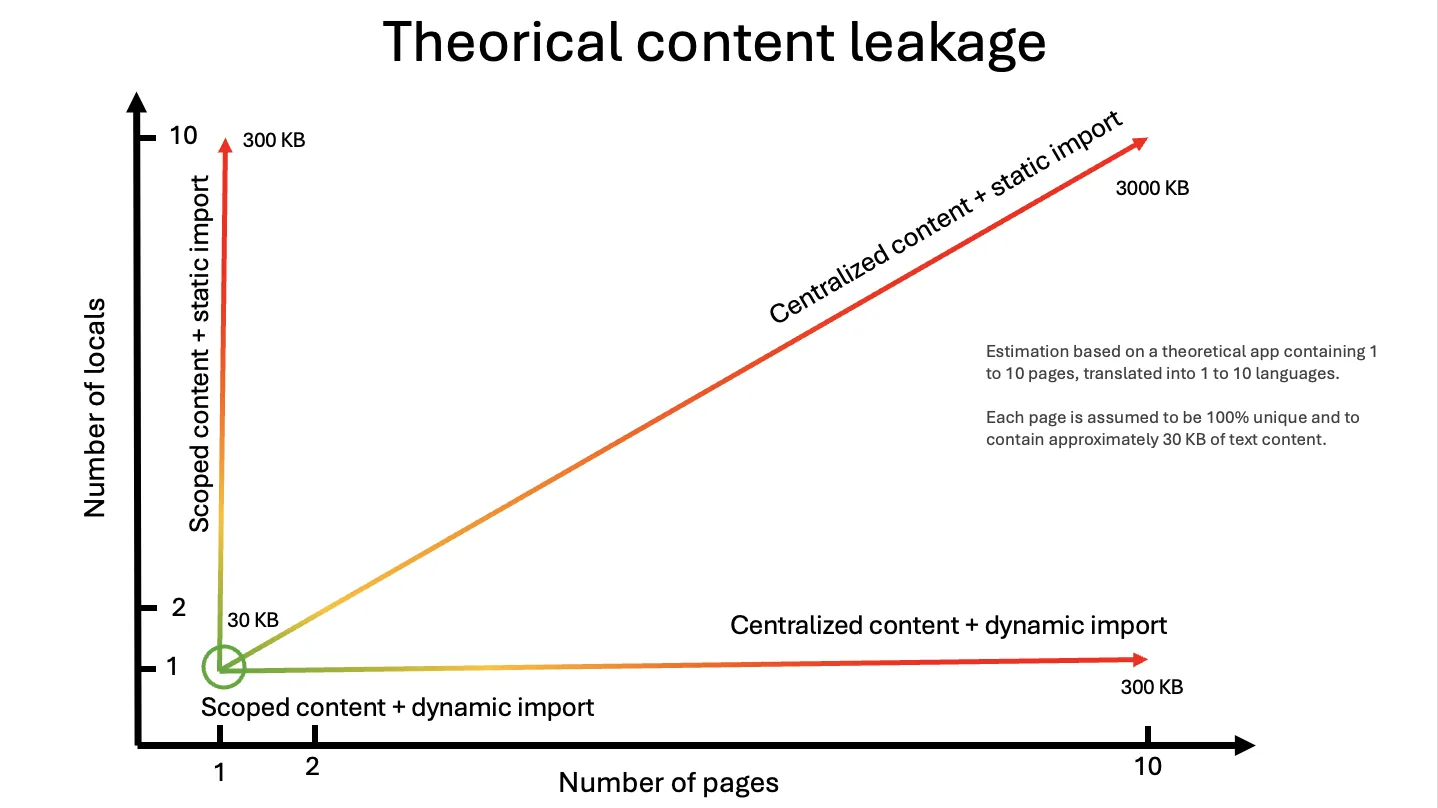
Moving to dynamic loading would not fix it either: with one function per message, loading each one lazily would mean thousands of requests.
Intlayer lets you choose, globally or per dictionary:
Copy the code to the clipboard
Open the table in a modal to view all data content clearly
importMode | What ships to the client | vs. Paraglide |
|---|---|---|
static | All locales of the dictionaries the page uses | Theoretically the same content |
dynamic | Only the current locale, lazy-loaded per dictionary | N times smaller with N locales |
fetch | Only the current locale, fetched from the Live Sync API | N times smaller with N locales |
With the build transformation and importMode: 'static', Intlayer loads, in theory, the exact same content as Paraglide. With 'dynamic' or 'fetch', it loads only what the current locale needs: for an app in N locales, the translation payload is N times smaller than Paraglide's.
Where Paraglide Still Fits
If your stack is Svelte with Vite and you support two or three languages, tree shaking works as advertised and the locale overhead stays small.
If your team already uses the inlang ecosystem (Fink, Sherlock, message format plugins), Paraglide integrates with it natively.
Try It on Your App
Check your live application's payload and locale leakage with the free i18n SEO Scanner:
To set up Intlayer:
Copy the code to the clipboard
Further Reading
To understand where these libraries come from, read the history of JavaScript i18n.
Comments
No comments yet. Be the first to share your thoughts.