
Ask your question and get a summary of the document by referencing this page and the AI provider of your choice
The content of this page was translated using an AI.
See the last version of the original content in EnglishIf you have an idea for improving this documentation, please feel free to contribute by submitting a pull request on GitHub.
GitHub link to the documentationCopy doc Markdown to clipboard
i18next VS Intlayer: React & Next.js Internationalisation (i18n) Benchmark

i18next is the most widely used i18n framework in the JavaScript ecosystem. Through react-i18next and next-i18next, it powers a large share of React and Next.js applications. Intlayer is a compiler-based, component-scoped alternative.
This article compares them on measurements rather than feature lists. The numbers come from Benchmark Bloom, an open-source suite that builds the same application with each library and records what the browser actually downloads.
tl;dr:i18nextis the heaviest runtime in the benchmark: +77 KB gzip per page on Next.js in the naive setup, +22 KB after the full namespace + lazy-loading optimisation. Intlayer adds +0.3 KB. Everyi18nextconfiguration except the fully scoped one ships ~90% of foreign-page strings; Intlayer ships 0% by default. Switching locale with a lazily-loaded backend cost 123-185 ms withreact-i18nextversus 3-4 ms with Intlayer. The@intlayer/next-i18nextadapter keeps thei18nextAPI and landed at 150.7 KB per page versus 218.5 KB for the original.
In short
- i18next / react-i18next / next-i18next - Mature, plugin-rich, framework-agnostic. Namespaces, language detectors, backends, ICU via plugin,
<Trans>for rich content. Content is centralised inlocales/{lng}/{ns}.json. Powerful, but every optimisation (namespace splitting, per-page loading, type safety) is configuration you own and maintain. - Intlayer - Component-centric content model.
.content.tsdictionaries sit next to the component they serve, a build-time compiler tree-shakes and lazy-loads them per component and per locale, strict TypeScript types are generated from your content, and missing translations fail at build time. Ships middleware, SEO helpers, a Visual Editor / CMS and AI-assisted translation.
Open the table in a modal to view all data content clearly
| Library | GitHub Stars | Total Commits | Last Commit | First Version | NPM Version | NPM Downloads |
|---|---|---|---|---|---|---|
aymericzip/intlayer |  |  |  | April 2024 |  |  |
i18next/i18next |  |  |  | Jan 2012 |  |  |
i18next/react-i18next |  |  |  | Dec 2015 |  |  |
i18next/next-i18next |  |  |  | Nov 2018 |  |  |
Badges update automatically. Snapshots will vary over time.
Side-by-side feature comparison
Open the table in a modal to view all data content clearly
| Feature | Intlayer (react-intlayer / next-intlayer) | i18next (react-i18next / next-i18next) |
|---|---|---|
| Translations near components | ✅ Yes, .content.ts collocated with each component | ❌ No, centralised locales/{lng}/{ns}.json |
| TypeScript integration | ✅ Strict types auto-generated from content | ⚠️ Basic; strict keys need CustomTypeOptions augmentation and resource typing |
| Missing translation detection | ✅ TypeScript error + build-time error/warning | ⚠️ Runtime fallback (saveMissing, key echo) |
| Rich content (JSX / Markdown / components) | ✅ Direct support | ⚠️ <Trans> with indexed placeholders |
| ICU support | ⚠️ WIP | ⚠️ Via plugin (i18next-icu) |
| Pluralisation | ✅ Enumeration-based patterns | ✅ _one / _other suffixes (Intl.PluralRules) |
| Formatting (dates, numbers, currencies) | ✅ useNumber, useDate, ... (Intl under the hood) | ⚠️ Interpolation formatters or manual Intl.* |
| Localised routing & middleware | ✅ Built-in proxy/middleware, getMultilingualUrls | ⚠️ Not core; custom middleware or third-party |
| SEO helpers (hreflang, sitemap, robots) | ✅ Built-in helpers | ❌ Manual |
| Synchronous server components | ✅ useIntlayer from next-intlayer/server works in any child server component | ⚠️ getFixedT on the page, then t passed as props |
| Tree-shaking (ship only used content) | ✅ Per component, per locale, automated by the compiler | ⚠️ Manual: namespaces + ns list per page + backend |
| Lazy loading | ✅ importMode: 'dynamic' (one line of config) | ✅ Via backend plugins (i18next-resources-to-backend, i18next-http-backend) |
| Purge unused content | ✅ Dead dictionaries are dropped at build time | ❌ Not built-in |
| Testing missing translations (CLI / CI) | ✅ npx intlayer content test | ⚠️ i18next-parser / third-party |
| AI-powered translation | ✅ Built-in, uses your own provider keys | ❌ No (Locize is a separate paid service) |
| Visual Editor / CMS | ✅ Free Visual Editor + optional CMS | ❌ No (Locize / external platforms) |
| MCP server & Agent Skills | ✅ Yes | ❌ No |
| Ecosystem / community | ⚠️ Smaller but growing fast | ✅ Largest and most mature |
The benchmark
What was measured
The Benchmark Bloom suite builds the same application with each library: 10 pages (home, about, blog, careers, contact, FAQ, pricing, products, settings, team), 10 locales (en, fr, es, de, it, pt, zh, ja, ko, ru), identical components and identical content. Pages are measured in en and fr. Each library is implemented in up to four loading strategies, from the naive setup to the optimal one:
Open the table in a modal to view all data content clearly
| Strategy | Description | Who does this |
|---|---|---|
| static | Every locale and every page bundled together (resources inlined in init()) | Quick prototypes, AI-generated code |
| dynamic | Only the active locale is loaded through a backend, but all namespaces at once | Most projects |
| scoped-static | One namespace per route, all bundled upfront | Rare |
| scoped-dynamic | One namespace per route + backend lazy loading. Only the current page, current locale | Apps with a strict performance budget |
Intlayer has no "scoped" variant: the compiler scopes content per component automatically, so its static and dynamic rows are already scoped.
For each build, the suite records:
- Lib size: gzip size of an empty component that only imports the i18n library. The fixed cost of the runtime.
- Page JS: gzip JavaScript downloaded per page, averaged over all pages and locales.
- Locale leak %: share of translated strings found in the downloaded JS that belong to a locale the user is not viewing (fingerprinted on
enandfr, so 50% means "the other measured locale is fully present"; with 10 locales bundled, the real waste is higher). - Page leak %: share of translated strings found in the downloaded JS that belong to a page the user is not on.
- Component avg: average gzip size of each component compiled in isolation. Shows how much i18n runtime a single component drags in.
- E2E reactivity: wall-clock time between selecting a new locale and
html[lang]updating in the DOM (Playwright, 5 iterations). - Hydration: React hydration phase duration.
Numbers below come from the run dated 2026-09-12 withnext-i18next16.3.0,react-i18next17.0.13 andintlayer9.5.1. The test application is deliberately small (a few dozen strings per locale), so leakage percentages describe a pattern: they grow with your content while the runtime cost stays fixed.
Results on Next.js (next-i18next)
Pick the metrics and the libraries you care about:
Metric
Dynamic JSON loading
Lazy-loads translations at runtime
Scoped JSON (namespacing)
Per-page translation namespaces
What is this metric?
The total gzip-compressed size of the internationalisation library bundle. It only includes the provider and content retrieval logic after tree-shaking and minification.
Why is it important?
A smaller library size reduces the initial JavaScript payload, leading to faster download and execution times on the client.
View as
Open the table in a modal to view all data content clearly
| Library | Strategy | Lib size (gz) | Page JS avg (gz) | Locale leak | Page leak | Component avg (gz) | E2E reactivity | Hydration |
|---|---|---|---|---|---|---|---|---|
| base (no i18n) | - | 0.0 KB | 141.0 KB | 0.0% | 0.0% | 0.9 KB | 13.4 ms | 11.8 ms |
next-i18next | static | 19.7 KB | 218.5 KB | 0.0% | 89.8% | 78.5 KB | 16.4 ms | 15.6 ms |
next-i18next | dynamic | 19.7 KB | 169.5 KB | 50.0% | 89.8% | 26.1 KB | 15.4 ms | 27.7 ms |
next-i18next | scoped-static | 19.7 KB | 220.1 KB | 0.0% | 89.8% | 78.9 KB | 16.4 ms | 14.7 ms |
next-i18next | scoped-dynamic | 19.7 KB | 163.4 KB | 0.0% | 0.0% | 27.1 KB | 15.9 ms | 15.1 ms |
next-intlayer | static | 5.5 KB | 141.3 KB | 0.0% | 0.0% | 8.5 KB | 15.5 ms | 16.9 ms |
next-intlayer | dynamic | 5.5 KB | 141.3 KB | 0.0% | 0.0% | 6.9 KB | 15.3 ms | 15.9 ms |
@intlayer/next-i18next (compat) | static | 9.4 KB | 150.7 KB | 0.0% | 0.0% | 9.7 KB | 10.7 ms | 11.3 ms |
@intlayer/next-i18next (compat) | dynamic | 9.4 KB | 150.7 KB | 0.0% | 0.0% | 9.7 KB | 11.9 ms | 10.6 ms |
How to read it
- Runtime cost. The
i18nextcore plusreact-i18nextis the largest runtime measured: 19.7 KB gzip for an empty component, versus 5.5 KB fornext-intlayer. - The naive setup is expensive. Inlining
resourcesininit()produces 218.5 KB per page, +77.5 KB over the base app. Every page carries every namespace. - Optimising is a long road. Moving to a backend (
dynamic) saves 49 KB but still leaks 90% of foreign-page strings and, in this configuration, half of the strings belong to the wrong locale. Splitting into per-route namespaces on top of it (scoped-dynamic) finally reaches 0% leakage at 163.4 KB, still +22.4 KB per page over Intlayer's 141.3 KB, which needed no configuration at all. - Component size. A component calling
useTranslation()compiles to 26-79 KB depending on the setup; the same component withuseIntlayer()compiles to 6.9 KB. - Hydration spikes to 27.7 ms in the
dynamicsetup: the i18next instance initialises and resolves its backend on the client before React can hydrate.
Full table, every library and every strategy, in the Next.js benchmark report.
Results on TanStack Start (react-i18next)
Same test app on TanStack Start with plain react-i18next, which removes the Next.js-specific wiring from the comparison.
Open the table in a modal to view all data content clearly
| Library | Strategy | Lib size (gz) | Page JS avg (gz) | Locale leak | Page leak | Component avg (gz) | E2E reactivity | Hydration |
|---|---|---|---|---|---|---|---|---|
| base (no i18n) | - | 0.0 KB | 111.0 KB | 0.0% | 0.0% | 0.7 KB | 8.1 ms | 21.6 ms |
react-i18next | static | 18.4 KB | 180.3 KB | 50.0% | 89.8% | 24.3 KB | 12.9 ms | 85.1 ms |
react-i18next | dynamic | 18.4 KB | 136.4 KB | 23.1% | 89.8% | 24.8 KB | 123.1 ms | 32.9 ms |
react-i18next | scoped-static | 18.4 KB | 184.2 KB | 50.7% | 89.8% | 25.3 KB | 185.1 ms | 25.2 ms |
react-i18next | scoped-dynamic | 18.4 KB | 127.2 KB | 0.0% | 0.0% | 26.7 KB | 17.6 ms | 11.3 ms |
intlayer | static | 5.0 KB | 125.8 KB | 50.0% | 0.0% | 8.1 KB | 3.2 ms | 11.5 ms |
intlayer | dynamic | 5.0 KB | 118.6 KB | 0.0% | 0.0% | 6.3 KB | 3.6 ms | 14.1 ms |
How to read it
- The naive
react-i18nextapp ships +69 KB per page over the base app, and hydration takes 85 ms (4x the base) because the whole resource tree is parsed and registered on the client before the first render. - Locale switching is where lazy loading bites. When resources are loaded on demand through a backend, changing the language triggers a network round-trip before
html[lang]updates: 123 ms indynamic, 185 ms inscoped-static. Intlayer updates the DOM in 3-4 ms in both modes: the locale change is applied immediately and is never blocked on a network round-trip. - The fully optimised
scoped-dynamicsetup reaches 0% leakage at 127.2 KB, still +8.6 KB over Intlayer'sdynamicrow, and it took a route-to-namespace map, a resources backend and a Suspense boundary per route to get there. - Intlayer's
staticrow already has 0% page leakage because only the dictionaries imported by the page's components are bundled. EnablingimportMode: 'dynamic'removes the locale leakage too. - Component size: 24-27 KB per component with
react-i18nextversus 6-8 KB with Intlayer.useTranslation()binds every component to the global i18next instance.
Full table in the TanStack Start benchmark report.
Why the gap? Global instance vs. compiled dictionaries
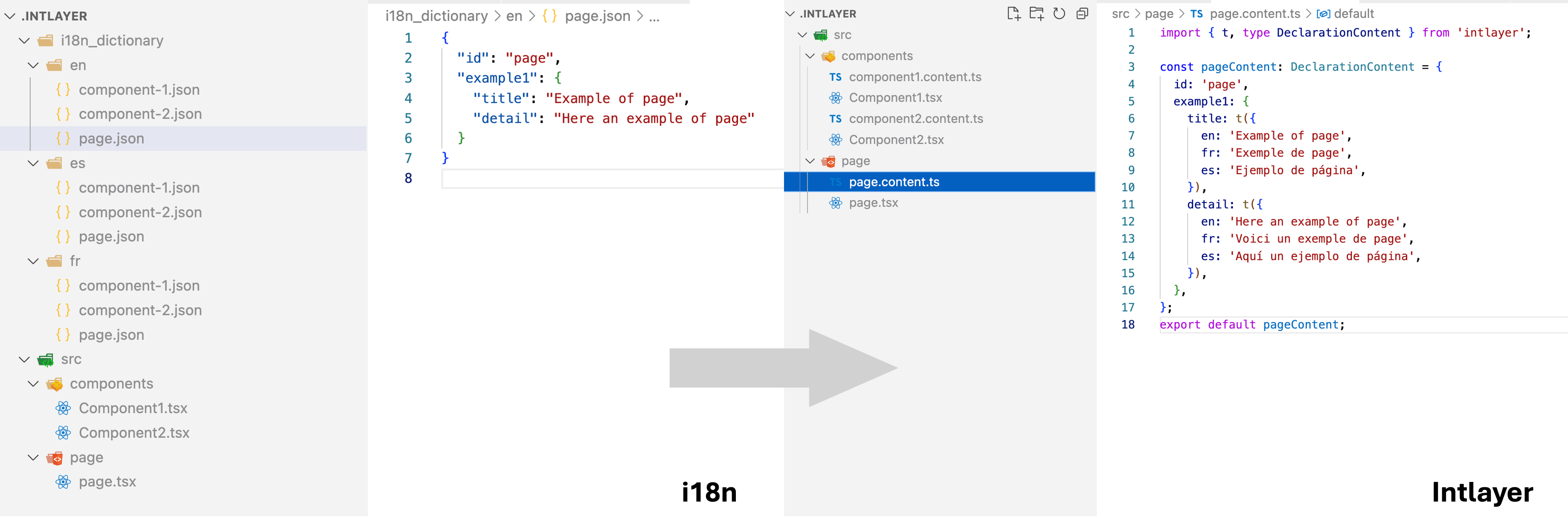
i18next was designed in 2012 as a runtime: a global instance holds a resource store, plugins extend it, and t() looks keys up at render time. This is what makes it so flexible (any framework, any backend, any format) and also what makes it costly:
Copy the code to the clipboard
The instance cannot know which keys a component will request, so it keeps whatever namespaces you tell it to load. Optimising means you split catalogues into namespaces, you list the namespaces each page needs, and you keep that list correct as components move between pages.
The bill grows on two axes at once, pages and locales:
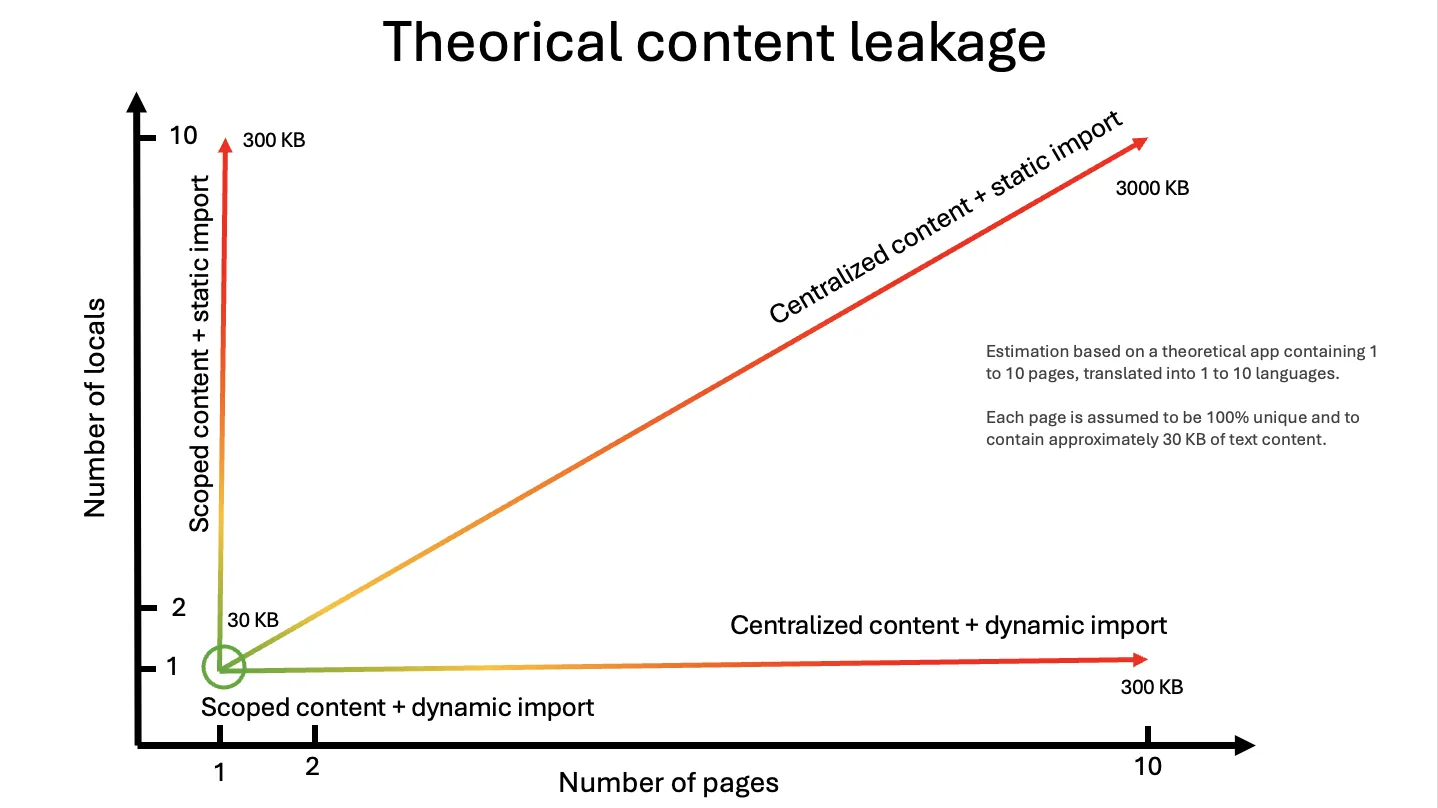
As the benchmark notes put it: "maintaining type safety and knowing exactly which namespace should be included on which page is a nightmare".
Intlayer removes the instance. Content is declared next to the component, and the compiler resolves the dependency graph at build time:
Copy the code to the clipboard
@intlayer/swc / @intlayer/babel sees which component imports which dictionary, bundles only those, only for the active locale, and drops the ones nothing imports. The "scoped-dynamic" pattern becomes the output of the build instead of a discipline the team has to maintain.
To get thedynamicrow's numbers, setdictionary.importMode: 'dynamic'inintlayer.config.ts. See the bundle optimisation doc.
Developer experience
Setup
Copy the code to the clipboard
Plus a client-side I18nProvider that re-creates the instance with the same options, a generateStaticParams, and a namespaces list on every page.
Copy the code to the clipboard
Copy the code to the clipboard
Client component
Copy the code to the clipboard
Copy the code to the clipboard
The page rendering this component must load theaboutnamespace, andt("counter.label")is a plain string until you augmentCustomTypeOptions.
Copy the code to the clipboard
Copy the code to the clipboard
label and increment are typed; a typo is a TypeScript error, a missing French value is a build error.
Synchronous server component
Copy the code to the clipboard
The page calls i18n.getFixedT(locale, "about") and threads t and locale down as props.
Copy the code to the clipboard
Keep the i18next API, get Intlayer's output
You don't have to rewrite components to get the benchmark numbers above. @intlayer/i18next, @intlayer/react-i18next and @intlayer/next-i18next are drop-in adapters: useTranslation, t(), <Trans>, {{interpolation}}, _one / _other plurals, context suffixes and returnObjects keep working, served from Intlayer dictionaries compiled by the Intlayer compiler.
Copy the code to the clipboard
Copy the code to the clipboard
In the benchmark, the compat build of the same Next.js app went from 218.5 KB to 150.7 KB per page, from 78.5 KB to 9.7 KB per component, from ~90% page leakage to 0%, and hydration from 15.6 ms to 11.3 ms, with the application code untouched. Your existing locales/{lng}/{ns}.json files can remain the source of truth through the JSON sync plugin.
See the migration guides: i18next, react-i18next, next-i18next.
When to choose which?
If you need its plugin ecosystem (detectors, backends, ICU, Locize), you localise outside React too (Node services, vanilla JS, other frameworks), your team already knows it, or a translation platform expects locales/{lng}/{ns}.json. Budget the time to namespace catalogues, wire a backend and maintain the page-to-namespace map if performance matters.
You want component-scoped content, strict TypeScript, build-time missing-key errors, zero-effort tree-shaking and lazy loading, instant locale switching, synchronous server components, and built-in editorial tooling (Visual Editor, CMS, AI translation, MCP server). Especially relevant for large, modular codebases and design systems.
You are already on i18next and want the bundle and reactivity gains without a rewrite. Your locales/{lng}/{ns}.json files stay the source of truth. Measured side by side in i18next vs @intlayer/i18next.
FAQ
It was designed as a framework-agnostic runtime: a global instance, a plugin pipeline, a resource store, a key resolver. That flexibility is compiled into every bundle. An empty component that only imports the library costs 19.7 KB gzip with next-i18next against 5.5 KB with next-intlayer, and the cost is paid on every page whatever your content weighs.
It fixes the bytes, not the latency. Moving to i18next-resources-to-backend saves ~49 KB per page but puts a network round-trip on the locale switch: 123 ms in the dynamic setup and 185 ms in scoped-static, against 3-4 ms with Intlayer. Hydration also jumps to 27.7 ms because the instance resolves its backend before React can hydrate.
Yes, with scoped-dynamic: one namespace per route, a resources backend and a page-to-namespace map you maintain by hand. It lands at 163.4 KB per page on Next.js, still +22 KB over Intlayer's 141.3 KB, which needed no configuration. See bundle optimization.
No. @intlayer/i18next, @intlayer/react-i18next and @intlayer/next-i18next keep useTranslation, t(), <Trans>, {{interpolation}}, _one / _other plurals, context suffixes and returnObjects. One plugin line in next.config.ts or vite.config.ts. Step by step in the next-i18next migration guide.
Backends and language detectors are accepted but inert: there is nothing left to load or detect at runtime. Locale detection becomes Intlayer's routing config (URL prefix, cookie, header). If your app fetches translations from a CMS at request time, use the Intlayer CMS or intlayer pull / push instead.
Related comparisons
Same benchmark, other libraries:
Going further on i18next:
Reference docs:
Compat adapters:
Migration guides:
To understand where these libraries come from, read the history of JavaScript i18n.
GitHub STARs
GitHub stars are a strong indicator of a project's popularity, community trust, and long-term relevance. While not a direct measure of technical quality, they reflect how many developers find the project useful, follow its progress, and are likely to adopt it.
Commit activity
Stars show popularity. Commits show how much work goes into a project. At the time of writing, Intlayer counts about 7,500 commits, more than most libraries compared here, and about 5 times more than next-intl or next-i18next.
- i18next/i18next
- i18next/react-i18next
- i18next/next-i18next
- aymericzip/intlayer
Commits on the default branch, source: GitHub API.
Intlayer is a monorepo, so its count includes every framework package, the CLI and the docs. Read commits as a signal of activity, not of quality.
npm downloads
- i18next
- react-i18next
- next-i18next
- intlayer
Source: npm registry downloads API.
Downloads reward the oldest solutions, not the best ones. A library released years ago is still installed by every project that chose it back then, by every CI run and by every package that depends on it. The count measures inertia more than a fresh choice.
AI assistants amplify the effect. next-intl, i18next and vue-i18n are everywhere in the code they were trained on, so they suggest them by default, without comparing the alternatives. Each suggestion adds downloads, which feeds the next suggestion. Compare on the benchmark rather than on the download count.
Conclusion
i18next earned its position: it runs everywhere, it has a plugin for everything, and it has been maintained for over a decade. The benchmark shows the price of that runtime-first design. The setup most teams ship costs +70-77 KB gzip per page, leaks ~90% of foreign-page content, and a lazily-loaded locale switch takes over 100 ms. Reaching 0% leakage is possible, but it takes a backend, a namespace per route and a map you maintain by hand, and it still lands +9-22 KB above Intlayer.
Intlayer moves that work into the compiler. Per-component dictionaries, per-locale lazy loading and dead-content purging are build outputs, not conventions. On the same app: +0.3 KB per page, 0% leakage, components 3-10x smaller, and a locale switch in 3-4 ms.
All the raw data, the test apps and the scripts are in the Benchmark Bloom repository. Run it yourself.
Refer to the 'Why Intlayer?' doc for more details.
Comments
No comments yet. Be the first to share your thoughts.